Migrating OS to SSD with 4k Alignment for Higher Performance
4k Alignment
Traditional hard drives have 512-byte sectors, but newer drives use 4k (4096-byte) sectors, which are fully compatible with all software and operating systems. This allows for more efficient use of the hard disk, as 4k sectors use less overhead than 512-byte sectors.
Alignment is crucial for partitions and data on hard drives. It's essential to have partitions aligned with the size of a sector, especially on SSDs or HDDs. Misalignment can lead to reduced performance and even a shorter lifespan of your drives. This is because data is read and written in sectors, and if partitions aren't aligned with these sectors, it can cause inefficiencies and wear and tear on the drive. A better configuration can be achieved by aligning partitions with the sector size, which can improve overall performance and extend the life of your hard drives.
Modern SSDs can support 4k clusters, but computers still address them as 512-byte clusters using Logical Block Addressing. This means each physical sector is divided into 8 logical sectors, making them accessible to the operating system.
Why 4k Alignment is Important for SSD?
The increasing popularity of SSDs among computers is largely due to their significantly faster speeds compared to traditional hard drives, which can significantly reduce Windows boot times. As a result, many users opt to install their operating system on an SSD alone to take advantage of this speed boost. However, unlike traditional hard drives, alignment is crucial for SSDs, and the problems mentioned above, such as fragmentation and slow write speeds, are equally relevant to SSDs that follow 4k alignment rules.
Users should be aware of the potential degradation of SSD memory cells and the risk of making them unusable due to misaligned partitions, which can lead to a decline in system speed and reduce the lifespan of the SSD. 4k partition alignment can help mitigate this issue by reducing unnecessary read/write operations.
How to Check 4k Alignment?
You can check if your hard disk is 4k aligned without any software, or use an SSD partition alignment tool. Simply click Start, enter "wmic partition get Name, StartingOffset" in the Command Line Prompt, and see if the StartingOffset is a multiple of 4096 (4k). If it is, your hard disk is 4k aligned. Alternatively, you can use an SSD partition alignment tool to check and align your hard disk if needed.
To check if your Linux partition is aligned, you can use the `fdisk` command. Run `fdisk -l` in the terminal, which will list all partitions in bytes. Then, take each partition size and divide it by 4096.
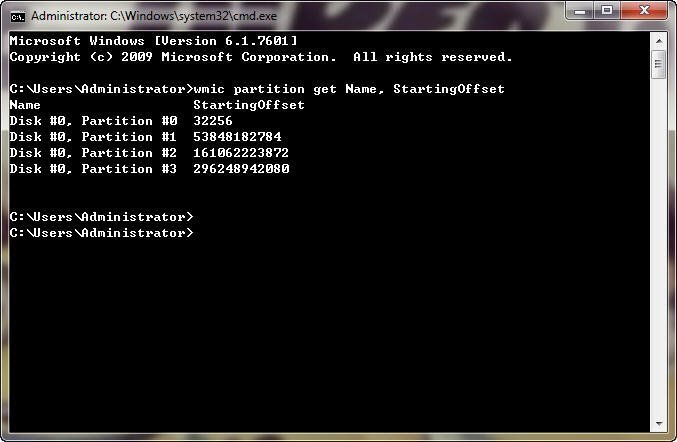
4K Alignment Software for Migrate OS to SSD
When migrating an operating system to a Solid State Drive (SSD), it's essential to consider alignment and use suitable software to ensure a smooth transition. Fortunately, Qiling Disk Master Professional is an all-in-one software that can help with partition alignment, migrating OS to SSD, cloning HDD to SSD, allocating free space, converting dynamic disk to basic, and creating a bootable CD, among other tasks. This software can guide you through the process of migrating your OS to an SSD with 4k alignment.
1. First you should install Windows on SSD from HDD.
2. Right-click the specified partition and select "Advanced" ->"Partition Alignment".
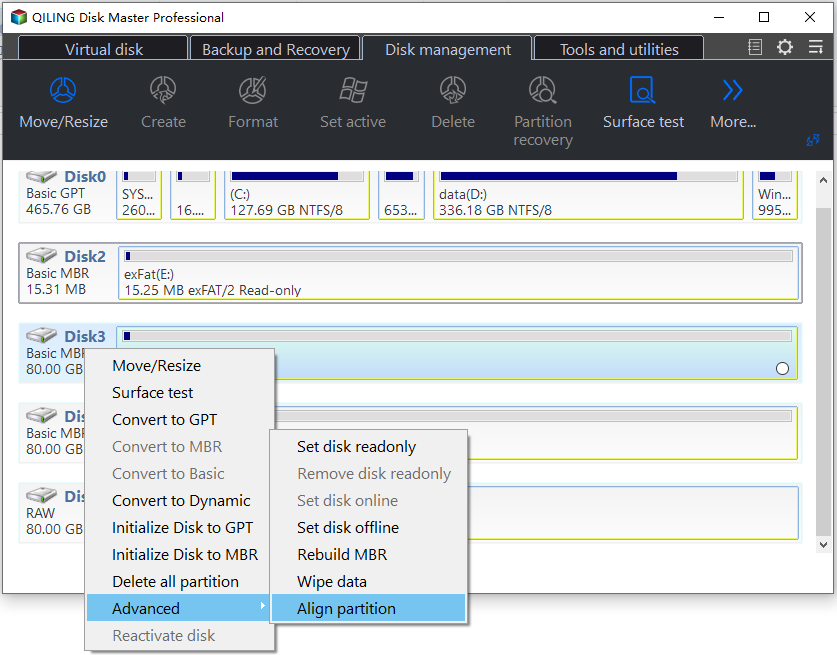
3. In the pop-up window, select the partition where the OS has been migrated to and align it with a 4096 sector.
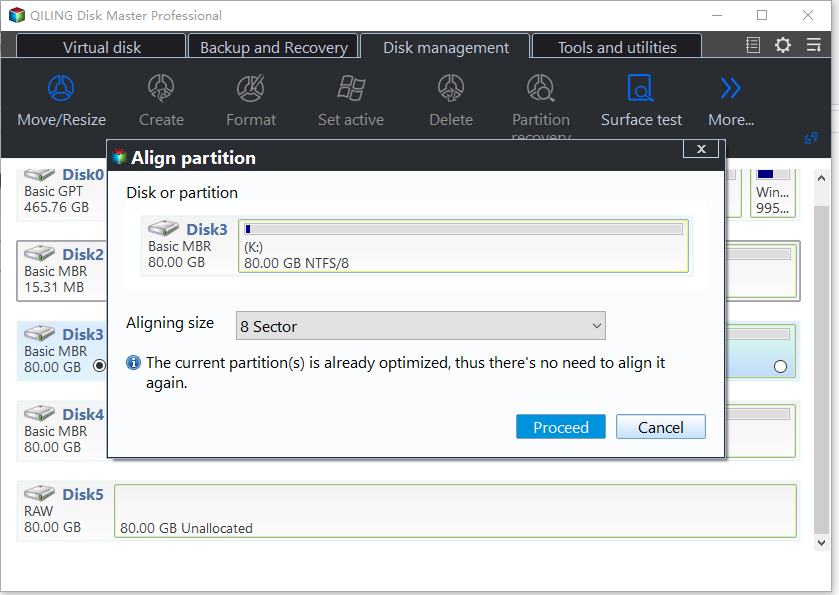
4. At this moment, you can preview the result. Then, just click "Proceed" to execute partition alignment and finish this operation.
Computer users want fast speeds, and SSDs are the best choice. However, not all software can take full advantage of the SSD's capabilities, especially when it comes to 4K alignment. To get the best performance out of an SSD, users need to take some extra steps, which can be easily done with Qiling Disk Master Pro. The demo version is available for download to try it out.
Related Articles
- Transfer Windows 7/8/10 OS (Operating System) to SSD
In order to get faster Windows boot time, you can migrate only OS to SSD drive from HDD. This article brings you a reliable software-Qiling Disk Master, allowing you to transfer only Windows 10, 8, 7 from HDD to SSD without boot issues. - The Best Way to Set up SSD for OS Only
Learn the advantages of using SSD for Windows OS only and how to set up SSD for OS only with the help of reliable software Qiling Disk Master step by step. - Fix Steam Not Recognizing External Hard Drive Error
This guide provides a step-by-step solution to fix the 'Steam not recognizing external hard drive' error, allowing you to easily make your external hard drive a game drive for Steam on your computer. - Surface Pro Stuck on Windows Logo - Reasons & Fixes
If your Surface Pro is stuck on the Windows logo, you can try restarting it in safe mode, checking for corrupted system files, running a System Restore, or performing a System Reset. - 5 Ways to Reset Windows 7 Password | Quick & Easy
To reset a Windows 7 password, follow these essential steps. You can regain access to your computer by learning the detailed instructions provided, which will guide you through the process of regaining access to your Windows 7 system. - How to Reset Windows Password When Locked Out🔥
Don't be panic, this post will assist you in solving the complicated problem of being locked out of your Windows account due to a forgotten password. You can reset your Windows password when locked out using the built-in administrator account, a password reset disk, or a third-party password
Products
Articles & Tutorials
- Data Recovery
- Data Backup
- File Recovery
- File Backup
- File synchronize
- System Backup and Restore
- Disk and Partition Clone
- Technical articles
- Disk Master Help
- Windows Deleted File and Disk Recovery Tutorials
- Windows File and Data Recovery Tutorials
- More Windows Tutorials for Install, Security, Files, and PC Tips
- Windows Boot, Repair, and Recovery Environment Tutorials
- Windows Backup Tutorials
- Windows Restore Tutorials
- Windows Clone and Migration Tutorials
- Windows Server Backup, Recovery, and Management Tutorials
- Windows Disk, Partition, and Storage Management Tutorials