How to Run Windows 10 from USB on Mac Computer?
- User case
- Why run Windows 10 from USB drive on Mac?
- How to run Windows 10 from USB on Mac computer?
- The bottom line
User case
I have a late MacBook Pro with MacOS installed on. I found some advanced games on my Mac can only be run under Windows 10 operating system. And I need to run some particular Windows programs from time to time. So I was wondering if I can run Windows 10 from USB flash drive or other external hard drive on a Mac computer. Any one has made it? Could you share me with a detailed guide? Thanks a lot!
Why run Windows 10 from USB drive on Mac?
To run Windows 10 on a Mac computer, the easiest method is using Boot Camp Assistant, a built-in tool. However, this requires dividing a separate partition from the Mac startup disk to install and run Windows 10, which can take around 36GB from a 128GB startup disk or 48GB from a 256GB startup disk.
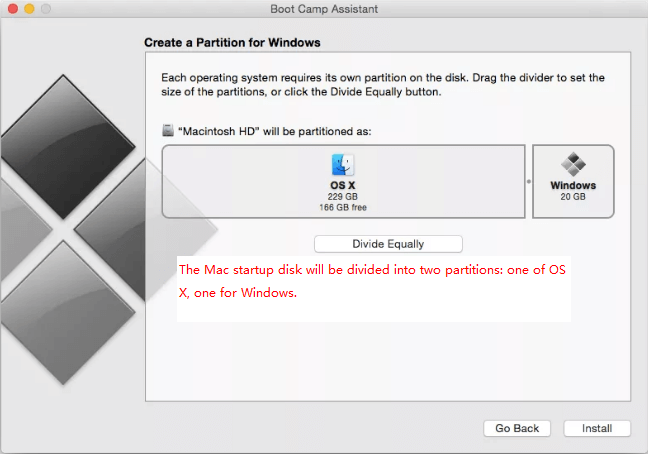
Mac users often report that Windows occupying a significant amount of space on their startup disk, leading to a "Your startup disk is almost full" error message. This can cause unstable and slow performance, preventing applications from launching or functioning properly, and may even result in sudden crashes or complete system failure.
To run Windows 10 from an external hard drive, you can use Boot Camp Assistant on your Mac to create a Windows partition on the external drive. This will allow you to boot Windows directly from the external drive without taking up space on your Mac's startup disk. Alternatively, you can use a virtual machine software like Parallels or VMware to run Windows 10 on your Mac without the need for a physical partition. Additionally, you can also use a cloud-based service like CloudBoot to run Windows 10 from an external drive. It's worth noting that the specific steps may vary depending on the method you choose.
How to run Windows 10 from USB on Mac computer?
To run Windows 10 on a Mac computer, you can use Qiling Disk Master Professional, which comes with a feature called "Windows To Go Creator". This allows you to create a Windows to Go USB drive that can be booted on any Mac computer, offering advantages over installing Windows 10 on Mac via Boot Camp Assistant.
✌Save boot disk space on Mac
Qiling Disk Master doesn't occupy any local disk space on Mac, whereas Boot Camp Assistant takes up space on the Mac local boot disk to install and run Windows 10.
✌Compatible with all Mac computers
The Windows to Go USB drive can be used on any Mac device, whereas the Windows installed by Boot Camp can only be used on the current Mac.
✌More time-saving and convenient
Boot Camp Assistant downloads Windows supported software, drivers, and files onto a USB, then installs them on the local disk, whereas Qiling Disk Master only requires a 64-bit Windows 10 ISO file to create a Windows to Go USB for Mac.
Steps to create bootable Windows USB for Mac
Now you can download the Demo version to have a try and follow the steps to create a Windows to Go USB device for Mac computers.
Before you do:
①To create a bootable USB flash drive, you need to use a Windows 10 computer. However, if your goal is to create a bootable SSD or other external hard drives, this feature is available on all versions of Windows 10, 8, and 7.
②This feature supports Legacy+UEFI boot mode and can only boot from UEFI mode.
③To create a bootable drive for a Mac computer, you can use a USB 2.0/3.0/3.1 drive, with USB 3.1 being the recommended option as it's faster for creating bootable drives and booting.
④To convert the USB external hard drive to GPT partition style, you'll need to use a tool like Disk Management or a third-party software like Qiling Disk Master or MiniTool Partition Wizard. These tools will allow you to convert the existing MBR (Master Boot Record) partition style to GPT, which will enable you to create larger partitions and improve overall disk management.
⑤Download a 64-bit version of Windows 10 from Microsoft, in the form of a disk image (ISO).
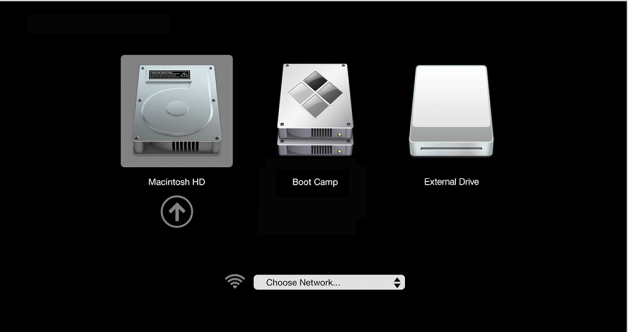
To install Windows 10 on a Mac, insert the USB drive into a Windows computer and install Windows 10 onto it. Once installed, safely remove the USB drive from the Windows computer and connect it to the Mac. If the Mac has only a USB-C port, use a USB-C to USB adapter to connect the USB drive. Then power on the Mac, hold down the Option key, select the USB drive, and press "Return" to run Windows 10 on the Mac from the USB device.
Bottom line
To run Windows 10 from USB on Mac, you can use Qiling Disk Master Professional, which allows you to install Windows 10 on Mac without Boot Camp Assistant. This software also has additional features like migrating Windows OS to SSD, extending NTFS system drive without reboot, and converting boot disk between MBR and GPT without losing data.
To manage disk partitions on a Server computer and improve performance, you can try using Qiling Disk Master Server, a tool that can help optimize your Server's disk usage and overall performance.
Related Articles
- How to Format Seagate Drive for Mac and PC Quickly and Securely?
Learn how to Format Seagate Drive for Mac and PC Quickly and Securely with clear steps, key checks, and practical tips. - Free Resize Bootcamp Partition without Reinstalling Window
Sometims, you might need to resize Bootcamp partition to make it bigger, then you can use the free Qiling Partition software, and it allows you to add more space to Bootcamp partition with simple steps. - Full Guide: Migrate Windows/Mac OS from Slow HDD to Fast SSD Drives
This guide explains Full Guide: Migrate Windows/Mac OS from Slow HDD to Fast SSD Drives with clear steps, key checks, and practical tips. - How to Use WintoUSB Tool to create a portable Windows OS drive?
Win to USB tool allows you to run Windows 10/8/7 on any other PC using a USB flash drive. This post will tell you how to perform that. - [Tutorial] How to Install Windows 11 without Secure Boot and TPM
Although you are not allowed to install Windows 11 on devices that don't enable Secure Boot or TPM 2.0, you can still find some workarounds to get it done. This article will show you the detailed steps to install Windows 11 without Secure Boot/TPM and a way to work Windows 11 on any unsupported PC. - Windows 11 Requirements Check Tool - Know Windows 11 Compatibility
This guide explains Windows 11 Requirements Check Tool - Know Windows 11 Compatibility with clear steps, key checks, and practical tips.
Products
Articles & Tutorials
- Data Recovery
- Data Backup
- File Recovery
- File Backup
- File synchronize
- System Backup and Restore
- Disk and Partition Clone
- Technical articles
- Disk Master Help
- Windows Deleted File and Disk Recovery Tutorials
- Windows File and Data Recovery Tutorials
- More Windows Tutorials for Install, Security, Files, and PC Tips
- Windows Boot, Repair, and Recovery Environment Tutorials
- Windows Backup Tutorials
- Windows Restore Tutorials
- Windows Clone and Migration Tutorials
- Windows Server Backup, Recovery, and Management Tutorials
- Windows Disk, Partition, and Storage Management Tutorials