How to Break Windows 10 Hard Drive Limit without Data Loss?
Is there a limit to hard drives in Windows 10?
In Windows 10, hard drives are often reported as less than 2TB due to the system emulating 512B sectors for compatibility, even if the physical disk uses 4K sectors. This emulation is done to maintain compatibility with traditional 512B sector hard disks.
If disk size limits are related to MBR or GPT partition style, this change partition style guide explains the next step.
512 bytes is equivalent to 1 sector, which is the smallest unit of storage on a hard drive. However, the actual storage capacity of a hard drive is typically measured in megabytes (MB) or gigabytes (GB), which is a larger unit of measurement.
►In Windows, the maximum hard disk size supported by the Master Boot Record (MBR) is 2 terabytes (TB), which is calculated as 2^32 * 512 = 2TB. This is due to the 32-bit addressing limit in legacy disk addressing.
►In Windows, the maximum hard drive disk size supported by GPT is 94 exabytes (EB), which is the result of 2^64 * 512. This is due to the 64-bit addressing capability of UEFI disks.
Note: The capacity of a hard disk is determined by the number of logical sectors, the size of each sector, and the system's ability to represent sector amounts in bits and bytes.
Windows 10 2TB limit and its cause
Windows 10 has a 2 TB limit, but it's not due to the operating system itself, rather it's caused by the partitioning scheme used to define the disks. Specifically, if you're using the Master Boot Record (MBR) scheme, you'll hit the 2 TB limit, but switching to the GUID Partition Table (GPT) scheme, which can support much larger capacities, will resolve the issue. GPT disks can have capacities up to 9.4 exabytes (EB) or even larger.
Sure-fire way to fix Windows 10 hard drive limit without data loss
To completely fix the maximum hard drive limit in Windows 10, I recommend using a free partition manager called Qiling Disk Master Standard. This tool allows you to convert an MBR disk to a GPT disk without losing any data, making it a useful solution for overcoming the 4TB limit. You can download it for free and follow the detailed steps to achieve this.
Step 1. Select the disk you want to convert and choose Convert to GPT from the context menu.
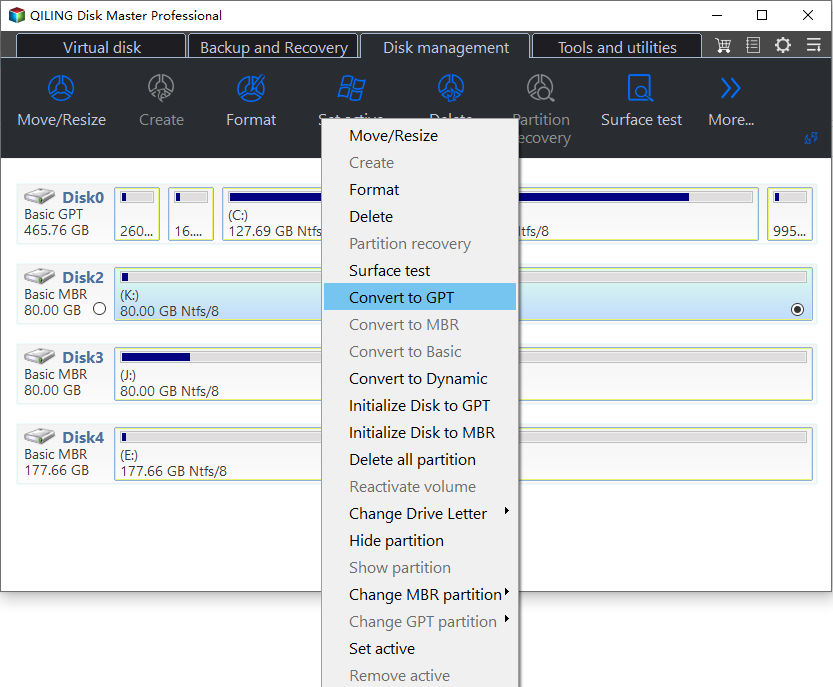
Step 2. Wait a while for the Disk master convert the partition to GPT.
✍Tips:
● If your hard drive's file system is FAT32, you can convert it to NTFS, which offers better performance and will make your computer run more smoothly.
● If you need to convert a disk that contains an operating system from MBR to GPT, you should upgrade to Qiling Disk Master Professional.
Summary
Windows 10's hard drive limit varies depending on the partitioning scheme used. A Master Boot Record (MBR) disk can support a maximum capacity of 2TB, whereas a GUID Partition Table (GPT) disk can support an enormous 94 exabytes (EB), far exceeding the MBR limit.
To completely fix the problem, you can convert the MBR disk to a GPT disk using a software like Qiling Disk Master. This software can also address other issues such as the inability to extend a volume, low disk space, and GPT protective partitions, making it a useful tool for resolving disk-related problems.
Related Articles
- How to Manage SSD Partition Alignment Well?
Partition alignment helps you optimize the performance of SSD. Learn how to do SSD partition alignment in Windows by using Qiling Disk Master. - Professional Software to Partition Hard drive in Windows 7/8/10/11
This tutorial will introduce you the professional partitioning software to help you Partition/Create/Delete/Format/Resize hard drive before installing Windows. - [Quickly Solved] Cannot Delete Partition in Windows 11, 10, 8, 7
This guide explains Cannot Delete Partition in Windows 11, 10, 8, 7 with clear steps, key checks, and practical tips. - Effectively Fix "We Couldn't Update the System Reserved Partition" Error
This guide explains Effectively Fix "We Couldn't Update the System Reserved Partition" Error with clear steps, key checks, and practical tips. - Guide on Checking Disk Speed in Windows 10 Using CMD [2024 Tutorial]
Protecting your data requires that you keep tabs on your SSD's performance. This article explains how to check disk speed windows 10 cmd. - How to Check Hard Drive for Bad Sectors - 3 Easy Ways 💡
Bad sectors on a hard drive can be caused by incorrect shutdown, dust pollution, and virus attacks. To identify them, you can use Partition Properties, Command Prompts, or third-party software. This article will guide you through the top 3 ways to check your hard drive for bad sectors.
Products
Articles & Tutorials
- Data Recovery
- Data Backup
- File Recovery
- File Backup
- File synchronize
- System Backup and Restore
- Disk and Partition Clone
- Technical articles
- Disk Master Help
- Windows Deleted File and Disk Recovery Tutorials
- Windows File and Data Recovery Tutorials
- More Windows Tutorials for Install, Security, Files, and PC Tips
- Windows Boot, Repair, and Recovery Environment Tutorials
- Windows Backup Tutorials
- Windows Restore Tutorials
- Windows Clone and Migration Tutorials
- Windows Server Backup, Recovery, and Management Tutorials
- Windows Disk, Partition, and Storage Management Tutorials