Best Backup Software for Server 2012(R2) - Qiling Disk Master Server
Why Need Windows Server 2012 Backup Software?
Backing up the company's server is crucial, especially since most users store their data on Windows Server. This backup will be extremely useful in case of data loss due to hardware failure, viruses, fire, or other tragedies, allowing you to retrieve your data. Without a backup, the damage will be irreparable, making it essential to minimize losses and avoid problems with your Server 2012 by backing up your Windows Server.
Many users rely on Windows Server Backup, a built-in tool, but it's often unstable and may not function correctly, prompting users to seek alternative backup software for Windows Server 2012.
The Best Backup Software for Server 2012 - Qiling Disk Master Server
Qiling Disk Master Server is designed for small to medium-sized businesses, providing data protection, disaster recovery, and disk or partition cloning capabilities. It features a simple and user-friendly interface that allows for easy creation of data backups and recoveries.
◉ It offers four types of backup: System/Disk/Partition/File Backup, which can meet your different needs.
◉ It allows you to set up automatic backup schedules: You can set daily/weekly/monthly/event triggers.
◉ It provides you with 3 backup methods: It allows you to do full, incremental, or differential backup for the scheduled task as per your needs.
◉ It supports backing up to multiple destinations, including hard drives, external hard drives, NAS, CD/DVD, and USB.
◉ This system supports various file systems, including NTFS, FAT32, FAT16, EXT2, and EXT3, as well as different disk styles and types, such as MBR, GPT, UEFI, and dynamic disk.
◉ The software supports various Windows operating systems, including Windows Server 2003, 2008/R2, 2012/R2, 2016, 2019, 2022, SBS 2003, 2008, 2011, and Windows PC operating systems.
The Qiling Disk Master Server offers a range of features to manage backup images, including verification, exploration, compression, encryption, splitting, and merging. This reliable backup software for Windows Server 2012 also boasts a user-friendly graphical user interface, allowing users to easily back up their server with just a few clicks. A graphic tutorial is available to guide users on how to create a system backup using this best backup software for Server 2012.
Step-by-Step Guide: Create System Backup for Windows Server 2012
To create a system backup for your Windows Server 2012 (R2) computer, follow the steps outlined in the how-to guide below. The guide provides a straightforward process for using the best backup software for Windows Server 2012 to create a system backup.
- Install the server backup tool and click Backup, then choose System Backup.
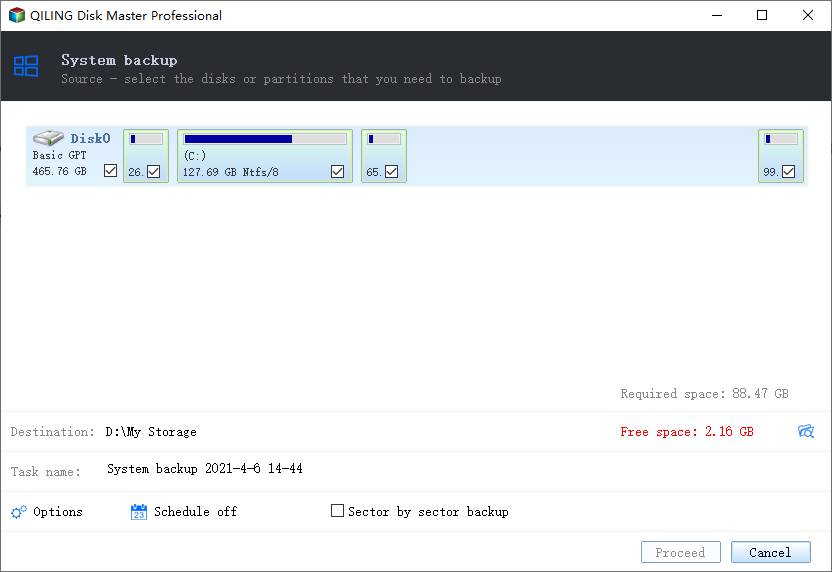
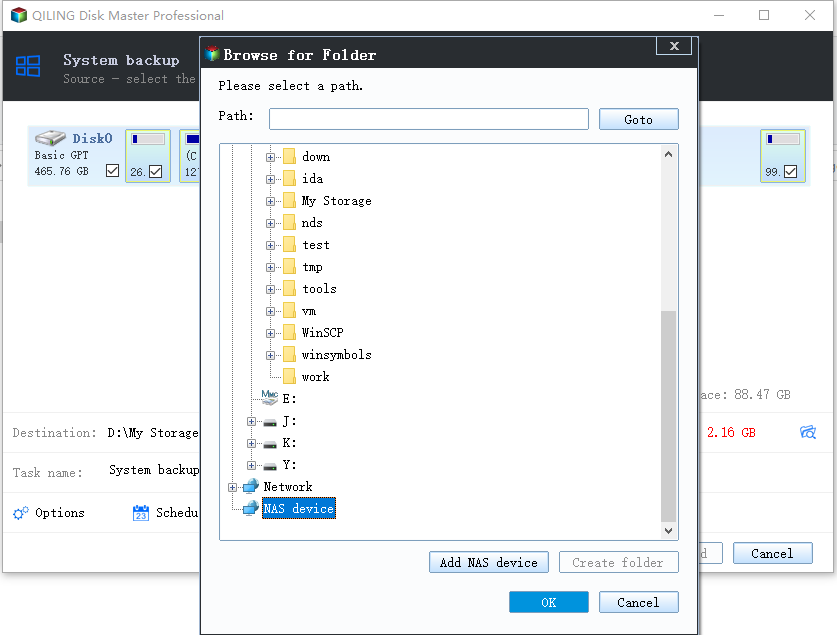
- The program will automatically select the necessary partitions for a system backup, allowing you to name the task and choose the destination path by clicking the column.
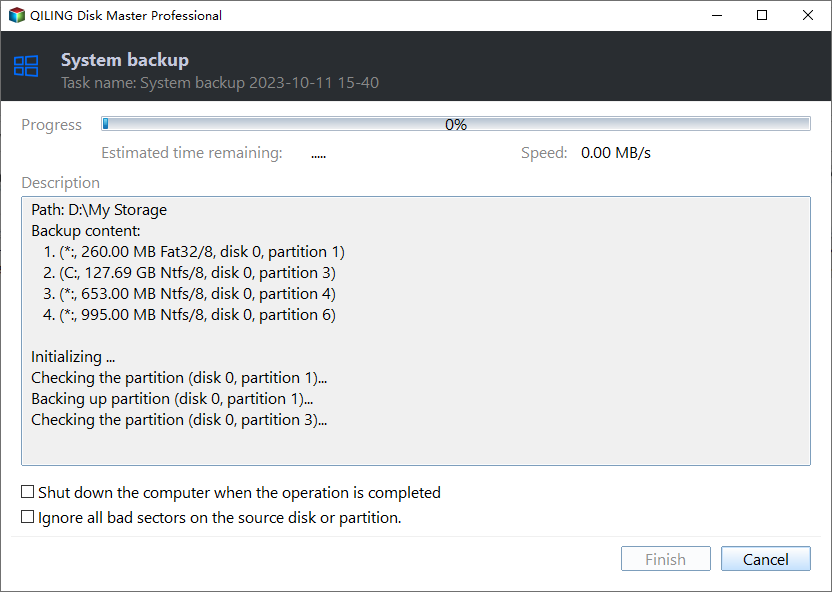
- Confirm the operation and click Proceed to make it.
Notes:
- Click Options to customize your backup settings, such as encrypting, compressing, and splitting your backup, to suit your specific needs.
- To create a scheduled backup, click the "Backup" and then "Schedule" button.
- To perform a backup, click Backup Scheme and choose a method (full, incremental, or differential backup), then select whether to automatically delete old image files via Automatic Backup Cleanup.
- To perform a system restore, go to Home, click Restore, and select the backup image.
Conclusion
Qiling Disk Master Server is an excellent backup software for Server 2012, offering powerful features that make the backup process effortless, even for those without technical expertise. By using it to backup your data and system, you can avoid common issues such as data loss and system crashes, providing peace of mind and protection for your digital assets.
It allows you to create recovery partitions for Windows Server and provides additional features like backup, cloning, restore, and sync. It is a qualified Disk Master and recovery alternative solution for all Windows PCs and Servers.
Related Articles
- How to Take System State Backup in Windows Server 2012 (R2)?
Create a Windows Server 2012 system state backup to protect system files, roles, and recovery data. - How to Create and Use Windows Server 2012 Recovery Disk?
If you are looking for a way to create Windows Server 2012 recovery disk in case your computer fails and restore it to previous date, please continue to read this article and learn the operating steps. - Create Windows Server 2012 Restore Point with 2 Alternative Ways
A restore point allows you to restore system to the previous state. This article will show you how to create Windows Server 2012 restore point with two ways. - Easily Create Windows Server 2012 Incremental Backup | 2 Ways
You will learn 3 backup types and find the 2 ways to make Windows Server 2012 incremental backup, try the best way to do incremental backups in Windows Server 2012 (R2), 2016, 2019. - Is TotalAV a Good Antivirus? (2024 Ultimate Review)🔥
Review TotalAV features, protection limits, and backup considerations before choosing antivirus software. - Microsoft Surface Factory Reset Without Password or Recovery Key
Reset a Microsoft Surface without a password or recovery key after checking backup and recovery options.
Products
Articles & Tutorials
- Data Recovery
- Data Backup
- File Recovery
- File Backup
- File synchronize
- System Backup and Restore
- Disk and Partition Clone
- Technical articles
- Disk Master Help
- Windows Deleted File and Disk Recovery Tutorials
- Windows File and Data Recovery Tutorials
- More Windows Tutorials for Install, Security, Files, and PC Tips
- Windows Boot, Repair, and Recovery Environment Tutorials
- Windows Backup Tutorials
- Windows Restore Tutorials
- Windows Clone and Migration Tutorials
- Windows Server Backup, Recovery, and Management Tutorials
- Windows Disk, Partition, and Storage Management Tutorials