Windows Server 2008 (R2) End of Life | What to Do Now?
Windows Server 2008 end-of-life date
Microsoft has again announced the end of life date for Windows Server 2008 (R2), with the first end date being January 13, 2015, marking the end of mainstream support, and a new end date of January 14, 2020, marking the end of extended support.
Microsoft will no longer improve Server 2008 (R2) Service Pack 1/2, accept warranty claims, or provide non-security hotfixes, and bug fixes and security updates will also no longer be available. This is due to the end of Mainstream Support and Extended Security Updates.

Microsoft stopped providing regular updates, including free security updates, non-security updates, free support options, and online technical content updates, indicating the end of the operating system.
Many systems, including Windows Server 2008, have reached the end of their active support and security support, and you can check the list by clicking here.
- Potential risks come with Windows Server 2008(R2) end of life
- Windows Server 2008 end of life, can you get extended support?
- Recommended: Upgrade operating system to higher versions
- Precaution: Add protection for important data in Server 2008 (R2)
Potential risks come with Server 2008 R2 end of life
As of January 14, 2020, Microsoft will no longer provide security updates and patches, making your computer more vulnerable to security risks, including the exploitation of powerful vulnerabilities like EternalBlue and BlueKeep, which have been frequently used by cybercriminals and led to significant data loss, as seen in the 2017 WannaCry attack.
In addition to the security risks mentioned above, there are some common risks that you should be aware of. These include compliance issues, increased operational costs, and the potential for system instability due to outdated software components.
1. Compliance issues
Many organizations need to update their equipment to stay compliant with security rules, as running outdated software like Windows Server 2008(R2) past its expiration date can result in non-compliance.
2. Increased operational costs
Maintaining an outdated operating system can be costly and poses a significant security risk, including the increased risk of malware spread, making it a financial burden for organizations to keep up with.
Windows Server 2008 end of life, can you get extended support?
Despite Microsoft's announcement to end Windows Server 2008(R2) Extended Support, there are still ways to extend support, although this is limited and Microsoft recommends upgrading to a newer version instead.
1. Pay for extended support
For enterprises, consider paying for an extended security update subscription to keep the server protected until upgrading to a newer Windows Server version is feasible.
Microsoft will provide security updates for up to three years after the end of support date, which is 2023, but it's only a temporary solution and not a long-term plan.
2. Migrate to Microsoft Azure to extend security updates
Microsoft allows Windows Server 2008 users to extend security updates by migrating to Microsoft Azure, where they can receive 3 additional years of Critical and Important security updates at no extra charge, and modernize when ready.
To get an additional 3 years of security updates and support for your on-premises products, you can migrate them to Microsoft Azure. However, not all products are eligible for this migration, only those listed in the provided chart qualify for this benefit.
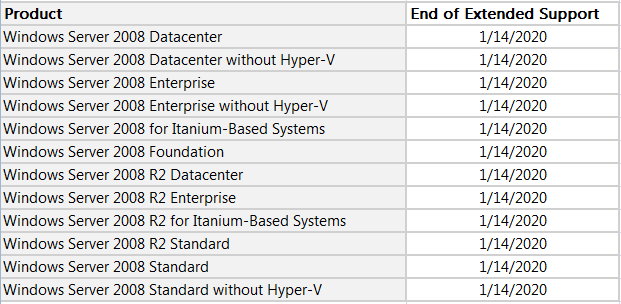
If you own a product that is no longer eligible for Extended Security Updates, you have to find an alternative solution as it's nearing the end of its lifecycle. Don't worry, you can explore other options.
Recommended: Upgrade the operating system to higher versions
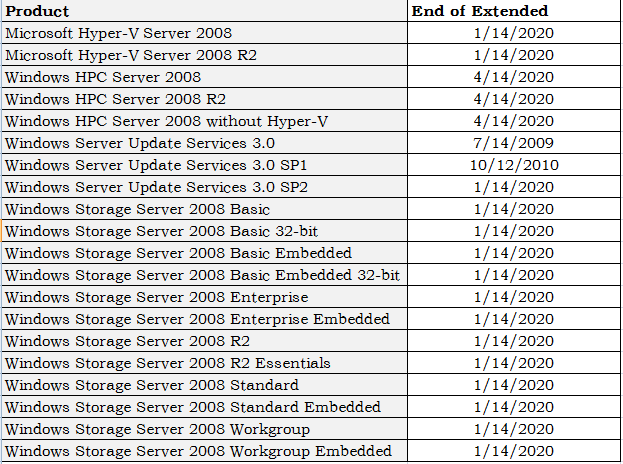
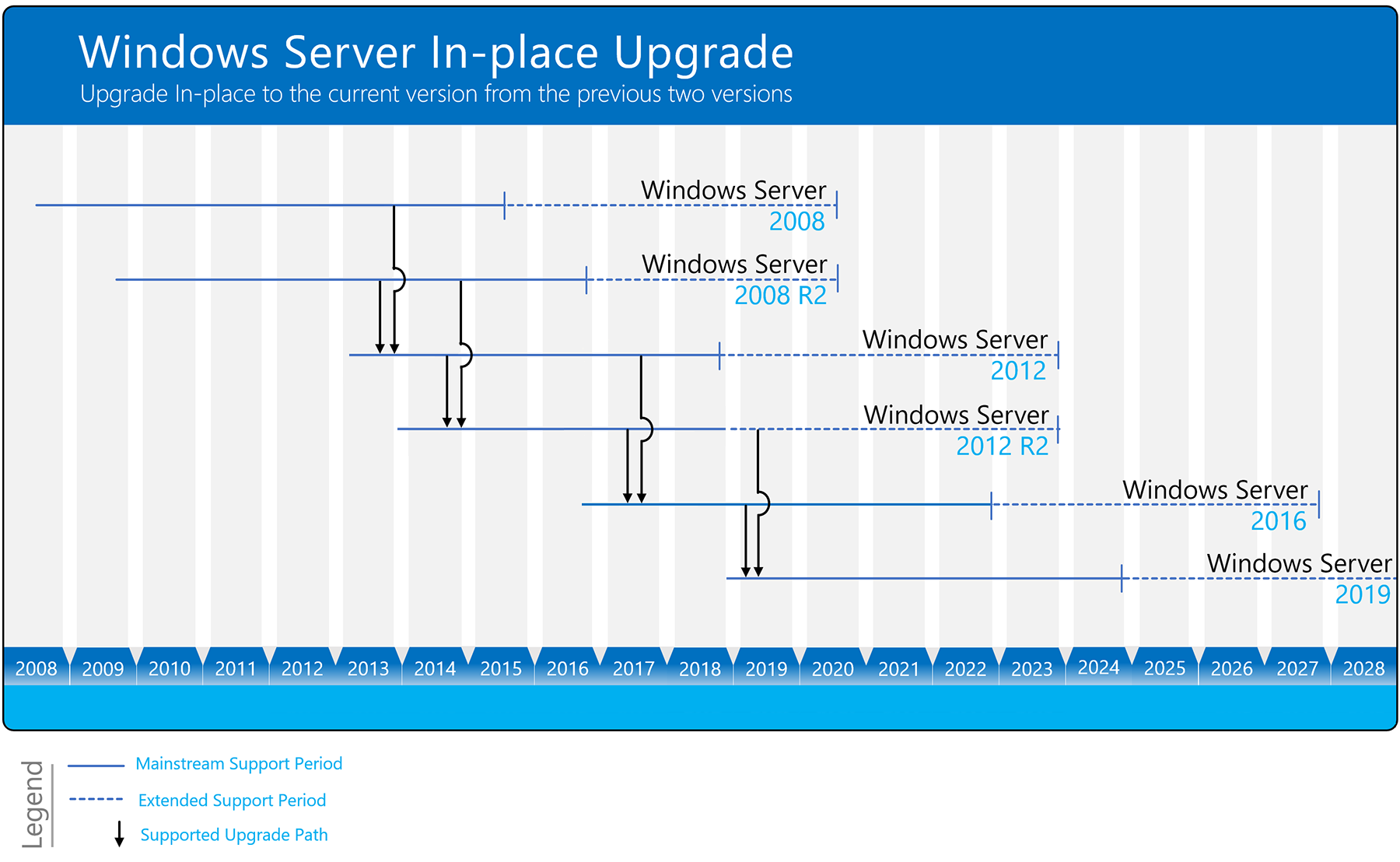
Users who own products that can't migrate to Microsoft Azure or don't want to migrate can consider upgrading their Windows Server 2008 (R2) operating system to a higher edition, such as Server 2016 or the latest Server 2019, 2022, through an in-place upgrade or clean install.
You may need to perform some infrastructure updates, such as updating drivers or upgrading physical hard drives, to ensure better compatibility with the new operating system in the future.
Precaution: Add protection for important data in Server 2008 (R2)
To ensure the security of existing crucial data, especially client data, it's essential to create protection and backups. Since security updates are no longer available, data backups are now more crucial than ever. Two practical backup utilities will be recommended for different backup conditions, providing a reliable solution for safeguarding valuable data.
For users with one or two Windows 2008 Servers, the Qiling Disk Master Server edition is recommended. This software offers various backup and cloning options, including system backup, disk backup, file/folder backup, partition backup, and schedule backup with options such as daily, weekly, monthly, and event-triggered backups, as well as incremental and differential backup schemes.
You can grab the free trial now:
▶ The software works with all Windows Server or Client systems, making it compatible with newer versions like Windows Server 2019 or 2022, allowing for data protection and migration.
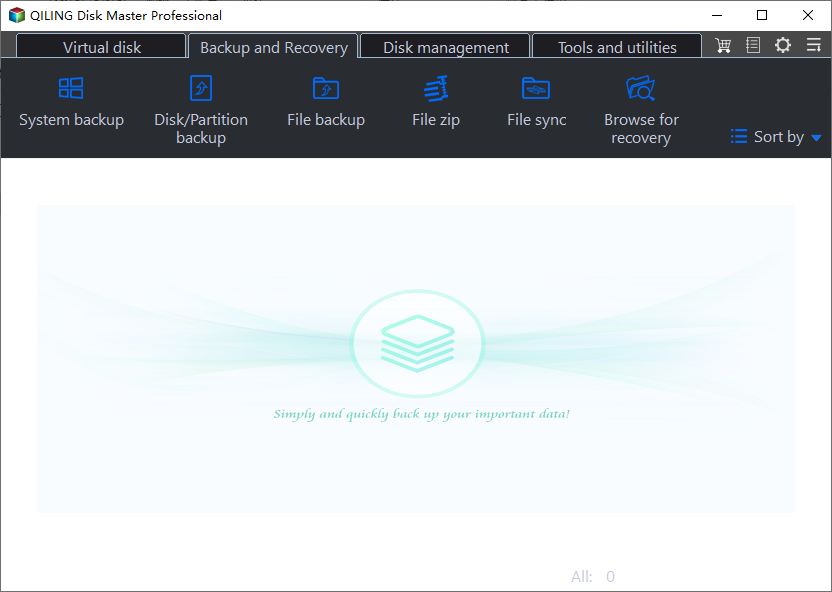
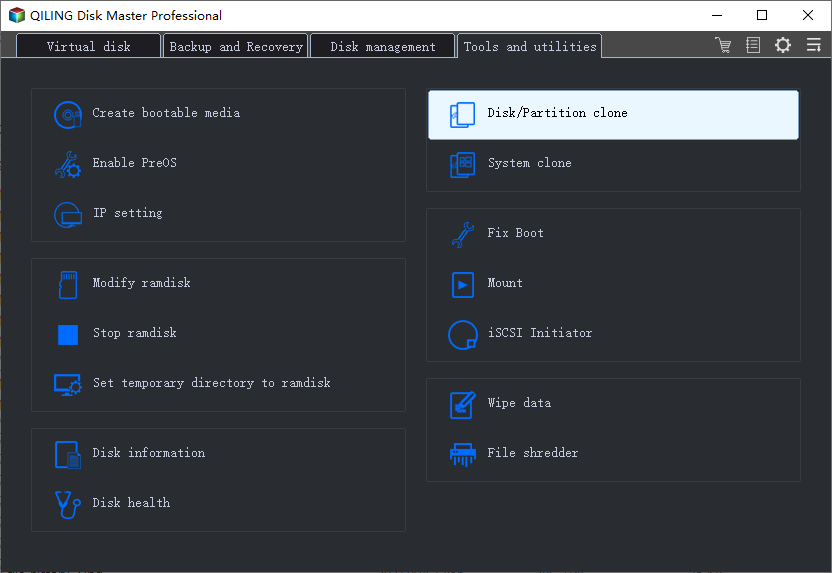
▶ The cloning feature is helpful in upgrading hard drives, allowing users to clone Windows Server 2008 hard drives to a desired disk without reinstalling the operating system. Additionally, System Clone and Partition/Volume Clone are available, and users can create a bootable drive to back up or clone a disk without Windows.
The bottom line
Windows Server 2008 (R2) is reaching its end of life, but you can prepare by choosing to pay for extended support, migrating to Azure, upgrading to higher versions, or continuing to use it without security updates. It's recommended to back up vital data on the server.
To protect unlimited PCs & servers in your company, you can use Qiling Disk Master Technician Plus, which offers unlimited billable technical services and allows for portable version creation.
Related Articles
- Windows 7 End of Life Extended What to Do?
Learn what Windows 7 end of life means, what risks remain, and how to plan upgrade, backup, or protection steps. - Restore Windows Server 2008 R2 to Previous Date | 3 Ways
Learn how to Restore Windows Server 2008 R2 to Previous Date | 3 Ways with clear steps, key checks, and practical tips. - How Do I Create System Image for Windows Server 2008(R2)?
Creating system image backup in Windows Server 2008 (R2) is essential to protect your system and data on it. With it, you can easily recover them without downtime in the event of a disaster. - Full Guide | Upgrade Windows Server 2012 R2 to 2019 Securely
To upgrade Windows Server 2012 r2 to 2019 on the same hardware and keep all the server roles and data intact, in-place upgrade is a good idea. Theoretically it shouldn't delete any of your data, but it's best to make a backup before upgrading just in case. - Best Handy Backup Free Alternative for Windows
In this post, you will get the best Handy Backup free alternative and learn how to create disk backup automatically with it in simple clicks. - Easy But Effective Hard Disk Not Initialized Fixes for Windows 10, 8, 7
If you find your hard disk is not initialized in Windows 10, 8, 7, you can try the following methods to fix "hard disk not initialized" issues like "hard disk unknown not initialized unallocated", or "disk unknown not initialized no size" on Windows.
Products
Articles & Tutorials
- Data Recovery
- Data Backup
- File Recovery
- File Backup
- File synchronize
- System Backup and Restore
- Disk and Partition Clone
- Technical articles
- Disk Master Help
- Windows Deleted File and Disk Recovery Tutorials
- Windows File and Data Recovery Tutorials
- More Windows Tutorials for Install, Security, Files, and PC Tips
- Windows Boot, Repair, and Recovery Environment Tutorials
- Windows Backup Tutorials
- Windows Restore Tutorials
- Windows Clone and Migration Tutorials
- Windows Server Backup, Recovery, and Management Tutorials
- Windows Disk, Partition, and Storage Management Tutorials