How to Use VSS in Qiling Disk Master?
What is VSS?
VSS is a technology that enables you to work while backing up, using a "shadow copy" of your data. If VSS isn't available, the backup will use a built-in technique instead. You can choose between two modes to start your backup.
For backup planning, combine VSS with a suitable backup retention policy to keep backup images manageable.
Volume Shadow Copy Service is useful when you need to back up files that are open or being used by applications. It helps Qiling Disk Master create a consistent backup image while Windows and other programs continue running.
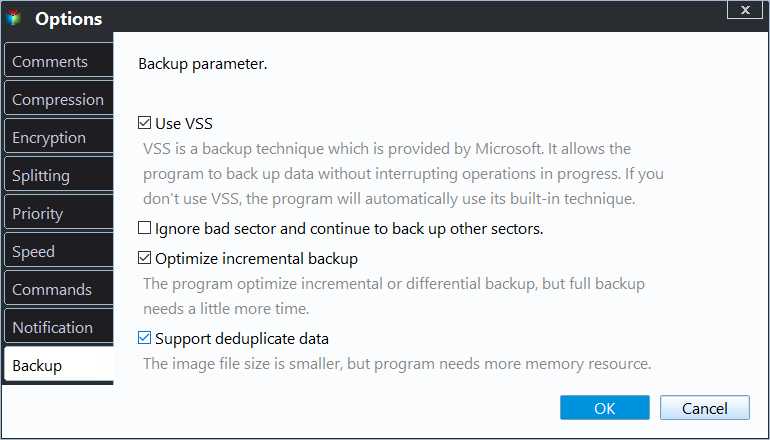
When should you use VSS?
For most system backup, disk backup, partition backup, and file backup tasks, using VSS is recommended. It reduces the chance of incomplete backup data when files are changing during the backup process.
If VSS cannot start because the Windows service is disabled or damaged, check the Volume Shadow Copy Service status in Windows Services and try the backup again. You can also restart the computer before creating another backup task.
 Note: We highly recommend you to use the VSS service.
Related Articles
- Failed to enable backup service
Fix the Qiling Disk Master error Failed to enable backup service. Check the installation path, start dmagent.exe, and set the schedule service to Automatic. - Failed to install Qiling Disk Master
Solutions for installing failure of Qiling Disk Master - Get Backup Retention Policy Best Practices Here!
Get backup retention policy best practices here to manage backup disk space while keeping the latest backups. - Create Command Line Backup with Qiling Disk Master
Qiling Disk Master allows you to create a system or disk partition image backup from command line interface or a batch (.BAT) file with the DiskMasterUI.exe utility. - Best Handy Backup Free Alternative for Windows
In this post, you will get the best Handy Backup free alternative and learn how to create disk backup automatically with it in simple clicks. - Easy But Effective Hard Disk Not Initialized Fixes for Windows 10, 8, 7
If you find your hard disk is not initialized in Windows 10, 8, 7, you can try the following methods to fix "hard disk not initialized" issues like "hard disk unknown not initialized unallocated", or "disk unknown not initialized no size" on Windows.
Products
Articles & Tutorials
- Data Recovery
- Data Backup
- File Recovery
- File Backup
- File synchronize
- System Backup and Restore
- Disk and Partition Clone
- Technical articles
- Disk Master Help
- Windows Deleted File and Disk Recovery Tutorials
- Windows File and Data Recovery Tutorials
- More Windows Tutorials for Install, Security, Files, and PC Tips
- Windows Boot, Repair, and Recovery Environment Tutorials
- Windows Backup Tutorials
- Windows Restore Tutorials
- Windows Clone and Migration Tutorials
- Windows Server Backup, Recovery, and Management Tutorials
- Windows Disk, Partition, and Storage Management Tutorials