Grandfather-Father-Son Backup Scheme - Safest Backup Strategy
What Is Grandfather Father Son Backup?
Grandfather-Father-Son (GFS) is a widely used backup rotation strategy that typically consists of three or more backup cycles. It allows for combining different backup frequencies and methods, such as daily, weekly, monthly, and annual backups, and saving them in two separate locations. This approach enables you to maintain a robust backup system with various levels of redundancy.
So how is it work? Here take the most traditional grandfather-father-son backup as an example:
- Grandfather: Take a full backup of your data once a month, ideally on the last day of the month, and store it securely off-site, such as in the cloud.
- Father: Once a week, typically on a Monday, perform a full backup of all data and save it locally. This ensures that a complete copy of the data is available in case of any issues or losses. The backup is taken on a specific day each week, allowing for easy tracking and scheduling of backups. This process is repeated every week, providing a consistent and reliable backup routine.
- Son: A daily incremental backup or differential backup is performed once a day or more frequently, such as hourly, and the backup is saved locally.
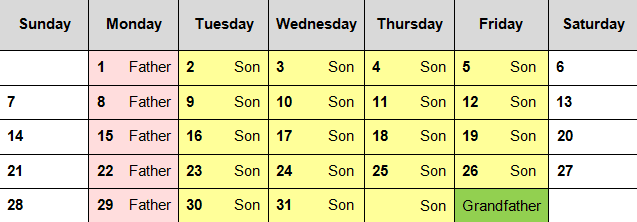
The grandfather-father-son backup scheme involves keeping three sets of backups: the oldest (grandfather), the middle-aged (father), and the youngest (son). Some backups are removed for safekeeping or disaster recovery, following the "first in, first out" rule, where the oldest backups are deleted to make space for new ones.
Grandfather Father Son Backup Advantages & Disadvantages
Grandfather-Compared to a single backup method, a father-son backup setup offers greater data protection. By storing multiple backup images on different storage devices, you significantly reduce the risk of data loss or system downtime in case of a crash or disk corruption. This setup ensures that you can easily recover your files or system, even in the event of a disaster.
The backup strategy takes a lot of time and requires two separate storage devices. It becomes even more complicated when creating incremental backups, setting multiple retention policies, and using different off-site storage. Restoring a daily incremental backup also requires ensuring all linked incremental images are intact.
Best Grandfather-Father-Son Backup Software
To create a grandfather-Qiling Disk Master Professional is a reliable backup software that offers a range of useful features, including different backup frequencies, backup methods, and cleanup methods, making it a valuable tool for creating a father-son backup system.
- Schedule Backup: It offers users 5 modes, including Daily, Weekly, Monthly, Event triggers, and USB plug in, for various time tracking needs.
- Full/Incremental/Differential Backup: The first option creates a full backup every time, while the last two options only backup changed files, saving time and disk space.
- Automatic Backup Cleanup: The backup system supports four different cleanup methods, including cleaning up by quantity, time, and space, as well as a method that is only available for differential backups.
I can't wait to show you the simple steps to create Grandfather, father, son backups, the detailed steps are listed below. Please download GFS backup software - Qiling Disk Master Professional first.
Create Grandfather-Father-Son Backup Step by Step
Here take Disk Backup for example to create grandfather-father-son backup. You just need to create 3 backup task with corresponding settings, among them, the grandfather backup uses off-site storage and the father and son use local storage.
Just like the 3-2-1 backup strategy, you need two storage devices at least, please prepare them before creating a backup task, one is local (internal/external disk, USB drive) and the other is off-site, such as, network drive, NAS, cloud drive, etc.
Then, learn the overall steps to create a disk backup and the corresponding settings:
▶ The overall steps:
- Run GFS backup software - In the Qiling Disk Master Professional, select the Backup tab and choose the Disk Backup option to proceed.
- Select the disk you want to back up by clicking on Disks, then click Add to add it to the backup list.
- Choose a local disk or off-site device to save backup image.
- Set grandfather-To set up a backup schedule for a father-son backup, confirm the settings, then click "Proceed" > "Add the schedule and Proceed now" or "Only add the schedule" to initiate the backup.
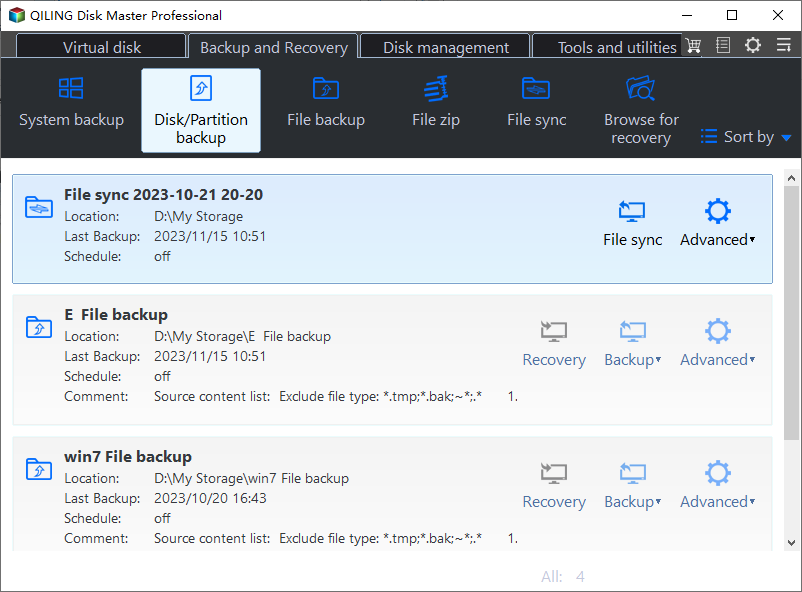
▶Set the grandfather, father and son backup settings in 3 different backup tasks.
About Son: Daily Incremental Backup
① Click on Schedule Backup and select Daily. You will then be able to choose three daily backup settings.
- Run once only at 2019/4/10 19:24
- Run once every day at 19:24
- Intervals (you can even set hourly backup )
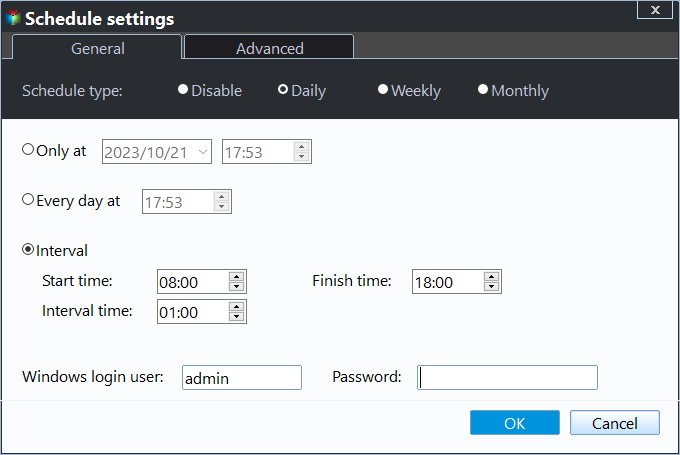
② To enable incremental or differential backups, go to the Backup Scheme tab and click OK. This will allow you to schedule backups and choose between incremental and differential backup methods. Incremental backups are the default method and can be used in place of differential backups.

About Father: Weekly Full Backup
① To schedule a weekly backup, click on "Schedule Backup" and select "Weekly". Then, choose the specific days of the week on which you want the backup to occur, such as Monday, and the selected days will be highlighted in orange.
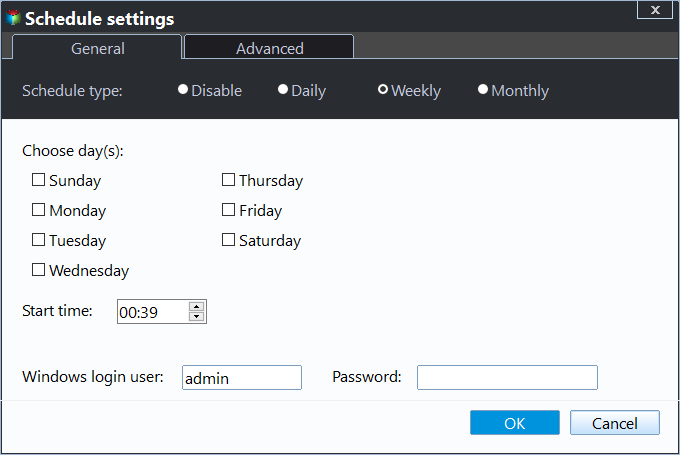
②To perform a scheduled backup, go to the Backup Scheme tab and select Full Backup.
About Grandfather: Monthly Full Backup
①Click Schedule Backup and choose Monthly, then select the last day of the month to perform the backup.
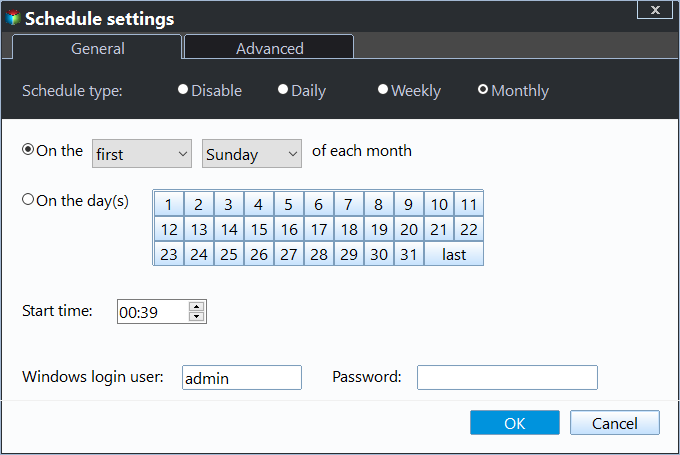
② To perform a scheduled backup, switch to the Backup Scheme tab and select Full Backup.
▶ Set the retention time of full backup, incremental backup, differential backup, and other backups. It helps to remove old backups automatically in the scheduled task.
Scroll down and enable automatic backup cleanup, then select one of the cleanup methods listed below.
- In the Incremental Backup mode, you have the default options of backing up by quantity, by time, or by daily/weekly/monthly intervals.
- If you're using Differential Backup, you can still use the By Space method.
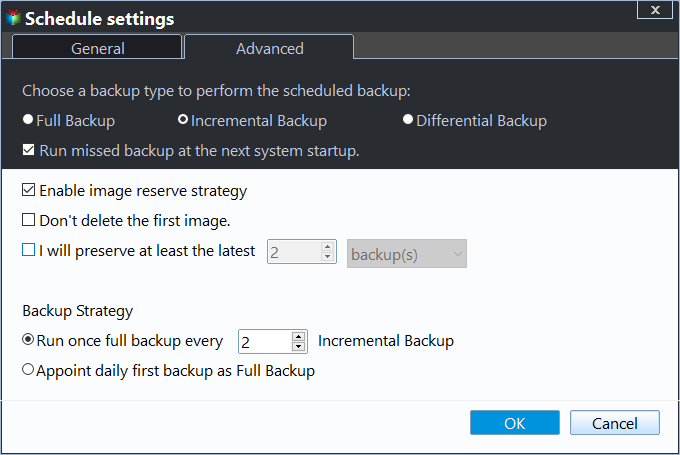
The Grandfather-Father-Son backup process involves creating three backup tasks that run at specific intervals. Once set up, the tasks will automatically run at the designated times, ensuring that your data is backed up regularly without requiring manual intervention. This means you can rest assured that your data is being protected, even if you forget to run the backups yourself.
Summary
To create a robust data protection system, use two storage devices and Qiling Disk Master Standard software. Set up three backup tasks: the "grandfather" task uses off-site storage, while the "father" and "son" tasks utilize local storage. This setup ensures a reliable backup scheme that protects your data and boosts working efficiency.
This software is primarily a file sync, clone, and restore tool, allowing users to perform real-time syncing of files and folders, keep track of changes, and restore backup images to new hard drives or even dissimilar hardware computers, while also supporting the migration of Windows 10 to an SSD drive without requiring a system reinstall.
Related Articles
- The 3-2-1 Backup Strategy | What Is It and How to Implement?
- 2 Best Server Backup Solutions to Backup Server Safely 2020
Try the following 2 server backup solutions to less downtime and recovery faster. Perform disaster recovery if something bad happened to your Windows Server. - How to Backup Files in Windows Server 2019 Easily? (2 Ways)
Learn how to Backup Files in Windows Server 2019 Easily (2 Ways) with clear steps, key checks, and practical tips. - (Solved) No Disks Are Available for Use as a Backup Storage Destination
If you have a problem fixing the 'no disks are available for use as a backup storage destination' error, click on this article and learn 5 effective solutions. - Fixes: DISM Error 87 the Parameter is Incorrect/Unknown
Fix DISM error 87, 'the parameter is incorrect' or unknown cleanup-image option, with clear checks for command syntax, administrator access, Windows updates, and system repair tools. - Download Synology Data Replicator Alternative for Windows 10/8/7
In this article, you will get how to free download Synology Data Replicator alternative and create a backup with Synology NAS. Get the details below.
Products
Articles & Tutorials
- Data Recovery
- Data Backup
- File Recovery
- File Backup
- File synchronize
- System Backup and Restore
- Disk and Partition Clone
- Technical articles
- Disk Master Help
- Windows Deleted File and Disk Recovery Tutorials
- Windows File and Data Recovery Tutorials
- More Windows Tutorials for Install, Security, Files, and PC Tips
- Windows Boot, Repair, and Recovery Environment Tutorials
- Windows Backup Tutorials
- Windows Restore Tutorials
- Windows Clone and Migration Tutorials
- Windows Server Backup, Recovery, and Management Tutorials
- Windows Disk, Partition, and Storage Management Tutorials