Top 6 Fixes to Failed to Create Volume Snapshot
- The error: Failed to create volume snapshot
- Troubleshooting unable to create volume snapshot in Windows
- #1. Modify Volume Shadow Copy Service
- #2. Increase Shadow Storage Space
- #3. Delete Old VSS Snapshots
- #4. Backup with Rescue USB Drive
- #5. Use Built-in Option in Macrium Reflect
- #6. Try Alternative Backup Tools
- Final words
The error: Failed to create volume snapshot
"I was able to create full and differential backup with Macrium Reflect a few days ago, but after an uninstalling and reinstalling due to personal reasons, it does not work now. The backup task failed with the return message: Backup aborted. Failed to create volume snapshot. Any advice?"

Macrium Reflect is a popular disk cloning and imaging utility that occasionally experiences errors, and in some cases, it fails to clone one disk to another, resulting in a similar error message.
Some users find the same error occurs while backing up with Acronis backup tool as well, indicating a common issue with volume snapshot creation during backup.
- Unable to create volume snapshot.
- Failed to Proceed the volume snapshot.
- Backup aborted. Failed to create volume snapshot.
- Failed to create snapshot copy on volume invalid argument.
VSS issues can occur frequently in various computer usage scenarios. The problem arises when the Volume Shadow Copy Service, responsible for creating snapshots of system files and data, encounters difficulties in performing its tasks. This can happen due to various reasons, such as disk space limitations, corrupted system files, or conflicts with other system processes.
Troubleshooting unable to create volume snapshot in Windows
Volume Shadow Copy Service (VSS) is a Windows technology that allows taking manual or automatic backup copies or snapshots of computer files or volumes, even when they are in use.
It typically applies to tasks like creating scheduled backups or automatic system restore points.
The volume snapshot creation error can be tricky to fix due to its varied causes. However, there are several common scenarios where this error occurs, and the following solutions can help resolve them.
#1. Modify Volume Shadow Copy Service
The Volume Shadow Copy service may be disabled or turned off by some software, so it's a good idea to check and switch it to Manual first.
- To open the Services window in Windows, press the Windows key + R key to open the Run dialog box, then type "services.msc" and press Enter. This will open the Services window where you can view and manage the running services on your computer.
- To locate the service named Volume Shadow Copy, right-click it and select Properties.
- Set the Start type to Manual and click Apply. If the Service status is Stopped, click Start to change it. Then, click OK.
- Restart the backup task.
Tip: If the backup tool requires VSS service to be disabled, the Start type can be changed to Disabled in the third step.
#2. Increase Shadow Storage Space
Insufficient storage space for Shadow Copy can result in a "Failed to create volume snapshot" error, typically accompanied by the error code 0x8004231f. This issue often occurs because the storage is being used for system restore points, which can be resolved by resizing the space.
- To open an elevated Command Prompt, click Start and type "Command Prompt" in the search box. Then, right-click on the result and select "Run as administrator" to open a command prompt with administrator privileges.
- To resize the shadow storage on the C: drive to 50GB, you can run the command `vssadmin resize shadowstorage /For=C: /On=C: /MaxSize=50GB` in the Command Prompt and press Enter. This will allocate 50GB for the shadow storage.
- Restart the backup task.
Tips: To see how much storage space is currently being used by shadow copies, type `vssadmin list shadowstorage` from the command prompt. This will display information about the current storage space used by shadow copies, including the total space used and the space used by each volume.
#3. Delete Old VSS Snapshots
If there is not enough space to allocate to shadow storage, consider removing old snapshots to free up space.
- Open an elevated command prompt as instructed.
- To view all existing snapshots, type `vssadmin list shadows` and press Enter. This command will display a list of all snapshots taken by the Volume Shadow Copy Service (VSS).
- Run the command `vssadmin delete shadows /all` and press Enter to delete all shadow copy snapshots.
Tip: To delete a shadow snapshot by ID, type the command vssadmin delete shadows /shadow={ID} in the Command Prompt (CMD).
#4. Backup with Rescue USB Drive
When you encounter a "Failed to create volume snapshot" error in Acronis, and you're under a tight deadline for the backup, you can still complete the backup using the bootable rescue media you created earlier. This media allows you to bypass the issue and successfully backup your data.
- Shutdown your computer and insert the rescue media.
- To set the PC to boot from the rescue drive, turn it on and immediately start pressing the Del key (or F2, depending on the PC model) to access the BIOS settings. Once in the BIOS, navigate to the Boot tab and set the rescue drive as the first boot device, ensuring it takes priority over the existing operating system. This will allow the PC to boot directly from the rescue drive and initiate the recovery process.
- Complete the backup task in the mini-OS.
#5. Use Built-in Option in Macrium Reflect
If Macrium Reflect fails to create a volume snapshot, you can try using its "Fix VSS Problems" feature. This tool will resolve issues with Windows VSS by re-registering the VSS DLLs, stopping and restarting the service, and repairing any damaged registry entries.
- On the main interface of Macrium Reflect, click on "Other Tasks" on the toolbar and select "Fix VSS Problems".
- Click Run in the pop-up window.
- Click OK to register the Microsoft VSS components, then restart the backup.
#6. Try Alternative Backup Tools
If the mentioned solutions don't solve your problem, consider trying other backup tools. Many powerful backup tools offer robust backup solutions, and some even have free versions available.
Qiling Disk Master Standard is a fast and reliable backup tool that excels in its performance. Its standout features make it a top choice for users looking for a trustworthy backup solution.
- Scheduled backup. This feature allows for automatic backups of user files or the entire system on a daily, weekly, or monthly basis. It also supports event-triggered backups and USB plug-in options, which become available after upgrading to the Professional version or higher.
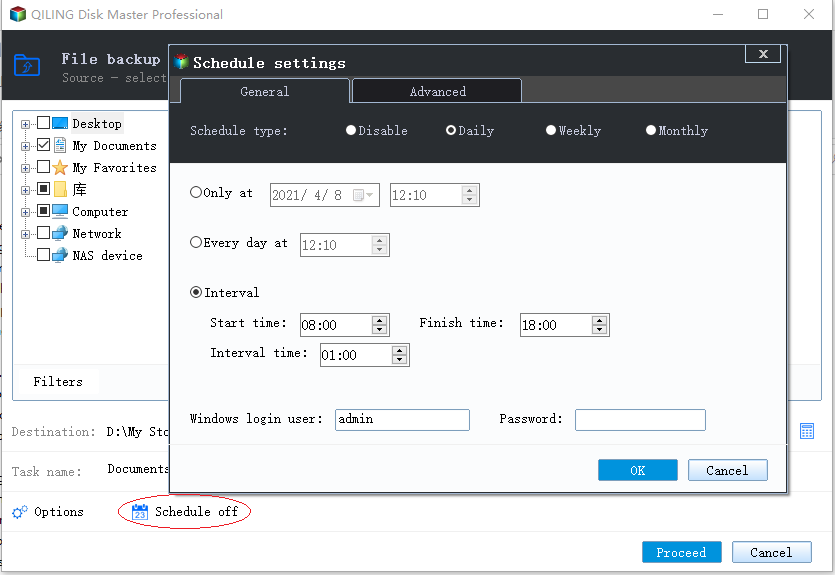
- Complete backup type. The backup options include full backup, incremental backup, and differential backup. Additionally, various backup types are supported, such as system backup, file backup, disk backup, and partition/volume backup.
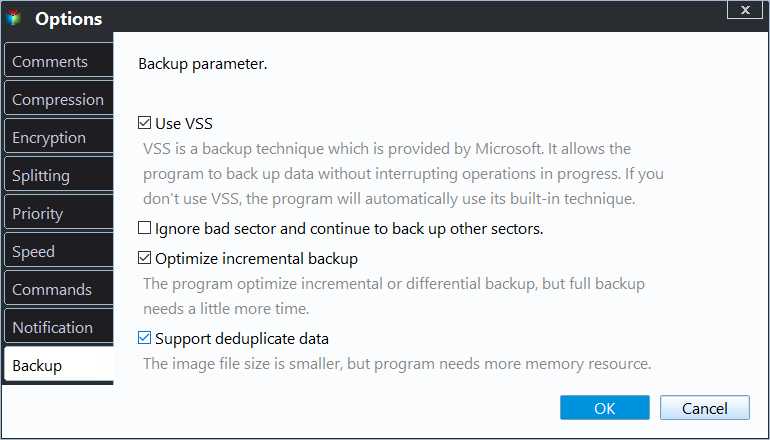
- Built-in VSS backup technology. It offers two VSS backup options in Backup Settings: using Windows VSS and using Qiling's built-in technique to back up without interrupting.
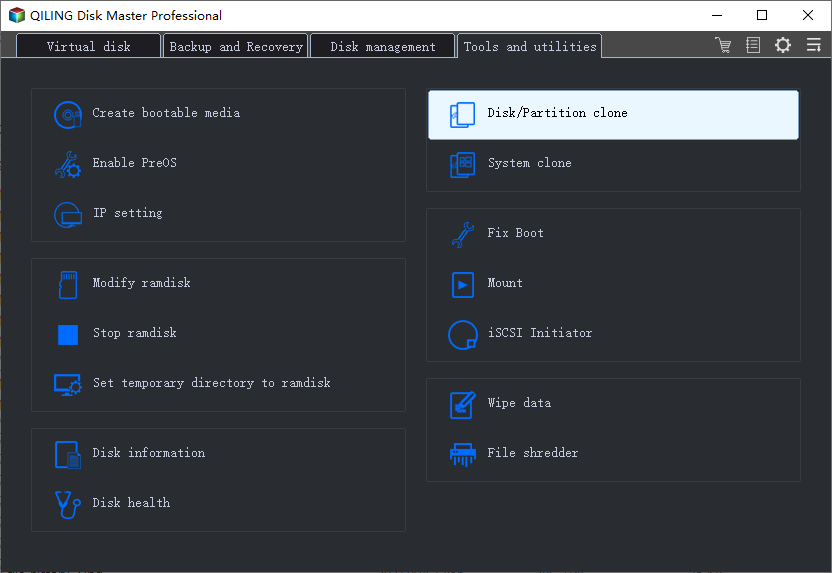
- Free disk cloning tool. When encountering issues with snapshot creation and invalid argument problems during disk cloning, using a disk cloning software can be a good solution to resolve the problem.
Final words
To resolve the issue of "Failed to create volume snapshot" when backing up and cloning, consider the following six common solutions: prioritize backups as a long-term task for protecting crucial data, and choose the one that best suits your situation.
Related Articles
- How to Use Volume Shadow Copy in Windows 10/8/7
You will learn how to enable/restore/disable volume shadow copy in Windows 10/8/7 as well as all-round way to backup files and folders. Get details now! - Quick Guide to Use Shadow Copy in Windows Server 2012
You will learn the Windows Server 2012 (R2) shadow copy best practices as well as more safer way to backup files. Anyway, check out these useful ways first. - How to Delete Shadow Copies in Windows 10 [4 Solutions]
4 ways provided in this article to delete shadow copies in Windows 10 easily. Just follow the steps to delete shadow copies here. - [Backup Guide] To Solve Windows 10 Backup Starts then Stops
When you periodically back up selected folders onto an external hard drive using File History on Windows 10, you will click - Fixed: Lenovo Onekey Recovery Current System Cannot Support Backup
This guide explains Fixed: Lenovo Onekey Recovery Current System Cannot Support Backup with clear steps, key checks, and practical tips. - Lenovo Onekey Recovery Driver Initialization Failed after Windows Update
Lenovo OneKey Recovery driver initialization failed please reinstall application and still fails after reinstalling, this mainly occurred after users upgrading Windows from 7 to 8 or 10. To reuse OKR, reinstall Win7 or just use Qiling Disk Master.
Products
Articles & Tutorials
- Data Recovery
- Data Backup
- File Recovery
- File Backup
- File synchronize
- System Backup and Restore
- Disk and Partition Clone
- Technical articles
- Disk Master Help
- Windows Deleted File and Disk Recovery Tutorials
- Windows File and Data Recovery Tutorials
- More Windows Tutorials for Install, Security, Files, and PC Tips
- Windows Boot, Repair, and Recovery Environment Tutorials
- Windows Backup Tutorials
- Windows Restore Tutorials
- Windows Clone and Migration Tutorials
- Windows Server Backup, Recovery, and Management Tutorials
- Windows Disk, Partition, and Storage Management Tutorials