Fixed: Lenovo Onekey Recovery Current System Cannot Support Backup
Symptoms: Current system can not support back up
"I want to make a Backup file from the OKR but when I try to make recovery by Lenovo one key recovery I get this message: current system can not support back up. Does any know how to fix it? "
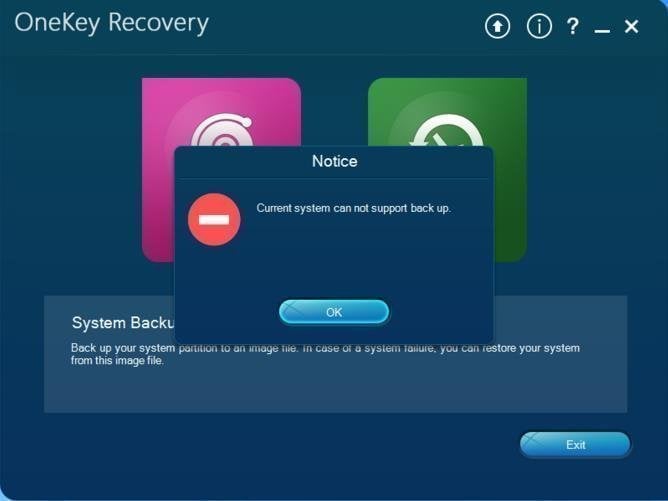
This is not a rare error for users who use Lenovo OneKey Recovery, thus we summarize the most common 2 situations in the following:
- Your computer comes with a pre-installed OneKey Recovery application, but it does not come with an operating system like Windows or DOS.
- Changes made to the original disk can affect the normal functionality of the system, specifically impacting the OKR's ability to locate the image path. This alteration can disrupt the system's functionality, leading to issues such as the OKR failing to locate the image path.
To create a recovery partition with a backup image easily, you can use a tool like Qiling Disk Master. This software allows you to create a system image and a recovery partition, which can be used to restore your system to a previous state in case of a failure. You can also use the built-in Windows feature called System Image Backup to create a system image and a recovery partition. Additionally, you can use a USB drive to create a recovery partition with a backup image, which can be used to boot your system in case of a failure. These methods can help you create a recovery partition with a backup image easily and quickly.
Solution to Lenovo OneKey Recovery backup error
If you're experiencing issues with a key recovery system's current backup and restore functionality, consider using a reliable backup and restore software like Qiling Disk Master as an alternative.
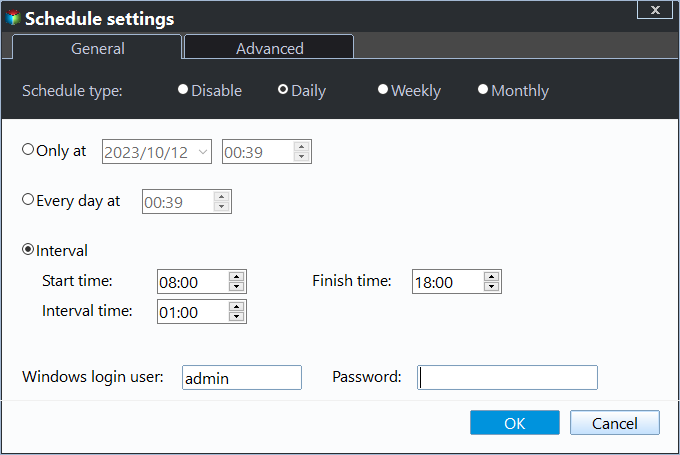
With this tool, you can schedule system backups to the recovery partition, keeping daily, weekly, and monthly records of changes. It also allows for encryption and compression of backups if desired.
Download it firstly and then follow the steps below to make a backup.
Step 1. Install and launch Qiling Disk Master on your Lenovo computer, then select "System Backup" from the main interface to proceed.
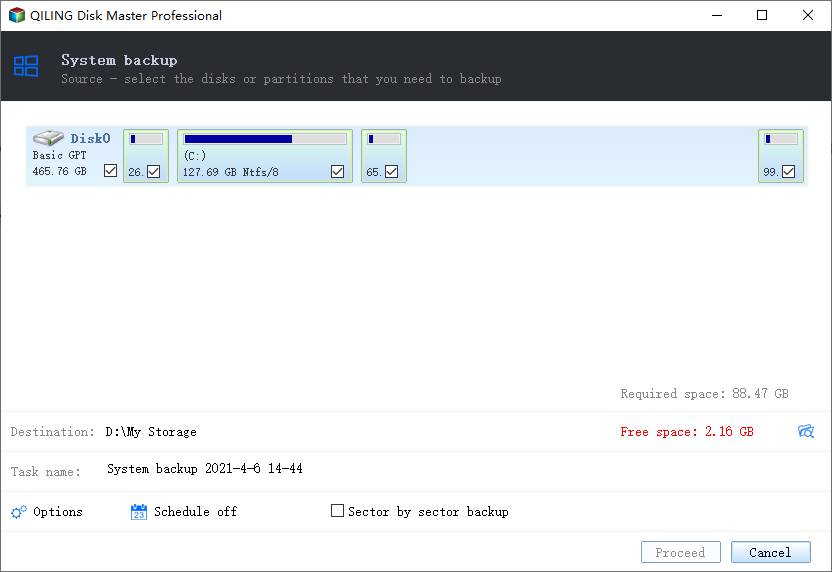
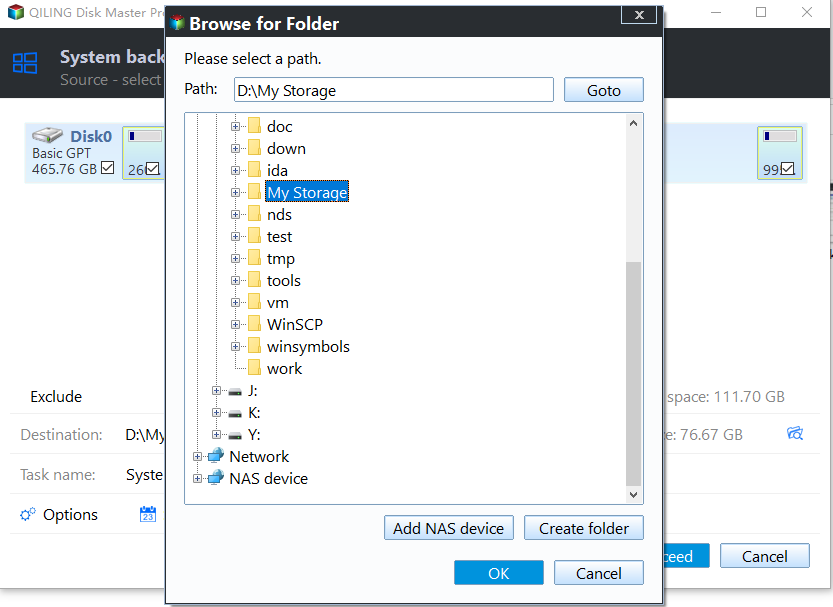
Step 2. To create a system recovery partition backup, select a suitable path from the highlighted available partitions or unallocated space, and then click "Proceed" to create an exact copy of your system.
Why choose Qiling Disk Master?
Qiling Disk Master is similar to Lenovo OneKey Recovery, but it has more advanced features and advantages over the latter.
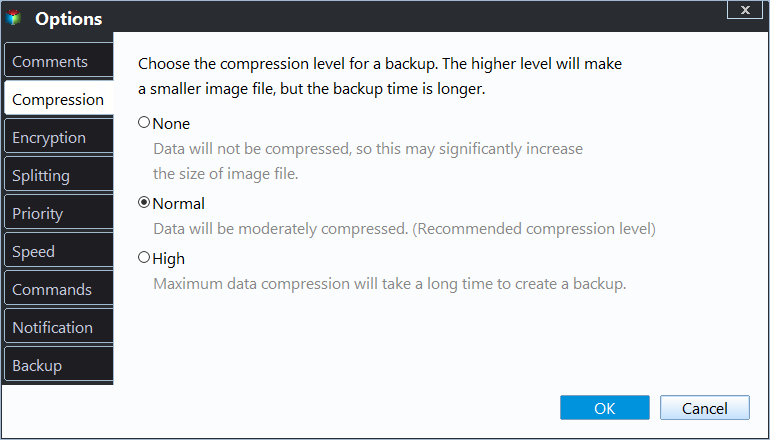
- During backup, you can compress or encrypt system image.
- OneKey Recovery allows you to set a daily, weekly, or monthly scheduler to automatically perform backups at designated times, ensuring your data is safely backed up in accordance with your desired frequency.
- It supports all brands of computers, including Lenovo, Asus, Dell, HP, Toshiba, Samsung, Sony, Acer, etc. whereas Lenovo OKR only supports Lenovo products.
- This software is compatible with all Windows operating systems, from Windows XP to Windows 11, as well as various Windows Server versions from 2000 to 2022.
- You may encounter errors like driver initialization failed, OKR button not working, or the One key recovery partition being damaged while using Lenovo OneKey Recovery.
Summary
If you're experiencing issues with Onekey Recovery's current system, you may not be able to fix the backup error. However, you can consider using an alternative software, such as Qiling Disk Master, which offers similar functionality and has several advantages, including continuous system protection and backup of newly installed programs and data. You can download Qiling Disk Master to try it out.
Related Articles
- What is OneKey Recovery and Its Feature
You will learn what is OneKey Recovery and how to create OneKey Rescue system easily. You can use Lenovo OneKey Recovery and Qiling Disk Master. - How to Create Lenovo Onekey Recovery on New Hard Drive
You can easily recover your system as long as you create Lenovo onekey recovery on new hard drive, even when the original is damaged. - How to Restore Onekey Recovery Function After Changing Partition Size
Many people have asked online that can't restore one key recovery function after changing partition size. Here are the solutions to cope with it. - How Do I Transfer Files from Google Drive to OneDrive [Ultimate Guide]
Download the files from Google Drive to your local hard drive and upload them to OneDrive. Use Google Takeout and share feature to transfer files from google drive to OneDrive. - 5 Best USB Backup Software Free Download [2022 Roundup Reviews]
Learn how to back up 5 Best USB Backup Software Free Download with practical steps, storage tips, and safer recovery planning. - Boot Drive vs Recovery Drive: Are They the Same Thing?
Follow this guide to Boot Drive vs Recovery Drive: Are They the Same Thing?, with backup options, storage tips, and recovery precautions.
Products
Articles & Tutorials
- Data Recovery
- Data Backup
- File Recovery
- File Backup
- File synchronize
- System Backup and Restore
- Disk and Partition Clone
- Technical articles
- Disk Master Help
- Windows Deleted File and Disk Recovery Tutorials
- Windows File and Data Recovery Tutorials
- More Windows Tutorials for Install, Security, Files, and PC Tips
- Windows Boot, Repair, and Recovery Environment Tutorials
- Windows Backup Tutorials
- Windows Restore Tutorials
- Windows Clone and Migration Tutorials
- Windows Server Backup, Recovery, and Management Tutorials
- Windows Disk, Partition, and Storage Management Tutorials