Clone NVMe SSD to Larger NVMe SSD Samsung (Bootable)
Quick Navigation:
- User Case: Clone NVMe to Larger NVMe Samsung
- About Samsung NVMe SSD
- Why Clone NVMe to NVMe Samsung?
- Best NVMe Cloning Software - Qiling Disk Master
- How to Clone NVMe SSD to Larger NVMe SSD Samsung Successfully
- Prepare Samsung NVMe SSD
- Steps to clone NVMe to NVMe Samsung in Windows 10 or 11
- Summary
User Case: Clone NVMe to Larger NVMe Samsung
"For a client i need to copy / clone a NVMe drive to a new larger NVMe drive. The source drive is what ever came in a Dell laptop two years ago to a Samsung drive.
I tried using an external USB connected NVMe drive last year, just like I have with SATA drives, but unfortunately, it didn't work with the Samsung software.
I have searched on the internet but lots of chatter on different ways to do this so am hoping one of my fellow spiceheads will have a definitive answer."
About Samsung NVMe SSD
Samsung NVMe SSD is a flash-The Samsung SSD is a high-performance solid-state drive that uses the NVMe protocol, achieving peak speeds 6-7 times faster than SATA. It's typically found in the M.2 form factor, making it a popular choice for those seeking reliable performance.
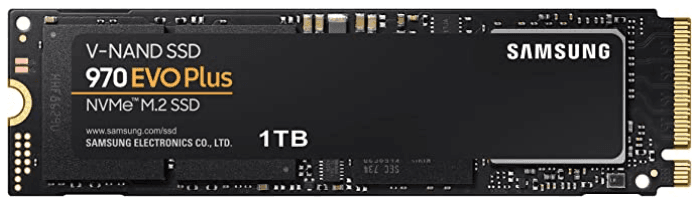
If you're a tech-savvy individual, gamer, or professional with heavy workloads, you may want to consider the Samsung 970 EVO Plus, Samsung 980 Pro, or Samsung 990 NVMe SSDs. These popular Samsung models are designed to provide exceptional performance and speed, making them ideal for those who want to ensure their computer is always running at its best.
Why Clone NVMe to NVMe Samsung?
Users want to clone their NVMe SSD to a Samsung NVMe SSD for high performance, as Samsung NVMe SSDs are known for delivering high performance compared to other brands. This is likely due to the desire for improved system responsiveness and faster data transfer rates. Additionally, users may also want to clone their existing SSD to a Samsung NVMe SSD for compatibility reasons, as Samsung NVMe SSDs are often used in specific systems or devices where compatibility is a concern.
- Upgrade disk capacities: A newly purchased computer is often equipped with a smaller SSD, such as 250 GB, but this limited space can quickly become consumed by installed programs and stored data. To address this issue, you may want to clone the existing 250GB SSD to a larger one, such as a 500GB, 1TB, or 2TB SSD, to free up space and expand your storage capacity.
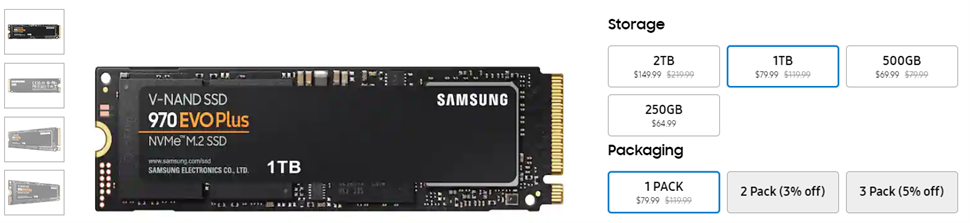
- More affordable price: The prices of popular NVMe SSDs have dropped significantly, with the Samsung 970 EVO Plus now available for $79.9 for 1TB and $149.9 for 2TB, the WD Black SN750 for $129 and $215 for 2TB, and the Crucial P1 1TB for $119. There is no 2TB option for the Crucial P1. The prices have been reduced on Amazon. The Samsung 970 EVO Plus 1TB is available for $79.
Best NVMe Cloning Software - Qiling Disk Master
For cloning NVMe to NVMe Samsung, the best NVMe cloning software is essential. The top choice for most users is Samsung Data Migration, which is free for Samsung users and allows them to migrate the operating system, programs, user data, and more from one NVMe SSD to another.
Users have reported that Samsung NVMe SSDs are not recognized by SDM when connected via USB, but an alternative software, Qiling Disk Master Professional, offers advanced features and may resolve this issue.
- Disk or System Clone: Both of them can clone Samsung NVMe SSD without boot issues. To clone the entire disk, use the "Disk Clone" feature, or to clone the OS only, use the "System Clone" feature.
- Edit Partitions: This software can clone and resize a hard drive, with the option to do it automatically or manually. It also allows for the conversion of MBR disks to GPT and vice versa.
- SSD Alignment: It improves SSD disk performance by enhancing reading and writing speeds.
This software is compatible with other NVMe SSD brands, such as WD Black SN750, Crucial P1, and can be cloned using the same steps as cloning a Samsung NVMe SSD.
How to Clone NVMe SSD to Larger NVMe SSD Samsung Successfully
To clone an NVMe SSD to a larger NVMe SSD from Samsung, you'll need to prepare the destination drive with the same capacity or larger, ensure it's empty or backed up, and format it to match the source drive's format. Then, you can use a cloning software like Samsung's own Magician tool or a third-party option like Qiling Disk Master to create a sector-by-sector copy of the source drive. This will ensure a precise and efficient transfer of data, including the operating system, programs, and personal files.
Prepare Samsung NVMe SSD
1. To upgrade your computer's storage, check if it has an M.2 PCIe x4 slot. If it doesn't, you'll need to get an M.2 NVMe adapter or enclosure to utilize the benefits of an M.2 NVMe drive.
- You can search for a specific Samsung NVMe SSD, such as the 970 EVO Plus, or a 980/990 Pro plus adapter or enclosure, to find a compatible solution for your M.2 slot.
- Confirm it is compatible with NVMe SSD you want.
2. To upgrade your storage, consider replacing your old NVMe SSD with a larger one, having twice or three times more capacity. The most popular choices for a larger SSD are 500GB and 1TB options, which can provide ample storage for your system.
3. To install the newly purchased NVMe SSD, you'll need an anti-static wristband to prevent damage to the components. If your laptop has only one slot, you'll need to connect the SSD using an M.2 NVMe adapter or enclosure.
- Locate the M.2 PCIe slot on your system and unscrew the motherboard standoff screws.
- Slide Insert the NVMe SSD into the motherboard at a 30-degree angle, starting from the notched end.
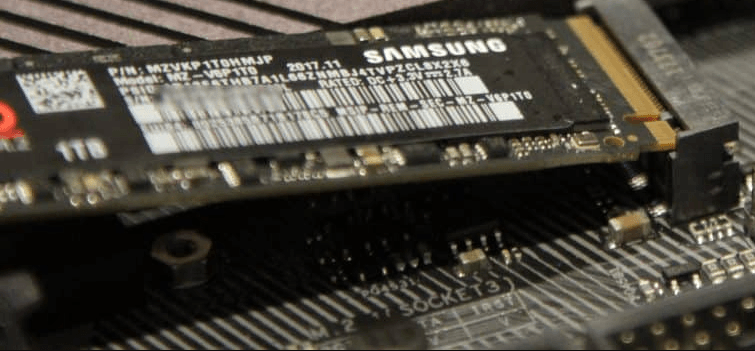
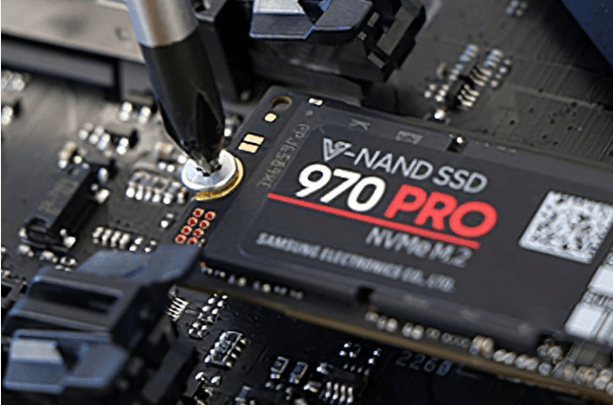
- Push from the back, then down. The SSD is securely fastened to the motherboard using a standoff mount screw, ensuring it is flush with the motherboard. The screw is then tightened to keep the SSD firmly in place.
4. Initialize NVMe SSD in Disk Management.
- To open Disk Management, press the Windows key + R to open the Run window, then type diskmgmt.msc and press Enter.
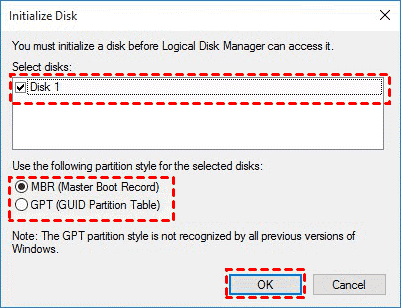
- Right-click the Samsung NVMe SSD and select Initialize Disk.
- Select the disk number (eg: Disk 1) and partition style (MBR/GPT) and click OK.
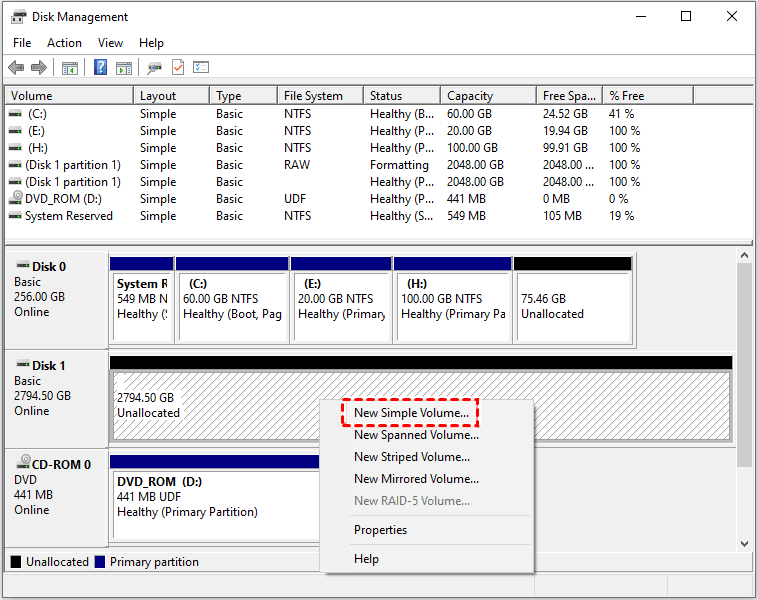
- Right-click the SSD disk unallocated space and select New Simple Volume. Then, follow the on-screen instructions.
5. To clone a disk, download and install the powerful SSD cloning software Qiling Disk Master, which supports Windows 11, 10, 8, 7, XP, and Vista, or for server users, try Qiling Disk Masterer Server.
Steps to clone NVMe to NVMe Samsung in Windows 10 or 11
Step 1. Open Qiling Disk Master Professional, click Clone and Disk Clone in order.
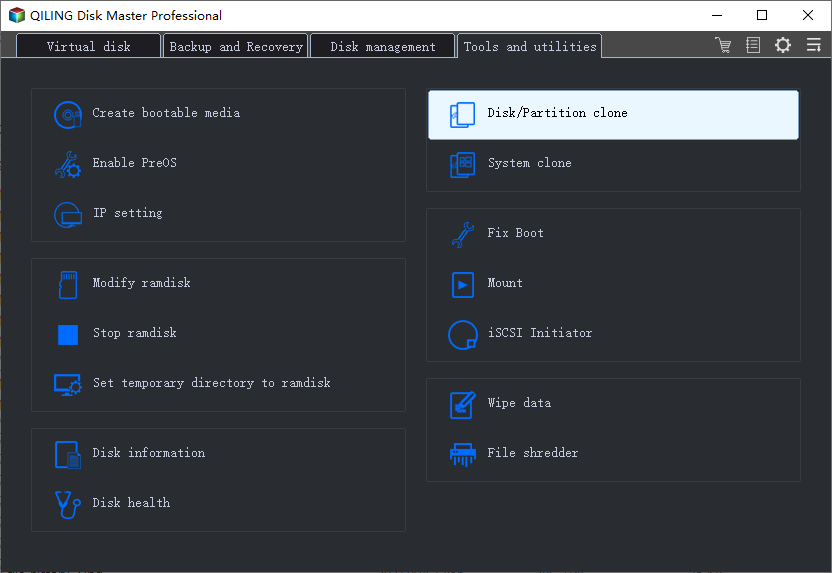
Note: The Professional version of the software supports cloning both system and data disks in Windows 11, 10, 8, 7, XP, and Vista, while the Standard edition is a free version that only clones data disks.
Step 2. Choose the old NVMe SSD as the source disk and click Next.
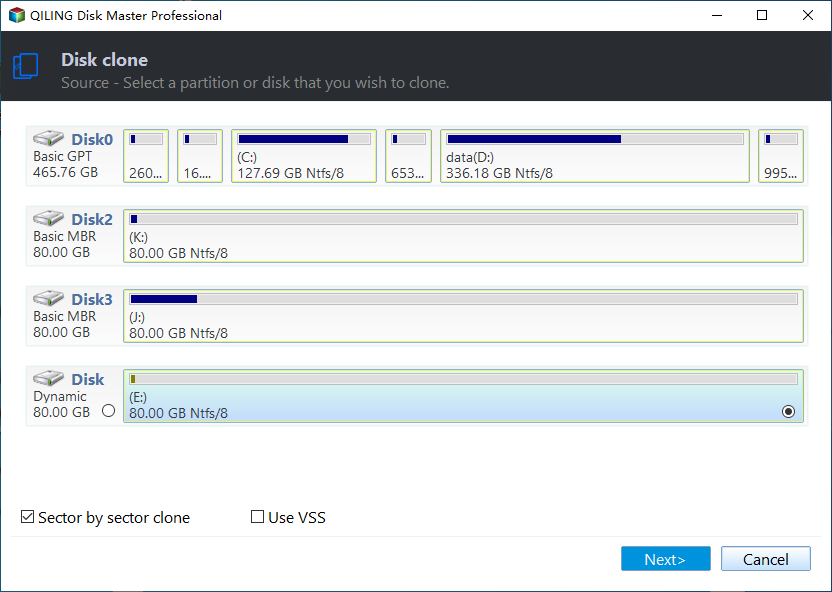
Step 3. Choose the larger Samsung NVMe SSD as the destination disk. Then, click Next.
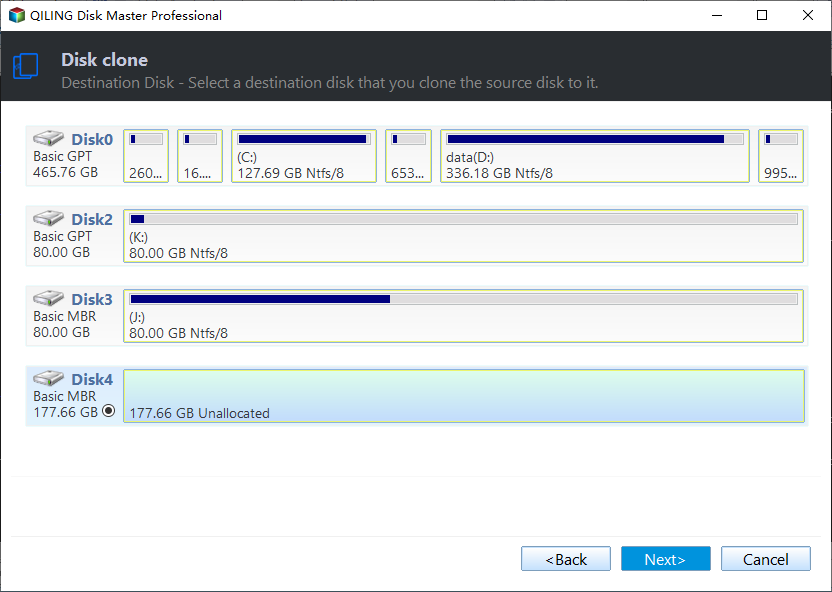
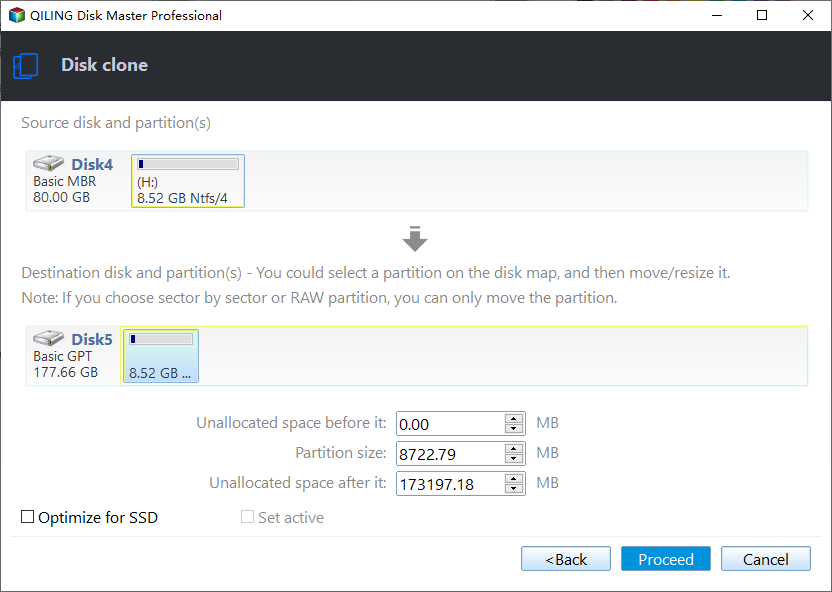
Step 4. To improve NVMe SSD disk performance, check SSD Alignment and click Edit Partitions to adjust partition size on the larger NVMe SSD. Then, click Proceed to clone the Samsung NVMe SSD to an NVMe SSD.
Notes:
- Edit Partitions: This feature provides three options: "Copy without resizing partition", "Add unused space to all partition", and "Adjust the partition size manually". Additionally, it may also display "Convert the destination disk from MBR to GPT" or vice versa.
- Sector By Sector Clone: This cloning mode clones all sectors of an SSD disk, taking a lot of time and space on the target disk, and is not suggested for use.
Summary
Cloning an NVMe drive to another NVMe drive, such as a Samsung model, can be easily done with powerful SSD cloning software like Qiling Disk Master Professional, ensuring high performance, but requires preparation and execution of the cloning process.
This software allows cloning of SATA, PCIe, and M.2 SSDs, including cloning a SATA drive to an NVMe drive, and supports various brands like Samsung, Crucial, WD, and Seagate.
Related Articles
- Guide | Clone NVMe SSD to New One Even with Single Slot
- How to Clone Windows 10, 11 to NVMe SSD (Step by Step Guide)
- 5 Steps to Clone M.2 PCIe (NVMe) SSD in Windows 11, 10, 8, 7
- Best Samsung M.2 SSD Migration Software for Windows 10/11
- Cloning 1TB HDD to 500GB SSD Samsung and Making It Bootable
- SSD Optimization Tips for Windows 10 You May Want to Know
Learn the key steps, checks, and practical tips for this related guide.
Products
Articles & Tutorials
- Data Recovery
- Data Backup
- File Recovery
- File Backup
- File synchronize
- System Backup and Restore
- Disk and Partition Clone
- Technical articles
- Disk Master Help
- Windows Deleted File and Disk Recovery Tutorials
- Windows File and Data Recovery Tutorials
- More Windows Tutorials for Install, Security, Files, and PC Tips
- Windows Boot, Repair, and Recovery Environment Tutorials
- Windows Backup Tutorials
- Windows Restore Tutorials
- Windows Clone and Migration Tutorials
- Windows Server Backup, Recovery, and Management Tutorials
- Windows Disk, Partition, and Storage Management Tutorials