Best WD Green Clone Software to Clone OS or Disk
Overview of WD Green SSDs
Western Digital's WD Green SSD is a low-power consumption drive from the company, which also produces a range of hard drives with color-coded names signifying their characteristics. The WD Green is designed for everyday light computing tasks, with slightly slower performance, while the WD Blue offers average performance for home use, and the WD Black is a cost-effective option with high performance.
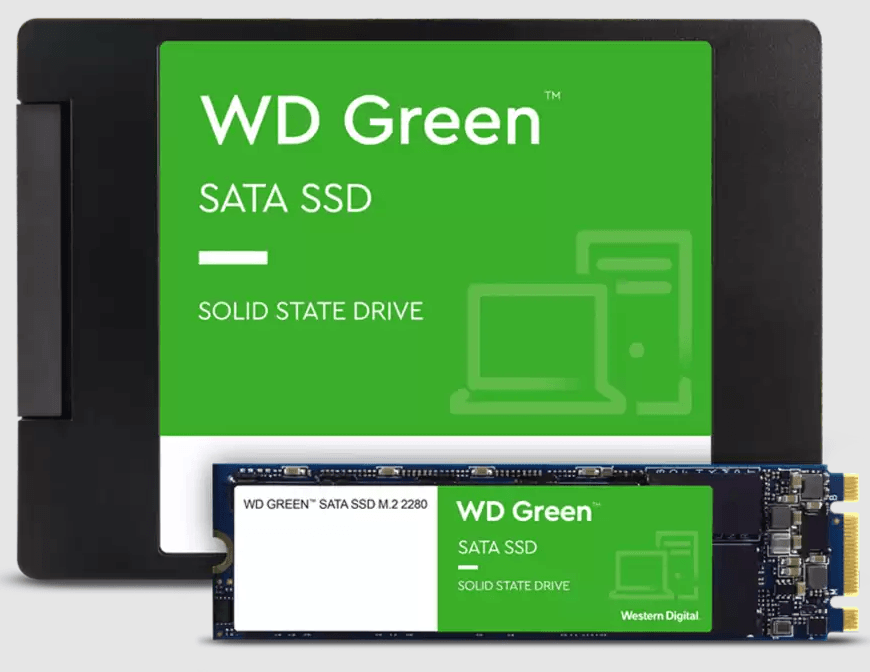
WD SSDs have earned a stellar reputation globally, making them a popular choice for storage among users. Many individuals currently use WD hard drives as their primary storage devices, and numerous others aspire to upgrade to WD SSDs, with WD Green clone software becoming essential for those already using WD hard drives or considering upgrading to a WD Green SSD.
Does Western Digital Have Cloning Software?
WD SSDs do not come with cloning software, so you'll need to use a separate program to clone your data. You can use a third-party cloning software like Qiling Disk Master to duplicate your data to the new WD SSD. These programs will guide you through the cloning process, ensuring that your data is transferred accurately and efficiently. You can also use the built-in Disk Utility on a Mac or the built-in Backup and Restore tool on a Windows PC to clone your data. Make sure to back up your data before starting the cloning process, and follow the on-screen instructions to complete the transfer.
If you need to clone a WD hard drive, you may consider using Acronis True Image WD Edition software, but be aware that it has some limitations.
► WD cloning software requires a WD hard drive to function, otherwise, the process will fail and display an error message stating that the product edition requires at least one Western Digital or SanDisk drive to be installed.
► You may still experience issues with Acronis True Image not cloning even if you connect a Western Digital hard drive or SSD to your computer, as the software may not be compatible with the device.
Cloning WD hard drives or SSDs can be hindered by certain problems, making the process troublesome. This article explores whether there are better WD Green SSD clone software options available to help overcome these issues.
Best WD Green Clone Software
Qiling Disk Master is the best Western Digital migration tool, offering clone options such as System Clone, Disk Clone, and Partition Clone.
This software is the best and most comprehensive disk cloning solution, allowing you to successfully copy a disk and ensure a secure boot. It is compatible with a wide range of Windows operating systems, including Windows 11, 10, 8, 7, XP, and Vista.
☁ Supports multiple SSD types and brands. It supports various types (SATA, NVMe, PCIe, M.2, U.2) and brands (WD, Integral, Samsung, Seagate, Intel, etc.).
☁ Intelligent clone. The software clones only used sectors by default, allowing for the cloning of a larger HDD to a smaller SSD without any issues. This also makes it possible to boot successfully from the cloned SSD. Furthermore, the Sector By Sector Clone option allows for the cloning of all sectors of a hard drive.
☁ SSD Alignment. This option utilizes 4k alignment technology to improve read and write speeds, and extend the lifespan of SSDs.
☁ For server users, you can use Qiling Disk Master Server, which supports Windows Server 2003, 2008, 2012, 2016, 2019, and all R2 versions.
Moving on, I will show you how to clone WD SSD with the best Western Digital cloning software on Windows 10/11.
How to Clone HDD/SSD to WD Green SSD Step by Step
To perform a Western Digital clone to SSD with just a few clicks, use Qiling Disk Master WD cloning software for Windows 10/11. Simply follow the software's instructions to clone your Western Digital hard drive to a solid-state drive (SSD), and once the cloning process is complete, you can successfully secure boot from the cloned SSD.
Critical tip: To ensure a smooth cloning process, it's recommended to back up any important data from the target WD Green SSD before proceeding, as the entire drive will be overwritten during the cloning process.
To connect the target WD Green SSD to the computer and ensure it can be detected, download Qiling Disk Master Professional.
Step 1. Run the WD Green clone software, and click Clone>Disk Clone.
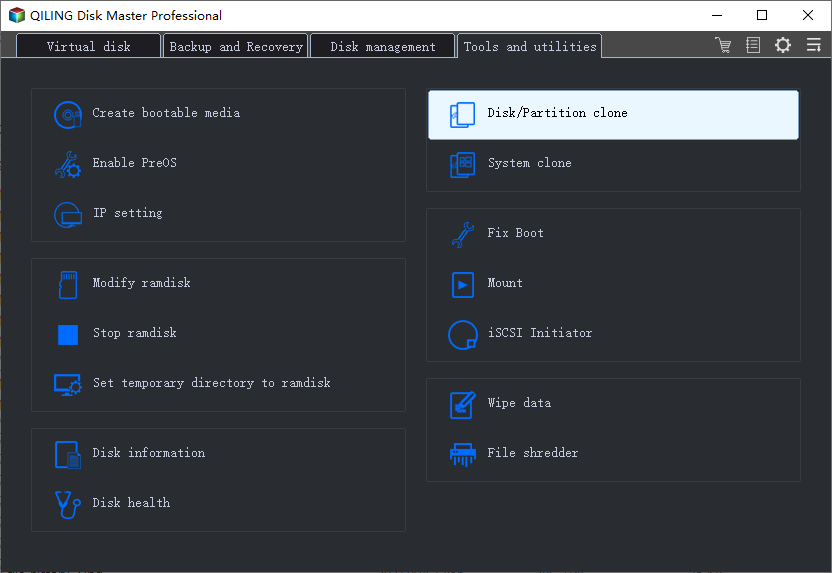
Notes:
ღ If you only want to clone your OS drive to a WD SSD, such as cloning Windows 10 to another hard drive, you can use the System Clone feature.
ღ Qiling Disk Master Standard is available for free to clone disk data.
ღ In the Professional edition, you can clone disks from one type to another, including MBR to MBR, MBR to GPT, GPT to GPT, and GPT to MBR.
Step 2. Select the HDD/SSD you want to clone as the source disk, and click Next.
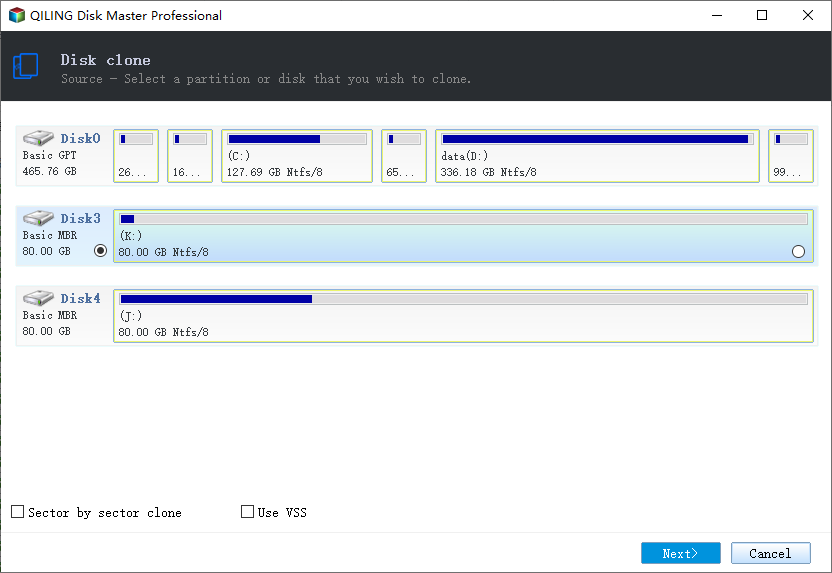
Step 3. Choose the WD Green SSD as the destination disk, and then click Next.
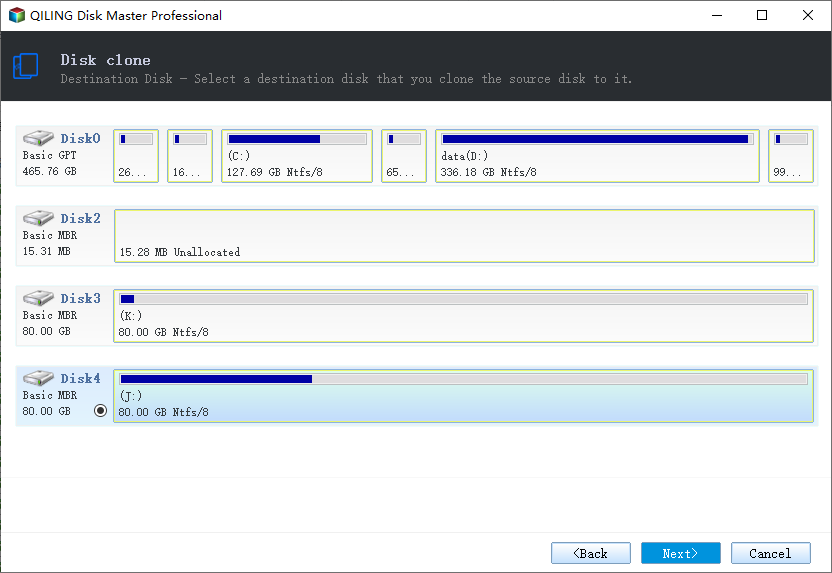
Step 4. To accelerate the reading and writing speed of your WD SSD, tick the SSD Alignment option and then click Proceed to clone your HDD/SSD to the WD Green SSD.
Edit Partitions: When cloning a smaller disk to a larger disk, it's recommended to check the option to fully utilize the storage space on the destination disk. This ensures that the entire capacity of the larger disk is used, making the most of the available storage.
The software will only clone the used sectors by default, but you can also clone all sectors on the disk if you check the box.
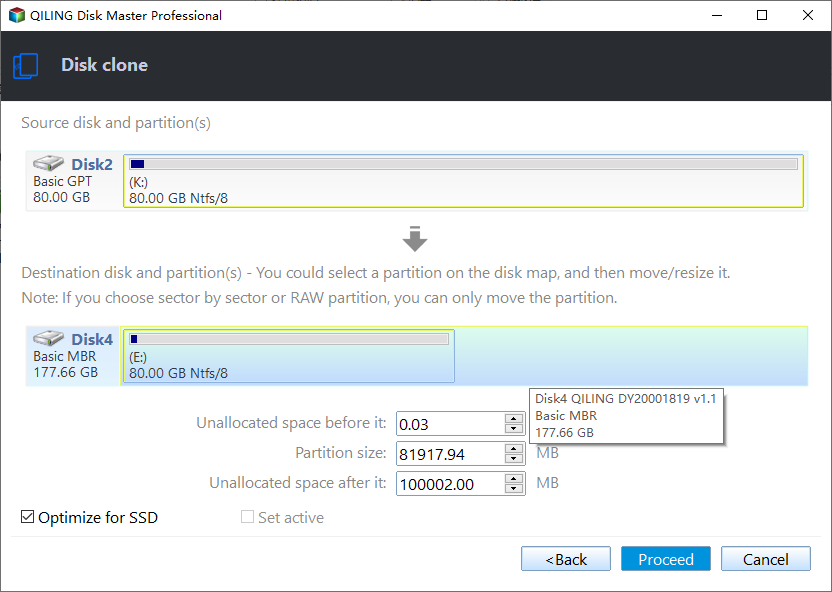
Tip: The steps for cloning a WD Green SSD can also be applied to cloning a HDD to a Kingston SSD, or cloning a HDD/SSD to an Integral SSD, or cloning a HDD to a Samsung SSD, and so on.
Secure boot from the cloned WD Green SSD
To make the newly cloned SSD bootable, follow these steps:
1. Restart your computer and press F2/F10/Del to enter the BIOS.
2. To set a new hard drive as the first boot option in BIOS, go to the Boot menu, and in the boot priority section, set the new hard drive as the first boot option.
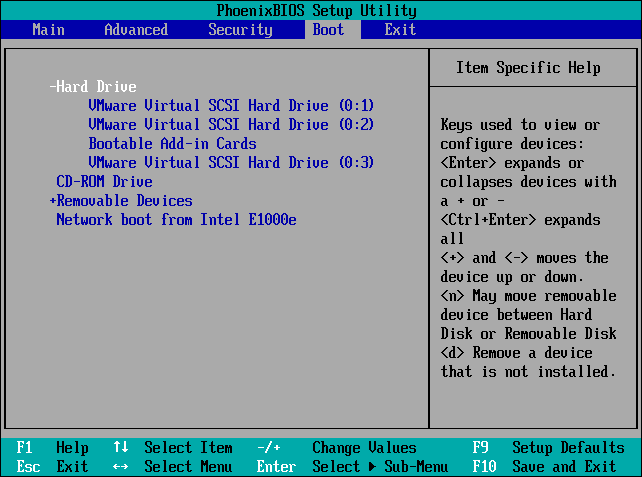
3. Press F10 to save all the changes and restart the computer.
WD Green Clone Software FAQs
#1. Does WD SSD come with cloning software?
WD hard drives do not usually come with cloning software, but you can use third-party cloning software like Qiling Disk Master to clone your WD hard drive.
#2. Is Acronis True Image for Western Digital free?
Acronis True Image is not free, but users can try it for 30 days before deciding whether to purchase a subscription or license.
Conclusion
Qiling Disk Master is a reliable WD Green clone software that can clone HDD/SSD to WD SSD, making it easy to upgrade or replace storage devices. By using this software, users can create an exact copy of their original drive, including all data, settings, and operating system, ensuring a seamless transition to the new SSD.
In addition to being a WD Green SSD migration tool, Qiling Disk Master also offers Backup, Restore, and Sync features. It allows you to sync your folders on Windows 11 based on your needs, making it a powerful and versatile tool. I strongly recommend trying it now.
Related Articles
- Free Western Digital Disk Cloning Software (Securely Boot)
In this article, you will find the best Western Digital (WD) disk cloning software to help you clone HDD to SSD easily and safely. The cloned drive will boot without any issues after cloning. - Best Western Digital SSD Migration Tool to Clone OS or Disk
This guide explains Best Western Digital SSD Migration Tool to Clone OS or Disk with clear steps, key checks, and practical tips. - Best Free Kingston Hard Drive Cloning Software
You can learn the best Kingston hard drive cloning software and how to clone HDD to Kingston SSD with secure boot. Please read on. - Best WD Blue SSD Transfer Software for Windows 11, 10, 8, 7
On this page, you will find the most reliable WD Blue SSD transfer software that can help you easily migrate the data or operating system on your computer or hard drive to WD SSD. And you can boot it successfully after data migration.
Products
Articles & Tutorials
- Data Recovery
- Data Backup
- File Recovery
- File Backup
- File synchronize
- System Backup and Restore
- Disk and Partition Clone
- Technical articles
- Disk Master Help
- Windows Deleted File and Disk Recovery Tutorials
- Windows File and Data Recovery Tutorials
- More Windows Tutorials for Install, Security, Files, and PC Tips
- Windows Boot, Repair, and Recovery Environment Tutorials
- Windows Backup Tutorials
- Windows Restore Tutorials
- Windows Clone and Migration Tutorials
- Windows Server Backup, Recovery, and Management Tutorials
- Windows Disk, Partition, and Storage Management Tutorials