How to Recover Deleted Photos from Canon PowerShot
Quick Navigation:
- How to Recover Deleted Canon PowerShot Photos
- Your Reliable Canon PowerShot Photo Recovery Tool
- Step-by-step to photo recovery for Canon PowerShot
I understand your concern. To retrieve deleted photos from your Canon PowerShot, you can try the following: Check if the camera's built-in recovery feature is enabled. Some Canon cameras have a built-in recovery mode that can restore deleted photos. If not, you can try using a third-party data recovery software specifically designed for camera memory cards. These software can scan the card and recover deleted photos.Canon PowerShot photo recovery. Please help.
Unfortunately, there's no "recently deleted" folder on a Canon PowerShot camera, making it difficult to recover accidentally or intentionally deleted photos and videos. However, there's still a workaround to recover deleted photos, even if there's no option provided by the device manufacturer.
How to Recover Deleted Canon PowerShot Photos
To recover deleted photos, you'll need a photo recovery tool, which you can find by searching online or trying a tool like Deep Data Recovery. When evaluating the effectiveness of a tool, ensure it can restore your deleted photos by checking its features and user reviews.
- The Canon photo recovery software should be run on a computer, not on the camera itself, to ensure compatibility and successful recovery.
- The tool supports Canon PowerShot and the SD card/TF card in the device, you can check for the information on the tool's official site.
- The Canon PowerShot uses the CR2 file format, which isn't supported by standard image viewers. However, you can use software like Adobe Lightroom, Canon's Digital Photo Professional (DPP), or free alternatives like IrfanView to view and edit CR2 files. If you're looking for a dedicated photo viewer that handles CR2 files, consider options like Canon's DPP, Adobe Lightroom, or Capture One.
If you're looking to recover deleted photos from a Canon PowerShot, I recommend using Deep Data Recovery. It meets all the requirements, allows free recovery of up to 200MB files, and is a reliable photo recovery software that can undelete and unformat photos from various storage devices.
Your Reliable Canon PowerShot Photo Recovery Tool
- It supports nearly all photo formats, including JPEG/JPG, PNG, GIF, BMP, CR2, CRW, DCS, DCR, KDC, and TIF.
- This tool supports most SD/CF card types, including Canon, Sandisk, MicroSD, Samsung, and Sony, among others.
- This software is fully compatible with Canon PowerShot camera picture recovery in Windows 11/10/7/8/XP/Vista/Server and Mac OS X 10.6 and later.
Step-by-step to photo recovery for Canon PowerShot
To recover deleted photos from a camera memory card with Deep Data Recovery, follow these steps: ... (please provide the rest of the content to complete the paragraph)..
- Install Deep Data Recovery on you PC
- Connect Canon PowerSHot with computer
- Select Pictures to Scan
- Select Camera card to extract data
- Preview and recover deleted photos from Canon PowerShot
To get the free trial version, click the download button and select the correct version for your computer's operating system, either macOS or Windows. There are separate versions for each, so make sure to choose the right one. Once downloaded, follow the built-in guide to install it on your computer, which is a straightforward and easy process similar to installing other software.
To transfer photos from a Canon PowerShot to a computer, use a digital cable to connect the camera directly to the computer, or remove the memory card from the camera and connect it to the computer via an e-card reader. This allows the computer to recognize the memory card as an external hard drive, ensuring that any data on the card is preserved and preventing accidental overwriting from the camera.
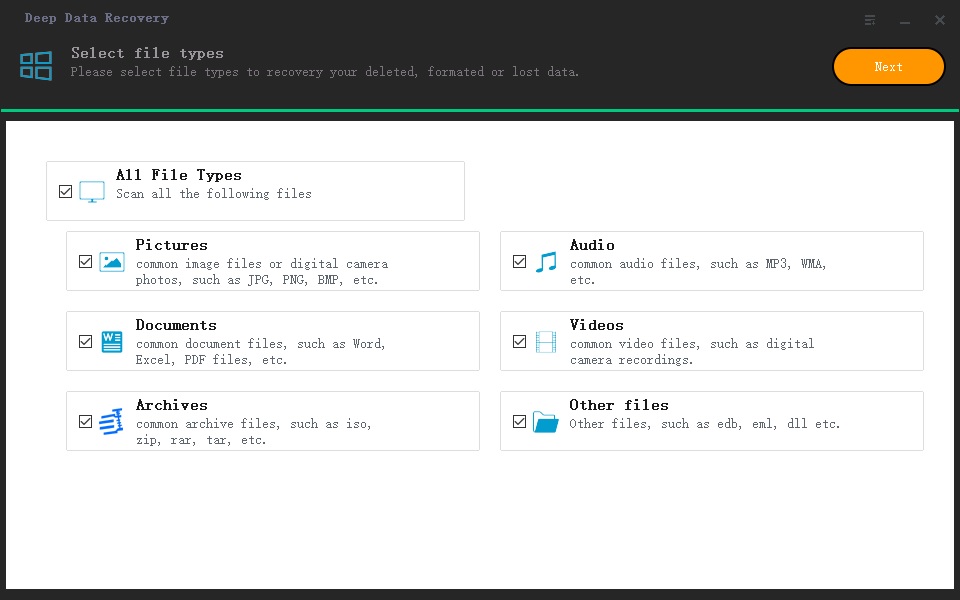
Run the photo recovery software for Canon PowerShot, and in the first window, uncheck all file types except "Pictures" to only scan for deleted images.
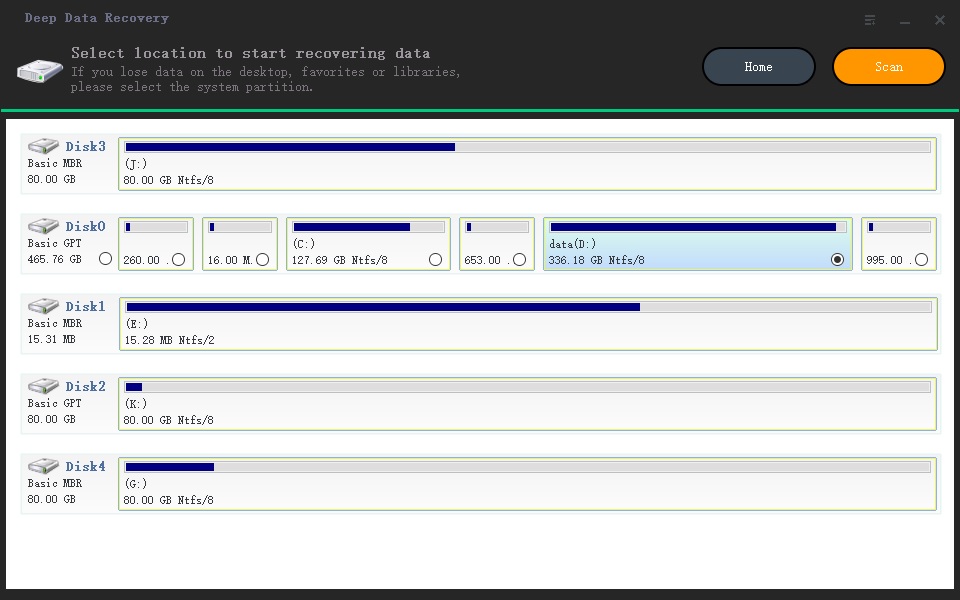
The software lists all partitions and external hard drives, allowing you to select the one related to your Canon PowerShot camera where photos were deleted or lost. Click the "Scan" button to initiate the recovery process and retrieve your deleted photos.
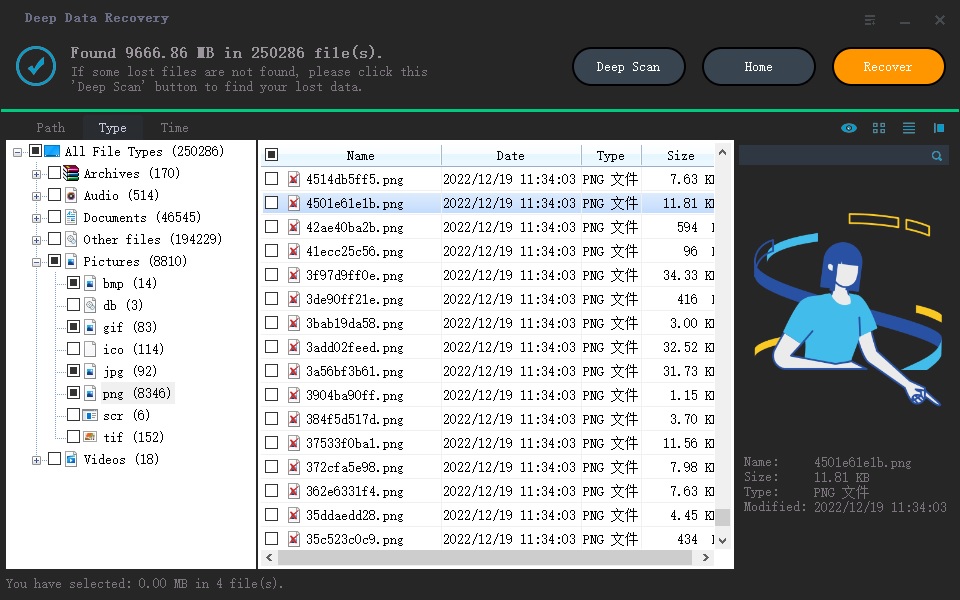
The scanning process on Canon PowerShot takes as long as the number of photos you have, so it's a good time to grab a cup of coffee while the software does its job. Once it's finished, you can preview the scanned photos, select the ones you want to recover, and click "Recover" to save them on your computer. To be safe, it's best not to save the recovered photos back to the Canon PowerShot, as it could risk losing them again.
Related Articles
- Recover Deleted Photos from Sony Cybershot Camera
- How to Recover Deleted Photos from Sandisk
- Sony Data Recovery Software: Recover Deleted Files from Sony SD Card
Learn how to Recover Deleted Photos from Sony Cybershot Camera How to Recover Deleted Photos from Sandisk Sony Data Recovery Software: Recover Deleted Files from Sony SD Card with clear steps, key checks, and practical tips. - 2023 Tips| How to Recover Files Deleted by McAfee
You can easily restore files deleted by McAfee antivirus software with Deep Data Recovery. And any deleted files by using antivirus programs like Norton and Avast can be restored with this powerful data recovery software. - How to Unformat Hard Drive on Windows 7 PC to Rescue Lost Data
If you're having trouble unformatting a hard drive on your Windows 7 PC, - this article is here to help. To unformat your hard drive and potentially rescue lost data, follow these steps. - How to Unformat Memory Card on Android Phone/Camera
If you want to unformat memory card on your Android device or camera and rescue the fromatted data, you need to follow the guide for recover data from formatted memory card.
Products
Articles & Tutorials
- Data Recovery
- Data Backup
- File Recovery
- File Backup
- File synchronize
- System Backup and Restore
- Disk and Partition Clone
- Technical articles
- Disk Master Help
- Windows Deleted File and Disk Recovery Tutorials
- Windows File and Data Recovery Tutorials
- More Windows Tutorials for Install, Security, Files, and PC Tips
- Windows Boot, Repair, and Recovery Environment Tutorials
- Windows Backup Tutorials
- Windows Restore Tutorials
- Windows Clone and Migration Tutorials
- Windows Server Backup, Recovery, and Management Tutorials
- Windows Disk, Partition, and Storage Management Tutorials