How to Recover Deleted Photos from Windows 8 Computer
Quick Navigation:
- The Different Scenarios to Recover Photos in Windows 8
- The Best Tool to Recover Deleted Pictures from Windows 8
- Your Safe & Effective Windows 8 Photo Recovery Software
- Step-by-Step Guide to Recover deleted photos from Windows 8
Losing photos from a computer can be devastating, whether it's due to accidental deletion, a formatted drive, a virus attack, or hard drive corruption. However, it's possible to recover deleted photos from a Windows 8 computer using a few simple steps, helping you get your cherished memories back without too much hassle.
If photos were permanently removed from a Windows PC, this permanently deleted photo recovery guide offers related recovery steps.
The Different Scenarios to Recover Photos in Windows 8
- If you mistakenly deleted images by using the delete button, you can still recover them by going to the Recycle Bin, selecting the images, right-clicking, and choosing the "Restore" option. This will restore the images to their original path. If you've cleared the Recycle Bin, you can still recover deleted files by using a data recovery tool or software.
- If there's a backup created on Windows 8, deleted pictures can be recovered by accessing the backup settings, but this would overwrite any files added after the last backup.
- If a user has already activated the backup and restore feature on Windows 8, the operating system will automatically back up data at scheduled intervals, allowing users to store these backups externally for added safety. In the event of accidental photo deletion, users can retrieve a recent backup file and restore the deleted images.
The Best Tool to Recover Deleted Pictures from Windows 8
With the advancement in technology, it is now possible to recover deleted images from a Windows 8 computer in a few simple clicks. The Deep Data Recovery tool is the best option to get back every single image, making it easy to recover lost pictures. This tool can help in recovering all the pictures efficiently, providing a solution to the common worry of losing valuable images.
The best photo recovery tool for Windows 8 is efficient, fast, and accurate in searching for lost photos and recovering them efficiently. Its robust algorithm scans the drive sector-by-sector, helping users retrieve as much data as possible. The recovery process is a three-step procedure: selecting the file location, scanning, and recovering the needed data. This tool can identify all file formats and storage units, making it useful for recovering not only Windows PC data but also deleted photos on Mac.
Your Safe & Effective Windows 8 Photo Recovery Software
- You can retrieve pictures lost due to various reasons such as deleting them, emptying the recycle bin, using 'Shift+Del', formatting the built-in hard disk, or losing them from an external drive.
- You can recover deleted photos from various devices, including laptops, PCs, USB drives, pen drives, SSDs, memory cards, digital cameras, and more, by using specialized software or tools that can scan and retrieve lost files.
- Easy-Use data recovery software to recover lost files from Windows and macOS devices, allowing you to preview various graphic types before recovery.
Step-by-Step Guide to Recover deleted photos from Windows 8
To restore pictures from Windows 8 or recover deleted files in Windows 8, follow these steps:
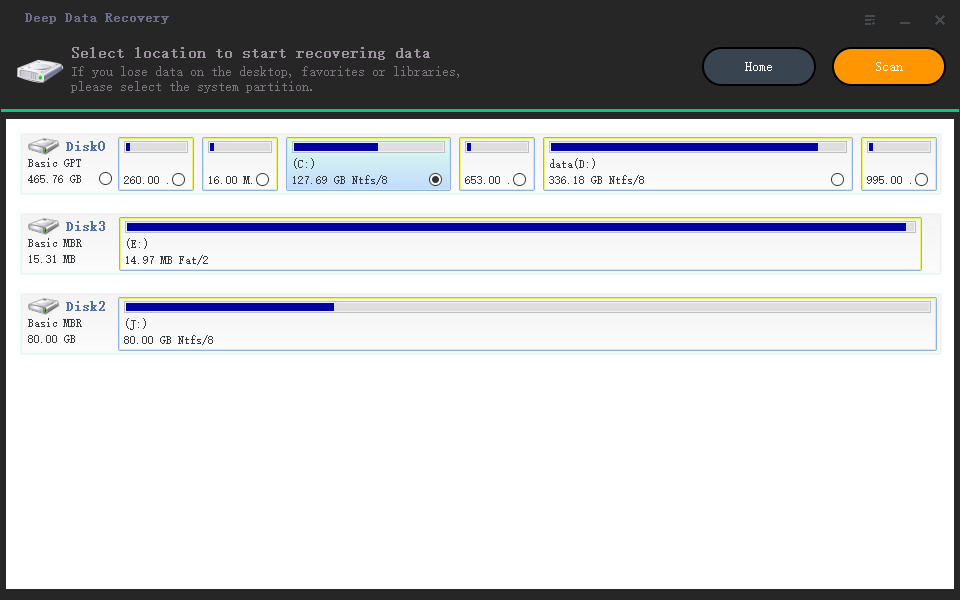
1. Launch the data recovery software, select the preferred drive, and press the "Scan" button to initiate the scan process.
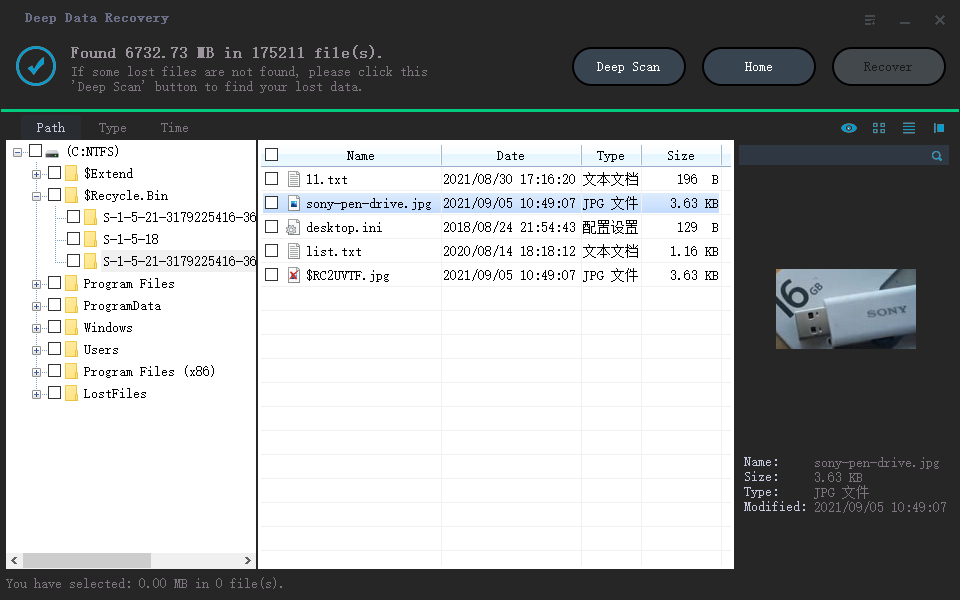
2. After completing the scan, the program will display all recoverable image files from the selected path or location, allowing you to see thumbnails or previews of the images. You can then select the files you want to recover, and after finishing the selection, click the "Recover" button to get the images back. You can choose a path and folder to save the files, and if you think there are more pictures, selecting "Deep Scan" is preferable, although this process is time-consuming and requires a longer wait time.
Taking a backup is crucial, as it protects against unexpected hard drive malfunctions or virus attacks. To recover permanently deleted photos in Windows 8.1, follow the above procedure. Additionally, creating a backup is essential, and you can use a tool like Qiling Disk Master to do so.
Qiling Backup is an excellent program that allows users to create backups of entire systems, partitions, or disks efficiently. It's fast, reliable, and enables the creation of backups for external hard drives and USB drives. The program offers both manual and automatic options, making it user-friendly. Its unique features make the backup process easier and more efficient, catering to the needs of users who want a hassle-free experience.
- You can create an individual file backup by selecting a folder or specific file formats, and it supports backing up all file formats to external devices like USB drives, external hard drives, and more.
- Cloning an existing drive can be a lifesaver when dealing with critical data, and a reliable cloning tool can help with this process. It ensures a secure and safe operation, without causing any harm to the original drive.
- One can create an entire system image backup of the OS drive or a partition, which helps when the need arises. This backup can be used to restore the system to its previous state in case of any issues or failures.
Related Articles
- Recover Deleted Photos from Sony Cybershot Camera
- Recover Deleted Photos from Sandisk
- How to Recover Deleted Photos on Canon Camera
- How to Recover Deleted Files After Windows 10 Updates [Fast and Safe]
Learn how to Recover Deleted Photos from Sony Cybershot Camera Recover Deleted Photos from Sandisk How to Recover Deleted Photos on Canon Camera How to Recover Deleted Files After Windows 10 Updates with clear steps, key checks, and practical tips. - Hard Disk Rescue Software - How to Rescue Files from Hard Drive
If you delete files from your driver or format your hard drive, you may permanently lose your data. However, you can rely on Qiling's hard drive rescue software to help you rescue files from your hard drive. - 4 Ways to Recover Data from Damaged/Corrupted Hard Drive [2023]
If your hard drive is damaged or corrupted, it's essential to identify the issue first.
Products
Articles & Tutorials
- Data Recovery
- Data Backup
- File Recovery
- File Backup
- File synchronize
- System Backup and Restore
- Disk and Partition Clone
- Technical articles
- Disk Master Help
- Windows Deleted File and Disk Recovery Tutorials
- Windows File and Data Recovery Tutorials
- More Windows Tutorials for Install, Security, Files, and PC Tips
- Windows Boot, Repair, and Recovery Environment Tutorials
- Windows Backup Tutorials
- Windows Restore Tutorials
- Windows Clone and Migration Tutorials
- Windows Server Backup, Recovery, and Management Tutorials
- Windows Disk, Partition, and Storage Management Tutorials