Fix MBR Server 2008 (R2) Step by Step
Corrupted MBR in Windows Server 2008
The Master Boot Record (MBR) is a critical part of a partitioned disk, located at the very beginning. It contains the partition table, which defines the layout of the disk, and a small executable code for the boot process to start. This code is responsible for loading the operating system's boot sector.
If the MBR of the hard drive that Windows Server 2008 installed is corrupted, causing the operating system to become unbootable, you can fix the MBR by creating a bootable Windows Server 2008 installation media, booting from it, and running the built-in command-line tool "bootrec" to repair or rebuild the MBR. This process can be completed in a few steps, including booting from the installation media, selecting the command prompt option, and running the bootrec commands to repair or rebuild the MBR. This will restore the operating system's ability to boot normally.
Repair MBR in Server 2008 with installation CD/DVD
You can repair a corrupted Master Boot Record (MBR) from the Command Prompt when you have the installation CD/DVD. To do this, follow these steps: boot from the installation CD/DVD, select your language and other preferences, and click Next. Then, click on "Repair Your Computer" and select the operating system you want to repair.
1. To install Windows Server 2008, insert the installation CD/DVD into the computer and set the boot order to prioritize the CD/DVD drive over the hard drive. This allows the computer to boot from the installation media and initiate the installation process.
2. At the Windows Setup window, set the desired settings and click "Next".
3. Go to Repair your Computer > Troubleshoot > Command Prompt.
4. In the Command Prompt interface, run the following commands:
▪ bootrec /fixmbr
▪ bootrec /fixboot
▪ bootrec /rebuildbcd
5. Once you've fixed the corrupted MBR, remove the installation CD/DVD and boot from the repaired hard drive.
Rebuild MBR in Server 2008 without installation CD/DVD
If you are unable to access your Server 2008 installation media, you can use a reliable MBR repair tool like Qiling Disk Master Server to fix the Master Boot Record (MBR) and create bootable media, allowing you to repair the MBR even if your machine is unbootable.
Stage 1 – Make a bootable media on a working machine
1. Insert a USB flash drive or CD/DVD containing Qiling Disk Master Server into a working machine and follow the installation instructions to set it up.
☞ PS.: You can download the demo version of Qiling Disk Master Server to have a try!
2. Run the MBR repair tool. Click "Tools" on the top navigation pane in the main interface, and select the "Make Bootable Media" option. Follow the instructions to complete the operation.
Stage 2 – Boot from the bootable media created via Qiling Disk Master
1. Connect the bootable media to the machine that is not bootable, then remove the bootable media from the working machine.
2. To complete the installation, boot your system from the created bootable device. This can be done by accessing the BIOS settings and changing the boot order to prioritize the USB drive or CD/DVD that contains the installation media.
Stage 3 – Rebuild MBR for Windows Server 2008
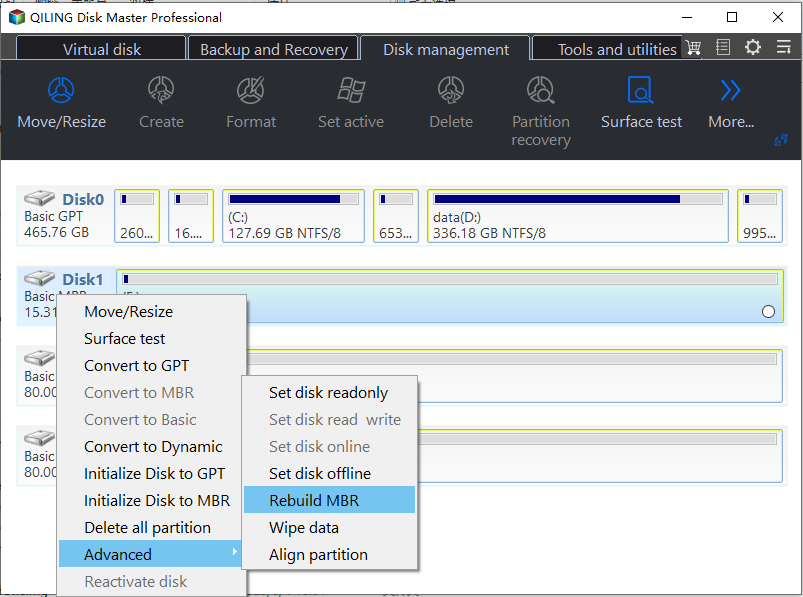
1. To repair a disk in Qiling Disk Master Server, select the disk that needs repair and choose "Rebuild MBR" from the right pane in the main interface.
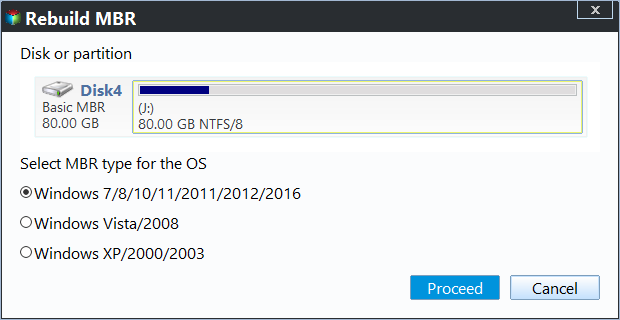
2. In the pop-up window, select the type of MBR for the current operating system, such as Windows Vista/2008.
3. You'll return to the main interface. Click Proceed to perform the operation.
Notes:
▪ This method can be used to fix MBR in various Server versions, including 2003, 2008 (R2), 2012 (R2), 2016, and 2019. However, you should select the type of MBR that corresponds to your specific server version.
▪ Rebuilding the Master Boot Record (MBR) can resolve issues like corruption of the MBR code, but it cannot fix problems related to bootable files or system file loss.
Conclusion
If Windows Server 2008 is not booting, you can fix the issue by repairing the Master Boot Record (MBR). To do this, you can use various methods, such as reinstalling the OS or restoring your Server to a normal state if you have a backup. If the problem is caused by a corrupted MBR, this should resolve the boot failure. However, if the issue is not related to the MBR, you can try other solutions.
Qiling Disk Master is a tool that goes beyond just repairing MBR, offering various features to help resolve multiple issues. One such feature is Migrate OS to SSD, which enables the cloning of Windows Server 2008 to an SSD, allowing for an upgrade to SSD without reinstalling the OS.
To save money, companies can install Qiling Disk Master on an unlimited number of computers using the Unlimited or Technician version, which also offers features like creating a portable version for technicians to provide billable services.
Related Articles
- Repair "BOOTMGR is missing" in Windows 2008 R2 from DVD Easily
Learn what causes the "BOOTMGR is missing" error in Windows Server 2008 R2 and how to repair it via different methods including Command Prompt and third-party tools. - How to Repair Windows Server 2008 R2 using Command Prompt?
Learn how to Repair Windows Server 2008 R2 using Command Prompt with clear steps, key checks, and practical tips. - Windows Server 2019 Legacy Boot: Install & Change Boot Mode
This article provides a guide on how to enable Windows Server 2019 legacy boot and switch from Legacy to UEFI mode, as well as a simple method to create a bootable Server 2019 media. - Backup Windows Server 2022 to USB Drive in 3 Steps
To protect your Windows Server 2022, it's essential to back it up to a USB drive, and this article will guide you through the process step by step. - Freeware to Format exFAT to FAT32 in Windows 7,8,10
Format exFAT to FAT32 in Windows 7 using Command Prompt, Disk Management, or free software. Learn the step-by-step guide to convert exFAT to FAT32 without losing data. - Quick Fixes: Format Micro SD Card from RAW to FAT32 in Windows 10/8/7
If you want to format Micro SD card from RAW to FAT32, here we list two methods to help you successfully format Micro SD card from RAW to FAT32 in Windows 10/8/7.
Products
Articles & Tutorials
- Data Recovery
- Data Backup
- File Recovery
- File Backup
- File synchronize
- System Backup and Restore
- Disk and Partition Clone
- Technical articles
- Disk Master Help
- Windows Deleted File and Disk Recovery Tutorials
- Windows File and Data Recovery Tutorials
- More Windows Tutorials for Install, Security, Files, and PC Tips
- Windows Boot, Repair, and Recovery Environment Tutorials
- Windows Backup Tutorials
- Windows Restore Tutorials
- Windows Clone and Migration Tutorials
- Windows Server Backup, Recovery, and Management Tutorials
- Windows Disk, Partition, and Storage Management Tutorials