Convert Primary Partition to Logical in Windows 7 with Ease
- What are a primary partition and a logical partition?
- Why need to convert primary partition to logical in Windows 7?
- How to convert primary partition to logical in Windows 7 with ease?
- Method 1: convert primary partition to logical using Diskpart
- Method 2: convert primary partition to logical via a specialized tool
- Summary
What are a primary partition and a logical partition?
A primary partition is a type of partition on a hard drive that can be directly accessed by the computer's BIOS. There are four primary partitions allowed per disk, and if all four are used, additional partitions can be created as logical partitions, which are secondary partitions that can't be bootable. Logical partitions rely on a primary partition to function.
◈ Primary Partition
A primary partition is a disk partition where both Windows OS and other data can be stored, with a maximum of 4 on MBR disks and 128 on GPT disks, but only one can be set active for system boot.
◈ Logical Partition
After creating 3 primary partitions in an MBR disk, the rest of the storage space can be used as an extended partition. This extended partition can be divided into multiple logical partitions, which can store data. However, an extended partition itself cannot be used to store data. It's a container for the logical partitions.
A primary partition is used for installing Windows and can be set active for booting, while a logical partition is mainly used for storing data and cannot be set active.
Why need to convert primary partition to logical in Windows 7?
MBR disks have a limitation of only four primary partitions, but users can convert a primary partition to an extended partition to create additional logical partitions as needed.
A logical partition is a storage medium that functions independently of the operating system and other partitions, and can be used to organize files by category, making it a convenient destination for file backup.
How to convert primary partition to logical in Windows 7 with ease?
In Windows 7, you can easily convert a primary partition to a logical partition using two effortless methods. Firstly, you can use the Disk Management utility to change the partition type from primary to logical.
Method 1: convert primary partition to logical using Diskpart
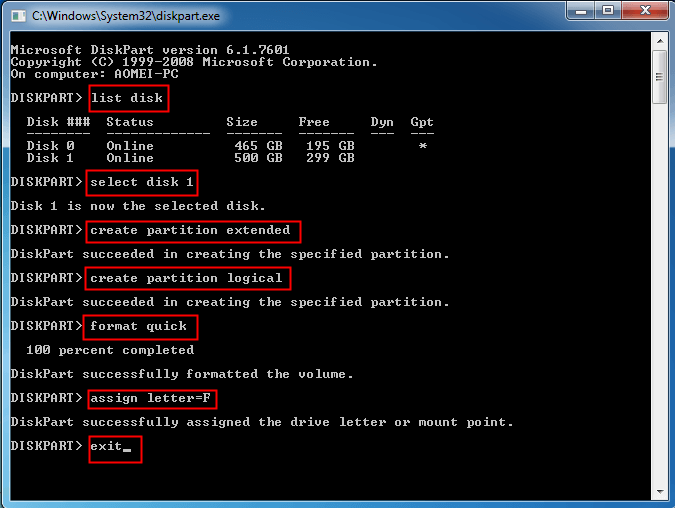
1. To run Diskpart as administrator, click the Start button and type "diskpart". Right click on the "diskpart" result and select "Run as administrator".
2. Type list disk and press Enter.
3. Select the disk number where you want to change the primary partition to a logical partition, and press Enter.
4. To create an extended partition using all the unallocated space on the disk, type create partition extended and press Enter.
5. To create a logical partition, type `create partition logical` and press Enter. This will utilize all the space on the extended partition.
6. format quick /Y to format the partition quickly and press Enter.
7. Type assign letter=# (ex: letter=F) to assign a drive letter and press Enter.
8. Type exit to exit Diskpart and press Enter.
Tips:
● If there's no unallocated space on the disk, you'll need to create some before creating an extended partition. This can be done by shrinking or deleting existing partitions, but be sure to make a backup of your current partitions first.
● If you don't want to use up the space to create an extended partition or a logical partition, you can use the command line to specify the size in MB for creating an extended partition or a logical partition in Steps 4 and 5.
Method 2: convert primary partition to logical via a specialized tool
To convert a primary partition to a logical partition directly via Diskpart, you cannot do so. Instead, you must first create an extended partition using the unallocated space, and then create logical partitions within the extended partition. This process can be complex and may result in data loss.
Fortunately, with Qiling Disk Master Professional, the process becomes much easier and the conversion won't damage your data! I'll show you how to convert primary partition to logical in Windows 7 with Qiling Disk Master in detail:
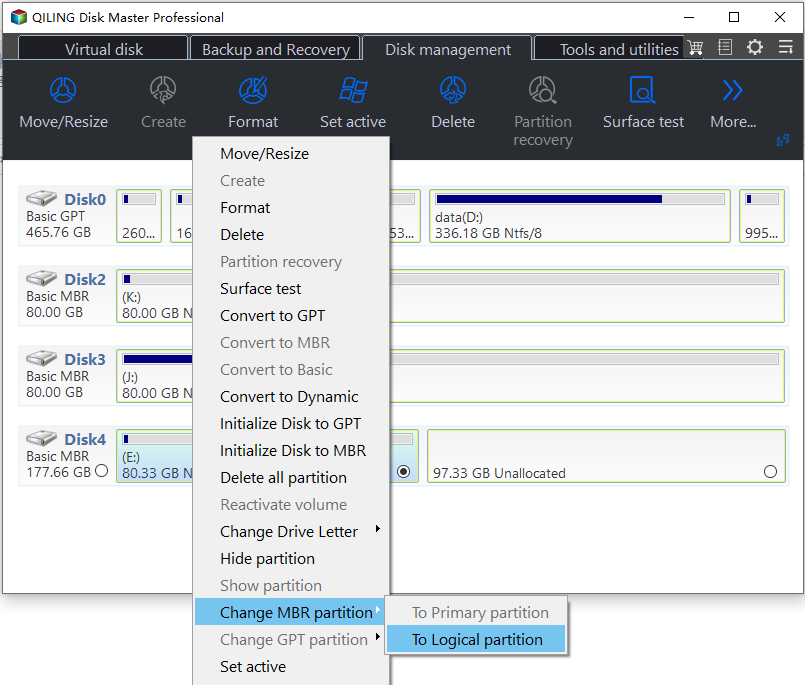
Step 1. Launch Qiling Disk Master. Right-click on the primary partition you want to convert and select "Advanced" > "Convert to Logical Partition".
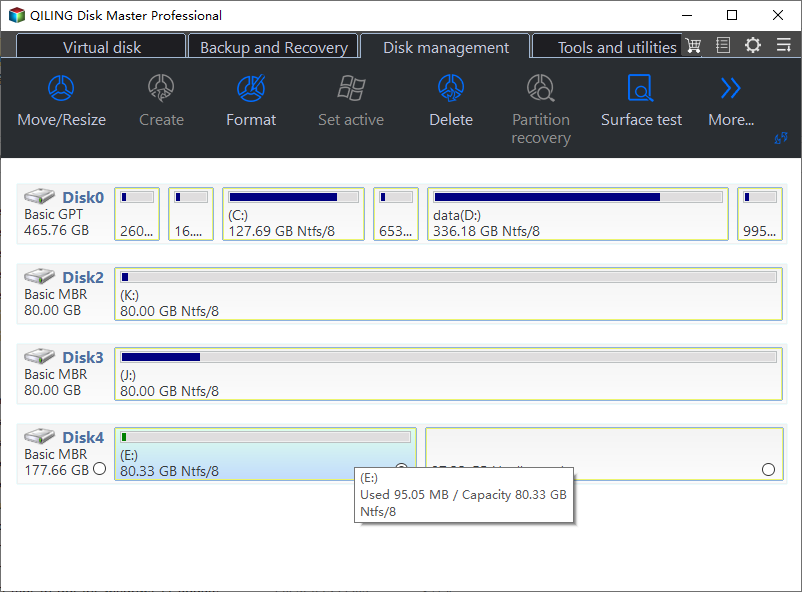
Step 2. Waiting for a memont, it will convert this partition to logical partition.
Tips
● You can't convert a boot partition to a logical partition. If you do, your computer may stop working.
● The conversion of a primary partition to a logical partition results in a 63 sector size difference, causing a slight change in the partition's location and size.
● If you want to create more than four primary partitions, you can convert the Master Boot Record (MBR) to a GUID Partition Table (GPT), which allows for more than four primary partitions.
Summary
When considering converting a primary partition to a logical one in Windows 7 or 10, you can try the two methods described above. Alternatively, you can use Qiling Disk Master, which not only allows you to change a primary partition to a logical one but also offers more advanced features such as fixing MBR2GPT validation failed error and formatting WD Elements for Mac. The Server edition of Qiling Disk Master is also available for use on Server computers.
Related Articles
- Fix Healthy Primary Partition RAW Problem with Top 3 Ways in Windows 7/8/10
If you find the healthy primary partition becomes RAW in Windows 11, 10, 8, 7, you can try the following methods to solve the Windows partition RAW problem successfully. - How Do I Merge Extended Partition to Primary Partition Simply and Quickly?
If you want to merge extended partition to primary partition and find no way, you can get an easy way to merge two or more partitions without data loss in this article. - GPT to MBR Converter Software - Free Download
While GPT is the new standard and is gradually replacing MBR, MBR is still the most compatible and is still necessary in some cases. If you are confused with GPT to MBR conversion, read this page patiently. - Solved: Conversion from FAT32 to NTFS is not available in Windows
Find practical guidance for Solved: Conversion from FAT32 to NTFS is not available in Windows, including disk, partition, file system, or Windows troubleshooting steps. - Are UEFI and GPT Required to Install Windows 11?
In this post, you'll learn whether UEFI and GPT are required for Windows 11 installation. Also, the ways to set boot mode as UEFI and to change disks from MBR to GPT will be introduced. - MBR or GPT, Which Is Better for 3TB Hard Drive?
To add more free space to your PC, you can set your 3TB hard drive to either MBR (Master Boot Record) or GPT (GUID Partition Table) mode, depending on your specific needs. This guide will walk you through the process to help you make an informed decision and set up your hard drive accordingly.
Products
Articles & Tutorials
- Data Recovery
- Data Backup
- File Recovery
- File Backup
- File synchronize
- System Backup and Restore
- Disk and Partition Clone
- Technical articles
- Disk Master Help
- Windows Deleted File and Disk Recovery Tutorials
- Windows File and Data Recovery Tutorials
- More Windows Tutorials for Install, Security, Files, and PC Tips
- Windows Boot, Repair, and Recovery Environment Tutorials
- Windows Backup Tutorials
- Windows Restore Tutorials
- Windows Clone and Migration Tutorials
- Windows Server Backup, Recovery, and Management Tutorials
- Windows Disk, Partition, and Storage Management Tutorials