Windows 7 Maximum Disk Size Problem | Fix It Right Now!
Content of this article:
If Windows 7 cannot use the full disk capacity because of partition style, this convert HDD to GPT guide provides a related fix.
What is Windows 7 maximum disk size?
To resolve the Windows 7 maximum disk size issue, you need to understand the basics of the problem. Firstly, Windows 7 has a built-in limitation that prevents it from formatting a disk larger than 32GB as a single primary partition. This limitation is due to the operating system's reliance on the Master Boot Record (MBR) format, which has a maximum partition size of 32GB.
Windows 7 maximum hard drive size
Windows 7 Backup and Restore may fail when backing up system images larger than 2.1 TB due to the operating system's maximum disk size limitation.
Microsoft only supports drives set to use 512 byte blocks for backups, and system bit information can also be an influencing factor.
In partition schemes, the number of bits in MBR is 32, while GPT disks have 64. This results in a maximum hard drive sector size of 2^32 or 2^64, leading to a maximum hard disk size of 2TB for MBR disks or 16TB, and 9.4EB for GPT disks.
Windows 7 maximum partition size
The maximum partition size for a FAT32 or NTFS partition is theoretically very large, but in practice, it's limited to 32GB by the built-in format tool in Windows 7/8/10, making it impossible to format a partition larger than 32GB as FAT32 or to convert an NTFS partition to FAT32 if it's larger than 32GB.
While FAT32 partitions are limited to 32GB, a professional tool like Qiling Disk Master Standard can create a single FAT32 partition larger than 32GB. In theory, NTFS partitions would be more suitable, as they have a larger size limit (64) compared to FAT32 (32). If the cluster number is sufficient, NTFS partitions can become very large.
If you're unable to extend an existing NTFS partition due to its current allocation unit size, you can change the cluster size to facilitate the extension. This process can be assisted by software.
How to break Windows 7 2TB limit size easily
Step 1. Download Qiling Disk Master Standard, install and enjoy it. Then, click the disk and select Convert to GPT disk.
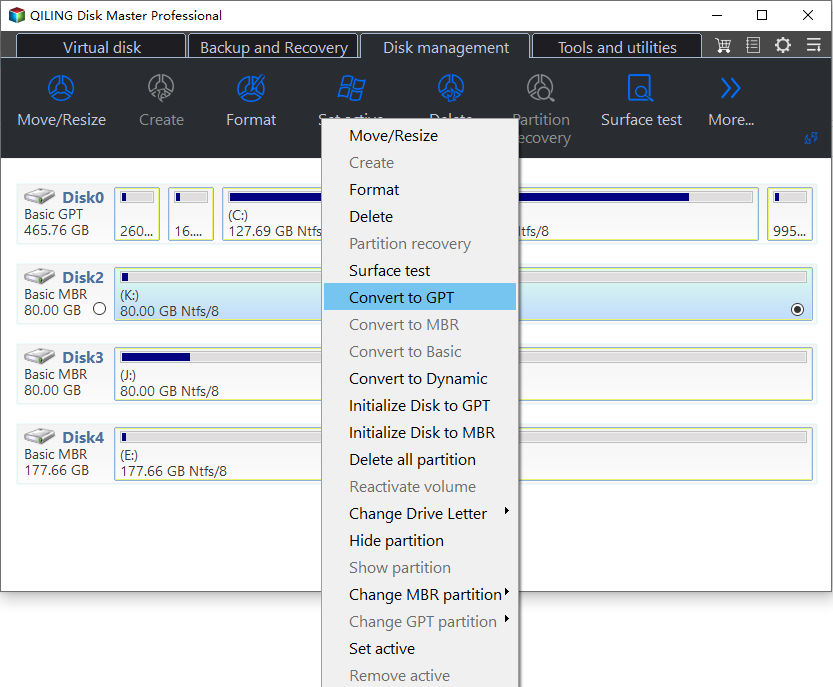
Then, waiting for a while to convert the disk.
Summary
If you're limited by Windows 7's maximum disk size or partition size, Qiling Disk Master can be a game-changer. This software offers a range of features, including merging partitions, resizing partitions, creating new partitions, changing cluster size, wiping disks, and even migrating your OS to an SSD. With so much to offer, it's definitely worth giving it a try!
Related Articles
- Best USB Formatter to Format 64GB Flash Drive to FAT32 in Windows
Two reliable FAT32 USB flash drive formatters can help you format USB stick (Sony Bravia, HP/Samsung/Kingston USB), pen drive, USB hard drive, SD card greater than 32GB to FAT32 in Windows 10/8/7. - Free FBackup Alternative You Need to Backup Windows 10/8/7
As the best free alternative to FBackup, Qiling Disk Master is easier to use and provides more features than FBackup. - Best Free File History Alternative for Windows 8/8.1/10
This guide explains Best Free File History Alternative for Windows 8/8.1/10 with clear steps, key checks, and practical tips. - Fix - The File Too Large for the Destination File System
If the file is too large for the destination file system, you can refer to a post for guidance on how to resolve the issue without formatting the system. - 2 Free Methods to Change Partition Size without Losing Data in Windows
Here, you can learn how to change partition size without losing data with Windows native tool and a free 3rd party partition manager in Windows 10/8/7. - How to Change Partition Type ID Easily? (2 Ways Included)
This tutorial demonstrates how to change partition type ID in two efficient solutions and tells basic information about partition type ID. -
MBR Maximum Disk Size
Understand the 2TB MBR limit and when GPT is needed for larger drives.
Products
Articles & Tutorials
- Data Recovery
- Data Backup
- File Recovery
- File Backup
- File synchronize
- System Backup and Restore
- Disk and Partition Clone
- Technical articles
- Disk Master Help
- Windows Deleted File and Disk Recovery Tutorials
- Windows File and Data Recovery Tutorials
- More Windows Tutorials for Install, Security, Files, and PC Tips
- Windows Boot, Repair, and Recovery Environment Tutorials
- Windows Backup Tutorials
- Windows Restore Tutorials
- Windows Clone and Migration Tutorials
- Windows Server Backup, Recovery, and Management Tutorials
- Windows Disk, Partition, and Storage Management Tutorials