DoD 5220.22-M Hard Drive Wipe: Detailed Guide
Quick Navigation:
- What is DoD wiping method (pros and cons)?
- Best DoD wipe tool for HDD/USB drive secure erase
- How to run DoD hard drive wipe in Windows 11/10/8/7 easily
- FAQs about DoD wipe
- Wrapping things up
What is DoD wiping method (pros and cons)?
DoD 5220.22-The DoD standard (DoD 5220.22-M) is a data sanitization method that involves overwriting hard disk drives (HDDs) with patterns of ones and zeros, as specified in a US Department of Defense document. This process has both advantages and disadvantages.
|
Pros |
Cons |
|
Provides security by overwriting data multiple times |
Insufficient for modern storage technologies like SSDs and flash-based media |
|
Helps comply with data protection regulations |
Time-The data can be stored in a database or a distributed file system, such as HDFS, which is designed to handle large amounts of data across a cluster of nodes. This approach allows for horizontal scaling, where the system can handle more data by adding more nodes, rather than relying on a single large storage device. |
|
Offers a standardized approach to data sanitization |
Excessive and unnecessary for non-sensitive or non-classified data |
Best DoD wipe tool for HDD/USB drive secure erase
To run DoD secure erase for a hard drive, you need a reliable disk wipe tool like Qiling Disk Master Professional, which offers features such as secure erase, partition management, and data recovery prevention, among others.
- It provides four wiping methods: Fill sectors with Zero, Fill sectors with random data, DoD 5220.22-M, and Gutmann, catering to different levels of secure erasure.
- It can help you wipe not only HDDs but also USB drives and SD cards.
- It allows you to create bootable media to perform a bootable disk wipe.
- All Windows PC operating systems are supported, including Windows 11/10/8.1/8/7/Vista/XP.
There are many DoD wipe software available for download on the internet. Some of the best ones include Blancco, KillDisk, and DBAN. These software can completely wipe a PC's hard drive, making it impossible to recover any data.
In the trial version, you can only preview the wiping process. To actually conduct the operation, you need to upgrade to the full version.
How to run DoD hard drive wipe in Windows 11/10/8/7 easily
Before wiping your hard drive using the Department of Defense (DoD) method, make sure to back up files that you still need, as data cannot be recovered after wiping. To proceed, follow these steps:
Step 1. If you're planning to wipe an external hard drive, make sure to connect it to your computer first. This will ensure that you can access and format the drive from your computer.
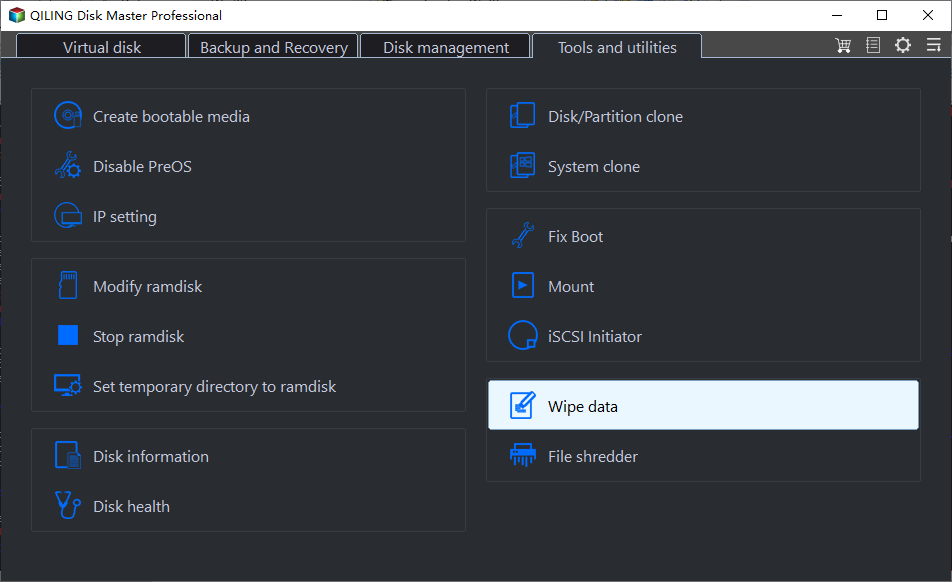
Step 2. Run Qiling Disk Master. Click Tools and choose Disk Wipe.
Step 3. On the Wiping Type page, choose Wipe Disk.
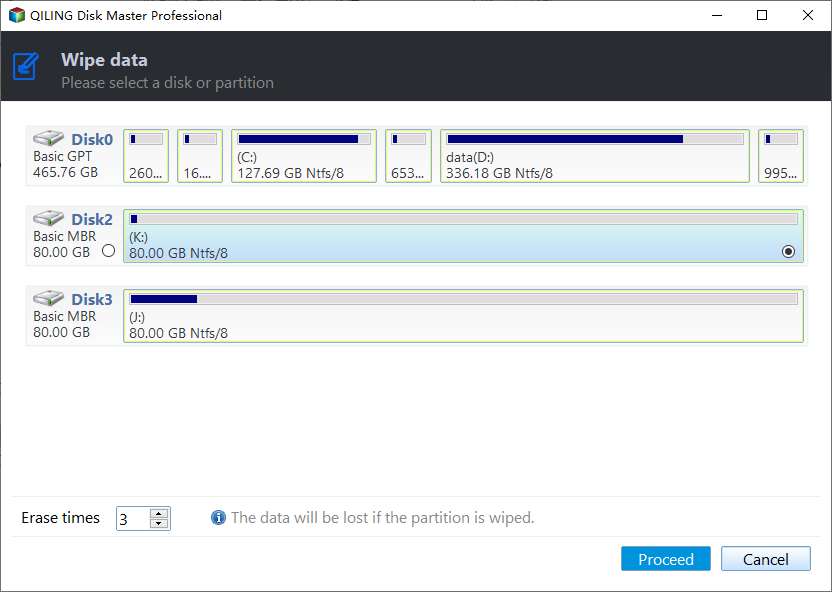
Step 4. Select the disk you want to wipe, and note that wiping the system disk will require a reboot.
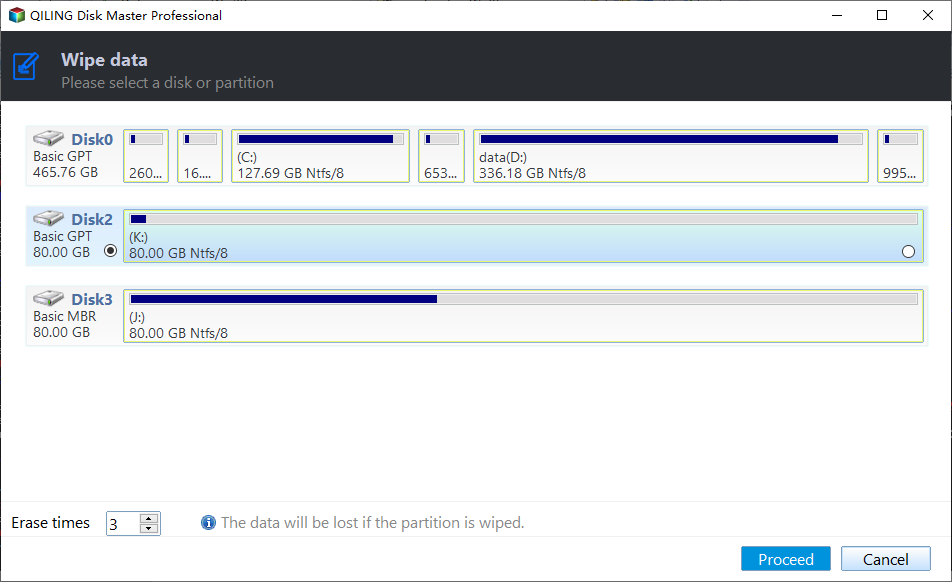
Step 5. To securely erase data, choose the desired wiping method, such as the Erase times option, and specify the number of erase times, which can be set to a maximum of 7 passes. Then, click Proceed to initiate the DoD secure erase process.
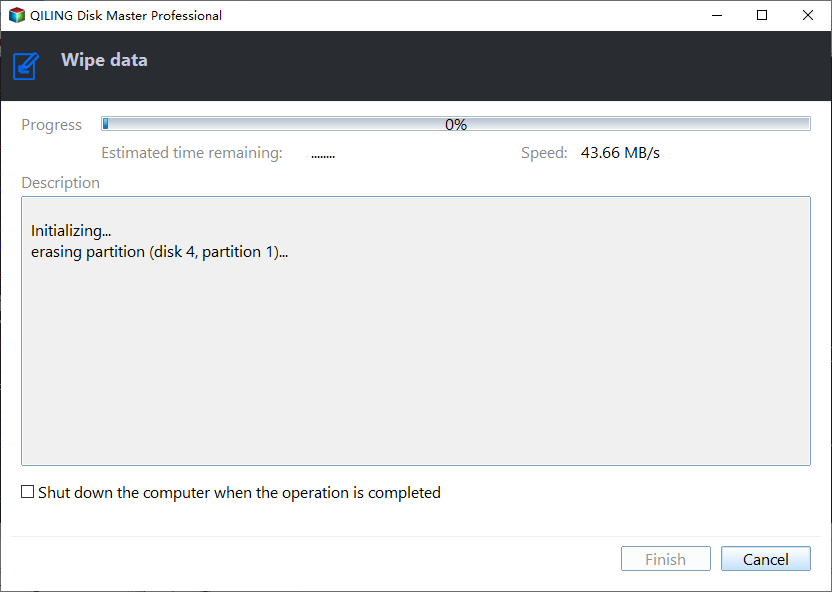
Tip: The wiping process can take several hours, depending on data and passes, so ensure your computer has enough power to complete it.
How to run DoD disk wipe on an unbootable PC
If your computer won't boot, you can create a bootable USB on another working computer, then use it to boot your own computer and perform a DoD hard drive wipe. To do this, follow these steps:
Step 1. Connect a USB drive to a working computer, download and install Qiling Disk Master, run it, click Tools and select Create Bootable Media to make a bootable USB drive.
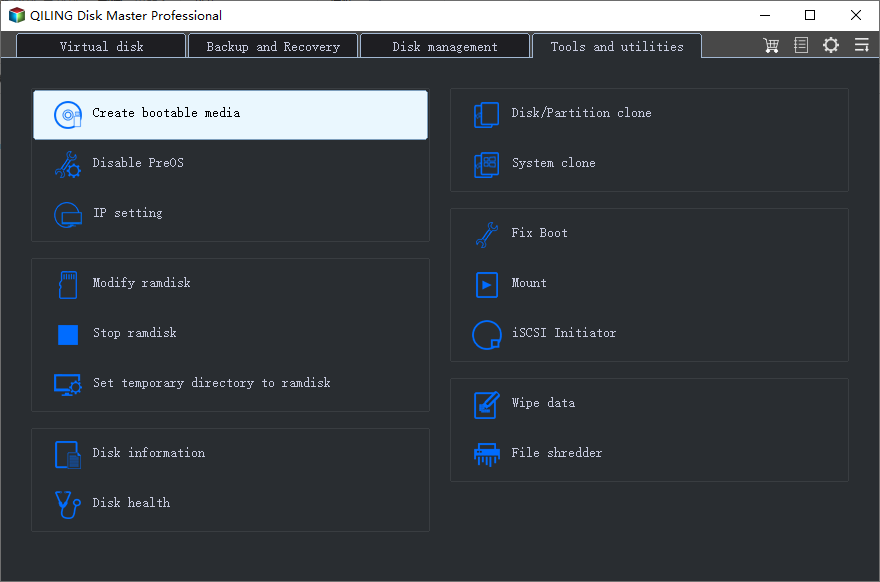
Step 2. To wipe out the hard drive, plug the bootable USB drive into the computer with the hard drive you want to erase. Then, enter the BIOS settings and set the USB drive as the first boot device, so the computer boots from it instead of the hard drive. This will allow you to access the operating system and tools on the USB drive to perform the wipe.
Step 3. Once your computer boots up, click on Tools and choose Disk Wipe. The rest of the steps remain the same.

FAQs about DoD wipe
▶ How many passes is a DoD wipe?
DoD standard is a 3-The wiping method involves three passes. The first pass overwrites all addressable locations on the hard drive with binary zeroes. The second pass overwrites the locations with binary ones.
DoD 5220.22-The National Industrial Security Program Operating Manual (NISPOM), DoD 5220.22-M, has an extended version called ECE, which is a 7-pass method.
▶ How long does a DoD wipe take?
It depends on your hard drive capacity and sometimes the interface type, which can greatly affect the wiping speed.
▶ Can data be recovered after a DoD wipe?
A DoD (Department of Defense) wipe of a hard drive will completely erase all data, making it impossible to recover any information using software or most hardware-based recovery methods. This is because the wipe will overwrite the drive's sectors with random data, rendering any remaining data unrecoverable.
▶ Can I wipe an SSD via DoD 5220.22-M?
Due to the different structures of an SSD and an HDD, you can't use DoD to wipe an SSD. If you want to delete all data on an SSD, learn how to erase an SSD securely instead.
Wrapping things up
You've learned about DoD 5220.22-M and how to perform a DoD hard drive wipe step by step. The process can be simplified with Qiling Disk Master, a professional disk wipe tool that makes disk wiping easy. Additionally, Qiling Disk Master is a superb disk clone software that can clone hard drives via Command Prompt, offering more features to explore.
Related Articles
- How to Reset Windows 10 PC and Keep My Files? (2 Methods)
- How to Reset or Refresh Windows 10 without Losing Programs?
- Custom Refresh Image in Windows 10 for Reset This PC
- How to Transfer Data from One Hard Drive to Another | Best Way
Learn the key steps, checks, and practical tips for this related guide. - Top 4 Ways to Restore Windows 11 Taskbar (Include 1 Tip)
Here, you will learn how to restore Windows 11 Taskbar with provided 4 fixes, and one best backup freeware is included. Read on to learn more detailed steps. - Settle Slow File Transfer in Windows 11 (7 Fixes and 1 Tip)
This article will show you 7 fixes to tackle slow file transfer in Windows 11, as well as a fast file transfer tool to increase your file transfer speed.
Products
Articles & Tutorials
- Data Recovery
- Data Backup
- File Recovery
- File Backup
- File synchronize
- System Backup and Restore
- Disk and Partition Clone
- Technical articles
- Disk Master Help
- Windows Deleted File and Disk Recovery Tutorials
- Windows File and Data Recovery Tutorials
- More Windows Tutorials for Install, Security, Files, and PC Tips
- Windows Boot, Repair, and Recovery Environment Tutorials
- Windows Backup Tutorials
- Windows Restore Tutorials
- Windows Clone and Migration Tutorials
- Windows Server Backup, Recovery, and Management Tutorials
- Windows Disk, Partition, and Storage Management Tutorials