Top 4 Ways to Backup Yahoo Mail to Computer
Why backup Yahoo Mail to PC?
Yahoo Mail allows users to send, receive, and manage emails online through a web browser or mobile app. To keep important Yahoo emails safe, create regular backups and save copies on your computer or another local storage device.
- Protect emails from account hacking or unauthorized access.
- Recover messages after accidental deletion.
- Keep access to important emails if your account is blocked or temporarily unavailable.
- Read saved messages offline when Yahoo Mail or your internet connection is unavailable.
You can save Yahoo emails to your computer in four ways. For individual emails, copy the message content or save the email as a PDF. For whole folders, add Yahoo Mail to Outlook and export to PST, or use email backup software.
To backup individual emails
👉 Way 1: Copy and paste Yahoo emails into a text editor
👉 Way 2: Save Yahoo mails as PDF
To backup email folders
👉 Way 3: Backup Yahoo mails with Outlook desktop app
👉 Way 4: Backup Yahoo emails via best email backup software
Way 1: Copy and paste Yahoo emails into a text editor
If you only need to save a few important Yahoo emails, you can copy the raw message content and save it as a local file.
1. To backup a Yahoo Mail email message, log in to your Yahoo Mail account and open the specific email message you want to backup.
2. At the top of the message window, click the three dots icon and select View raw message.
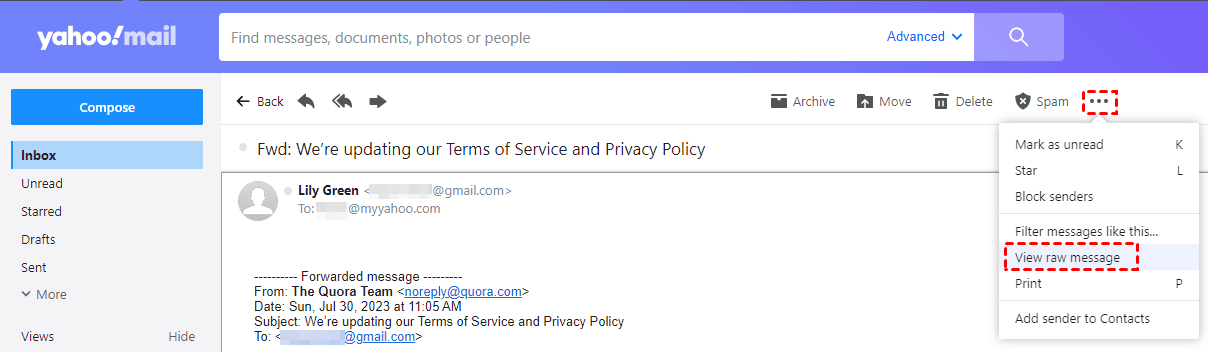
3. Press Ctrl + A to select all text and Ctrl + C to copy it.
4. Open a text editor on your computer, such as Word, Docs, Notepad, etc. Then, press Ctrl + V to paste all the content and Ctrl + S to save the file.
5. Close the file and change the file extension to .eml. You can then open it with your email client.
Way 2: Save Yahoo mails as PDF
To save Yahoo emails as PDF files, use the Print feature and select the "Save as PDF" option. This allows you to save emails as a portable document file, preserving the formatting and content of the email.
1. To back up an email message in Yahoo Mail, log in to your account and open the email message you want to save.
2. Click the three dots icon and select Print.
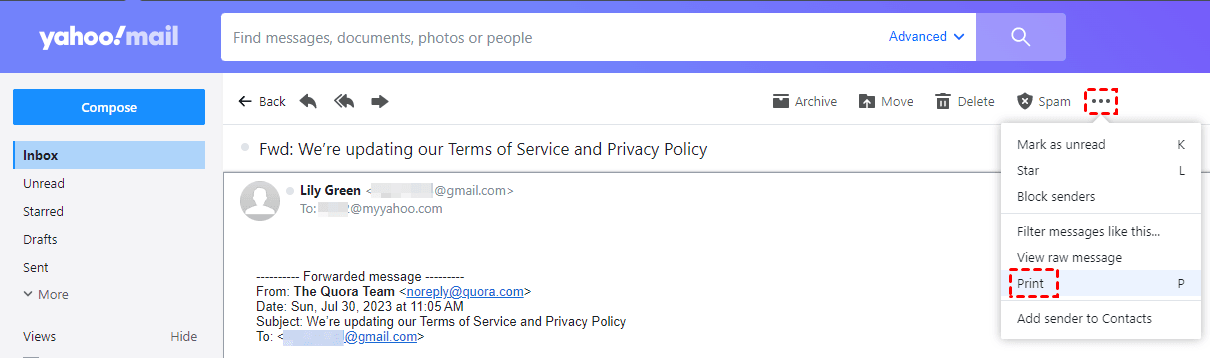
3. In the Print window, choose Save as PDF on the Destination column, then click on Save.
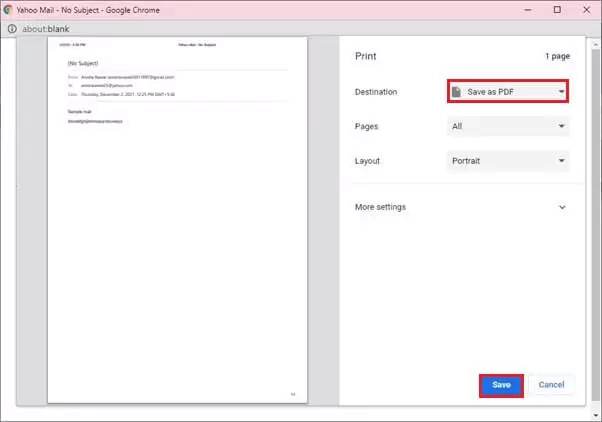
4. Choose a folder on your computer, name the PDF file, and click Save.
Way 3: Backup Yahoo mails with Outlook desktop app
Unfortunately, Yahoo Mail does not have an export feature, but you can use the Outlook desktop app to backup your Yahoo Mail to your hard drive.
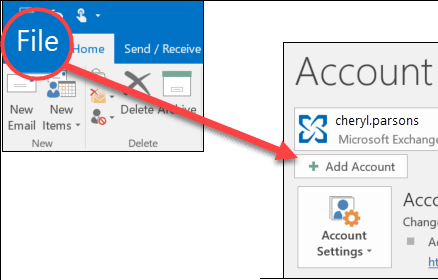
1. To add your Yahoo email to Outlook, launch the Outlook client and click "File" followed by "Add Account". Then, enter your Yahoo email credentials to add it to the Outlook client.
Note: If Outlook won't accept your password and you know you're using the right password, you may generate an app password for Outlook in Yahoo.
2. Click File > Open & Export > Import/Export in Outlook.
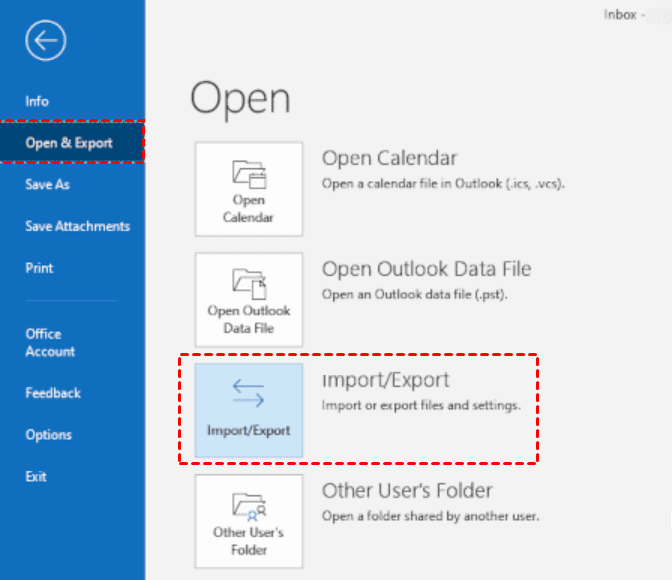
3. In the Import and Export Wizard, select Export to a file and click Next.
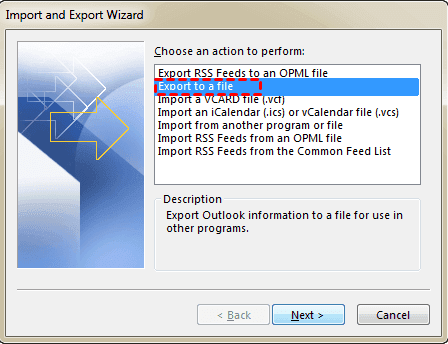
4. Select Outlook Data File (.pst), and click Next.
5. Check the specific Yahoo folder you wish to save and the subfolders within it, then click Next.
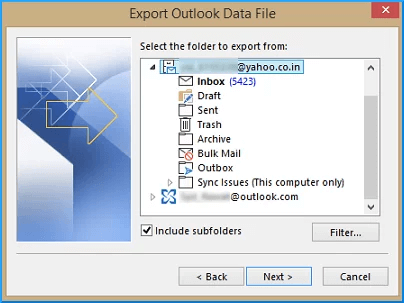
Note: You can't export from multiple folders at once. If you need to backup multiple folders, you'll have to export from each one individually.
6. To export the file, select the desired location by either clicking Next to use the default location or by clicking Browse to choose a different location. Once the location is selected, click the Finish button to complete the export process.
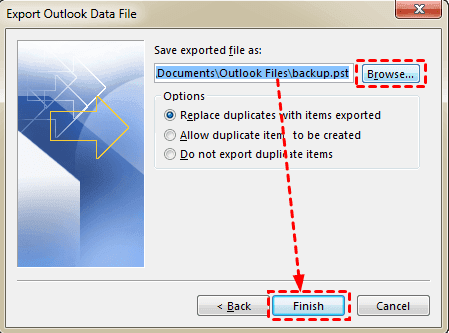
7. To protect sensitive files, enter and confirm a password, then click OK to start the export process, or leave the password field empty if you don't want to secure the files.
Way 4: Backup Yahoo emails via best email backup software
Besides the Outlook desktop app, Qiling Disk Master Professional, a top-rated email backup software, can also be a great help. It offers several useful features that can benefit you, including.
- This tool enables you to backup various mailboxes, including Zoho Mail, Gmail, Outlook Mail, Yahoo Mail, Hotmail, and iCloud Mail, among others.
- The software allows users to backup their entire mailbox or specific email folders, with the option to backup multiple folders simultaneously.
- Various backup devices: The software supports local and external hard drives, USB flash drives, and network-attached storage (NAS) devices.
- You can automatically backup your email data using the "Schedule Backup" feature.
Download and install Qiling Disk Master on your PC, then follow the steps to backup Yahoo Mail to PC.
1. Open Qiling Disk Master, click Backup, and select File Backup.
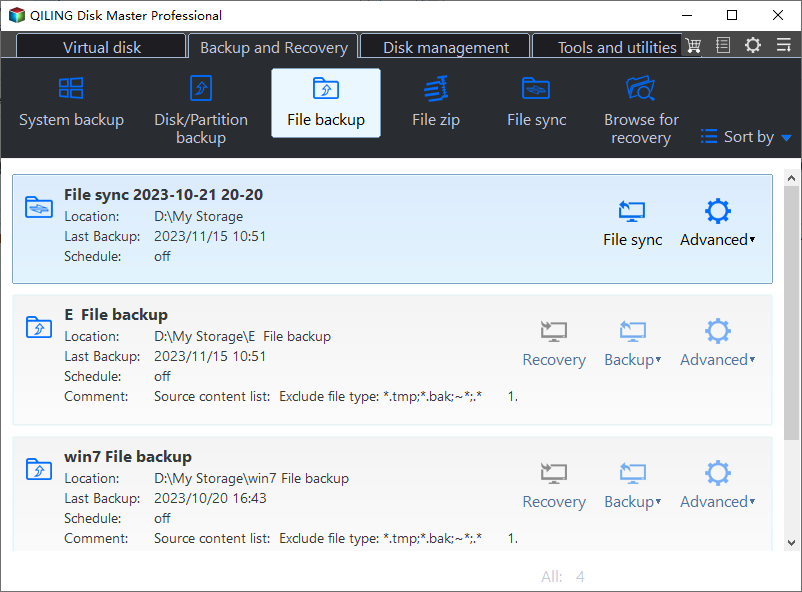
2. Create a backup task, name it, and click the "Add Email Data" option.
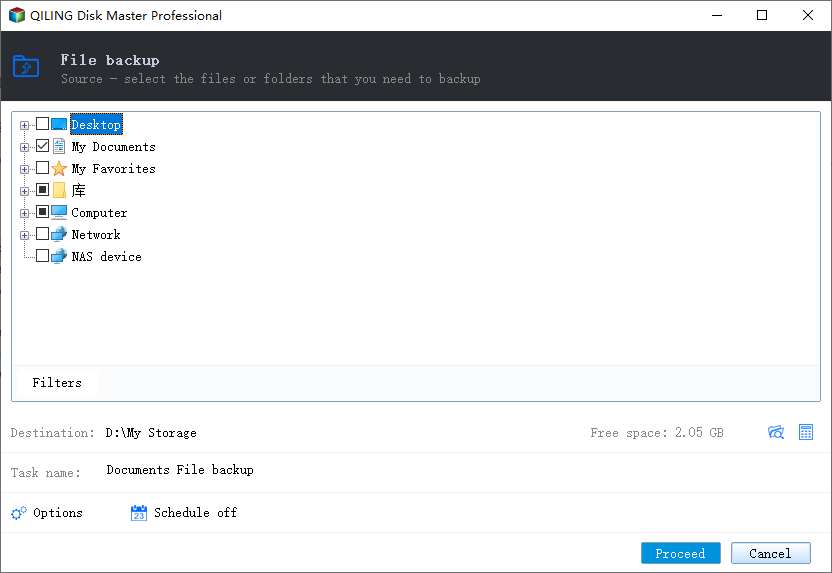
3. To add a Yahoo email account, click "Add Mailbox" and enter your Yahoo email credentials. Once added, you can select one or more email folders to be backed up.
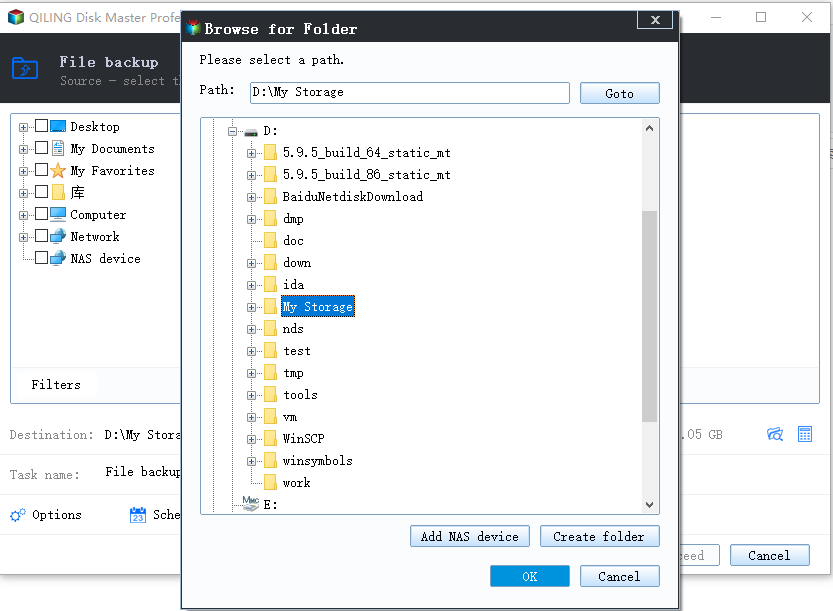
4. Select a destination path on your computer, external hard drive, USB drive, or NAS to save the backup image.
5. Customize the backup options, schedule, and backup scheme as needed, then click Proceed to back up your Yahoo emails.
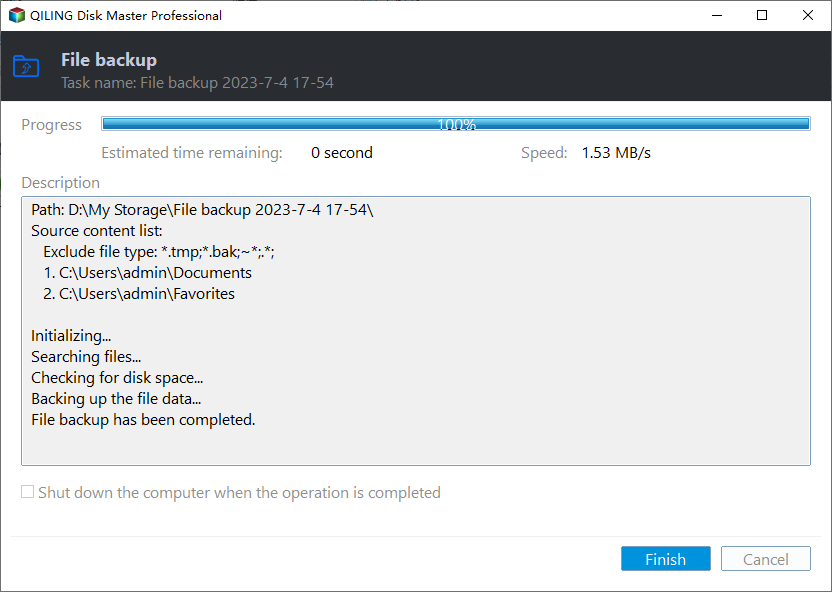
Note: If you accidentally lose your Yahoo emails, you can use Qiling Disk Master to easily restore them.
Summary
To back up Yahoo Mail to a computer, copy and paste individual emails, save messages as PDF files, export folders with Outlook, or use Qiling Disk Master to back up entire email folders.
Qiling Disk Master is a practical option for automatic Yahoo Mail backup and email folder recovery.
Related Articles
- How to Let Yahoo Mail Export Emails: Two Ways
Here are two ways to let Yahoo Mail export emails: using Outlook client and the Print feature on Yahoo Mail. Also, there is an easy solution to backup Yahoo Mail to hard drive easily. - Complete Guide: Backup Yahoo Mail to Hard Drive (4 Ways)
Learn four practical ways to back up Yahoo Mail to a hard drive for local storage and offline access. - Full Guide to Export Outlook 2016/2013/2010 Emails to PST
If you are in need of exporting Outlook emails to a PST file, read this article to get a stepwise guide. To backup your Outlook folders more easily, you may pick the best Outlook backup software. - The Best Solution to Ghost Hard Drive in Windows 10
You will learn how to ghost hard drive in Windows 10 for data protection and remove ghost drive easily to get rid of its bad effect.
Products
Articles & Tutorials
- Data Recovery
- Data Backup
- File Recovery
- File Backup
- File synchronize
- System Backup and Restore
- Disk and Partition Clone
- Technical articles
- Disk Master Help
- Windows Deleted File and Disk Recovery Tutorials
- Windows File and Data Recovery Tutorials
- More Windows Tutorials for Install, Security, Files, and PC Tips
- Windows Boot, Repair, and Recovery Environment Tutorials
- Windows Backup Tutorials
- Windows Restore Tutorials
- Windows Clone and Migration Tutorials
- Windows Server Backup, Recovery, and Management Tutorials
- Windows Disk, Partition, and Storage Management Tutorials