Mirror Sync Files/Folders with Best File Sync Software
What is mirror sync?
Mirror Sync is a feature in Qiling Disk Master that synchronizes files from a source directory to a destination directory, similar to basic sync and real-time sync. However, its primary focus is on ensuring that the files in the destination directory are always an exact replica of the source directory.
You can only make changes to files in the source directory, as any modifications made to files in the destination directory will result in those files being deleted or overwritten by files with the same name in the source, regardless of their size or modification time.
Why do you need mirror sync?
Mirror syncing creates an exact copy of files, effectively serving as a backup, eliminating the risk of data loss. This is a significant reason to mirror files or folders.
This feature will delete extra files and overwrite files modified in the destination, effectively preventing unwanted or malicious changes, or virus attacks, to some extent.
The synchronized files and folders are easily accessible and verifiable due to their identical nature, except for their storage location.
How does mirror sync work?
Mirror synchronization is a technique used to ensure that multiple devices or systems have the same data or state, even when they are not directly connected. This is achieved by periodically synchronizing the data between the devices, often through a central server or cloud service. The process involves updating the data on one device, which then triggers an update on the other devices, effectively mirroring the data across all connected systems.
During synchronization, the source directory directly compares with the destination directory to find differences, and then performs the following actions based on those differences.
- When copying files from one directory to another, if a file with the same name already exists in the destination directory but has a different size or modification time, it will be overwritten by the new file. This applies regardless of whether the new file is larger or has a more recent modification time.
- The files in the source directory that are not present in the destination will be copied to the destination directory.
- The files in the destination directory that are not present in the source directory will be deleted from the destination.
Step by step guide: mirror folder with Qiling Disk Master Professional
Qiling Disk Master Professional, the best file sync software, allows you to mirror folders in Windows to any detected devices, including local disks, external hard drives, flash drives, network drives, NAS, and cloud storage like Google Drive and Microsoft OneDrive.
The sync process can be automatic, triggered by daily, weekly, monthly schedules, event triggers, or USB plug-in, ensuring the latest files are always available and reducing the risk of data loss.
Download Qiling Disk Master Professional and install it on your computer. Next, prepare a storage device, such as a USB drive, to save your files. This is a convenient option as it's easy to carry and affordable.
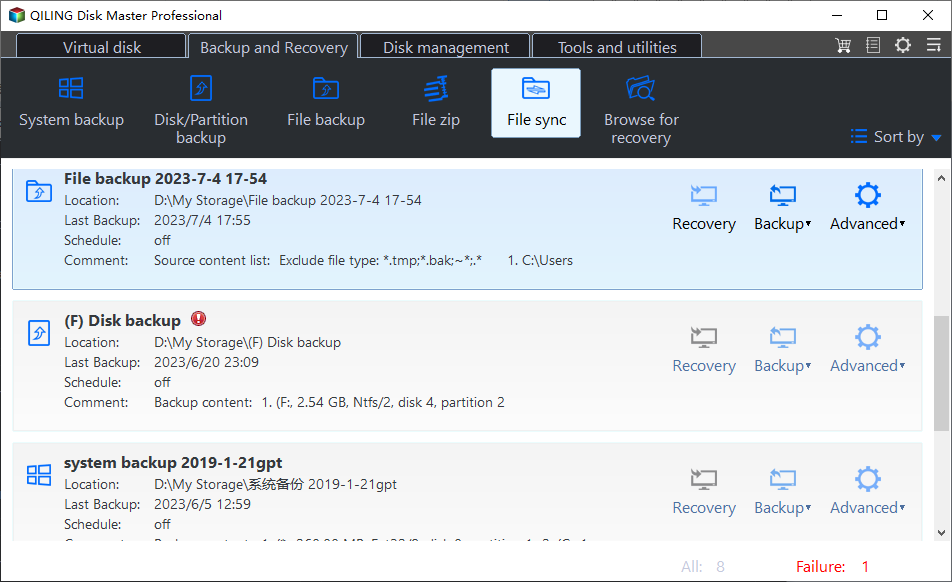
Step 1. Launch this software, click Backup and recovery and File Sync in turn.
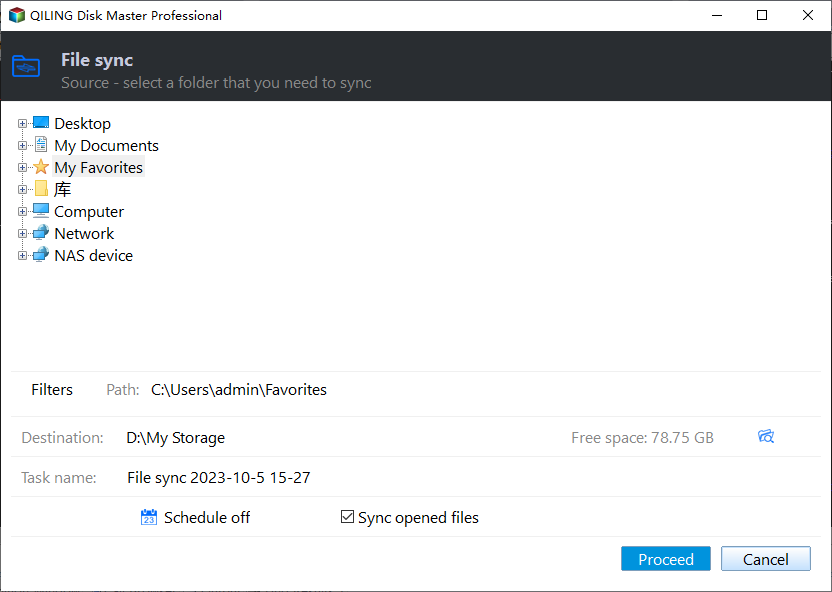
Step 2. To mirror folders, click on the task as per your need and click Folder > This PC to select the folders you want to mirror.
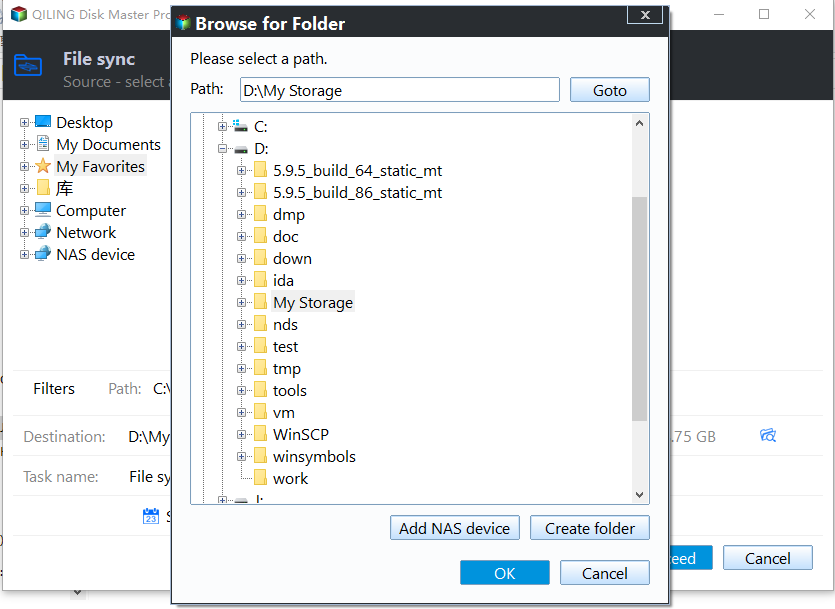
Step 3. Click where the arrow points and it will show you the drop-down menu. There are three options available:
- Select a local path: In the pop-up window, click "This PC" and select your USB drive under "Devices and drives".
- Add Share or NAS Devices: It enables the selection of a shared folder, network drive, or NAS.
- Select a cloud drive: You can choose cloud storage as the destination path, such as OneDrive, Google Drive, or Dropbox.
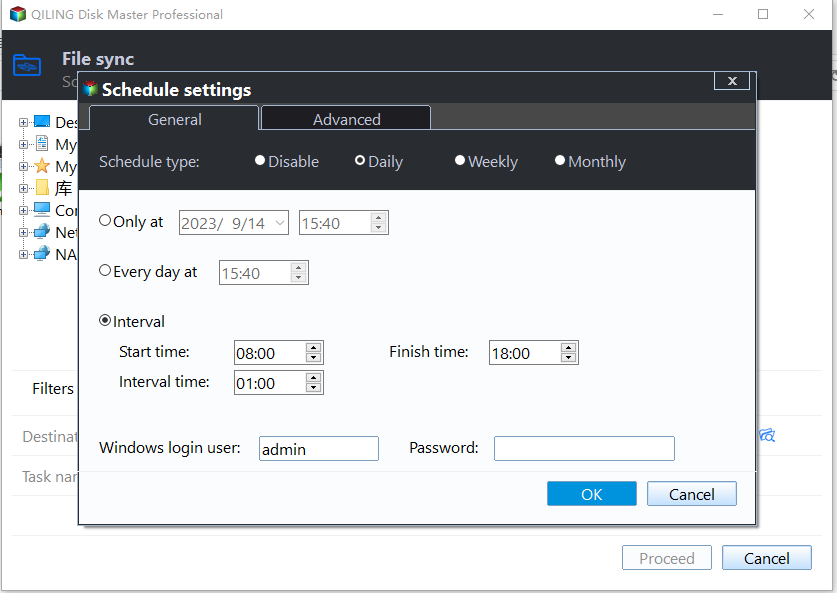
Step 4. To continuously track changes, set a schedule sync task with options such as daily, weekly, or monthly syncs, as well as event triggers and USB plug-ins. Click the "Schedule Sync" button and select your preferred priority. This allows for flexible and customizable syncing according to your needs.
Tips:
◔ If you don't make many changes to files, daily, weekly, or monthly syncs can help you stay up-to-date with any modifications.
◔ "Event triggers" can help you set up Windows to mirror a folder in response to specific events, such as user logon, logoff, system startup, and shutdown.
◔ A "USB plug in" can automatically sync files from or to a USB flash drive when plugged in, eliminating the need to manually open software.
◔ In the schedule settings, you'll find an option at the bottom to "Wake the computer to run scheduled task." This is useful when scheduling sync tasks during off-peak hours, like midnight.
Step 5. Confirm everything is OK and click Proceed to mirror files.
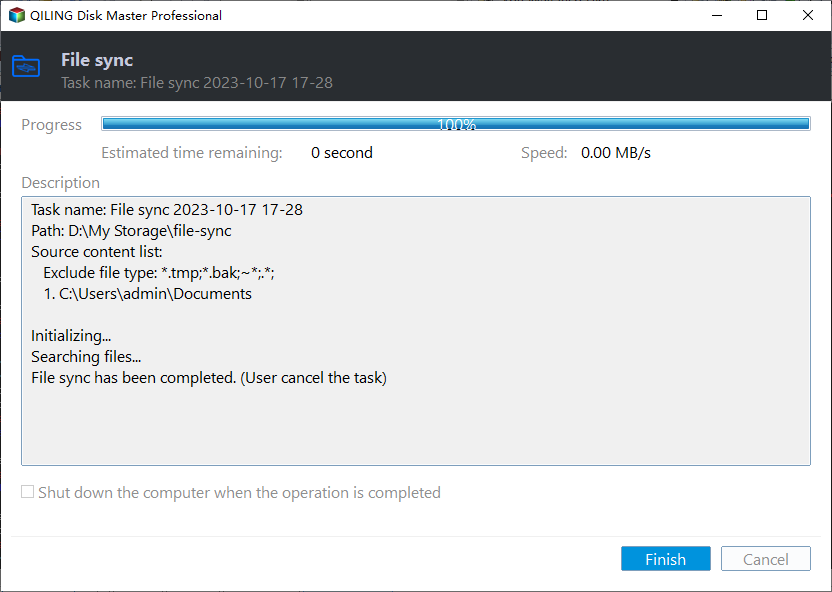
Notes:
◔ To avoid issues with a scheduled sync task, ensure that the name of the source folder remains unchanged. This will prevent the program from being unable to synchronize it anymore.
◔ Don't add new files to the destination path or modify files in the destination, as these files will eventually be deleted or overwritten.
◔ A single file larger than 4GB cannot be synced to a FAT/FAT32 partition because the file size limit in those partitions is 4GB.
◔ The core of mirror sync is one-way file sync, but Qiling Disk Master still supports two-way file sync to track changes in both source and destination directories.
◔ If you modify files frequently or work in a team, it's best to use "Real-Time Sync" which tracks changes in real-time and syncs files immediately when detected.
Qiling Disk Master is a professional backup and restore software that offers various backup options, including System Backup, Disk/Partition Backup, File Backup, and Cloud Backup, making it suitable for different needs.
Related Articles
- Easy Way to Mirror Folder to Network Drive in Real-Time
- Mirror PC Folder to OneDrive | 3 Ways
- How to Use Dropbox to Mirror Folders in Windows 10/8/7?
- Automatically Mirror Folders to Synology NAS | 2 Simple Ways
- 4 Easy Ways to Change Program Files to D Drive Quickly
Learn the key steps, checks, and practical tips for this related guide. - How to: Change SD Card Serial Number Without Formatting in Windows
Here comes the best way to change SD card serial number without formatting on Windows 10, 8, 7.
Products
Articles & Tutorials
- Data Recovery
- Data Backup
- File Recovery
- File Backup
- File synchronize
- System Backup and Restore
- Disk and Partition Clone
- Technical articles
- Disk Master Help
- Windows Deleted File and Disk Recovery Tutorials
- Windows File and Data Recovery Tutorials
- More Windows Tutorials for Install, Security, Files, and PC Tips
- Windows Boot, Repair, and Recovery Environment Tutorials
- Windows Backup Tutorials
- Windows Restore Tutorials
- Windows Clone and Migration Tutorials
- Windows Server Backup, Recovery, and Management Tutorials
- Windows Disk, Partition, and Storage Management Tutorials