How to Recover Files after Reset Windows 10
Quick Navigation:
- Recover data after reset windows 10 with Deep Data Recovery for Windows
- Your Effective Data Recovery Software for Windows 10 Reset
If you've lost files due to a Windows 10 reset, you can recover them using Deep Data Recovery software. The sooner you act, the higher the success rate. To recover files after a factory reset, download the software and follow the provided guide.
If reset removed personal files, this permanently deleted file recovery guide offers related Windows recovery steps.
Resetting Windows 10 can result in the loss of important files, as it affects not only the operating system and installed software but also files saved on the C drive, including those on the Desktop and in My Documents, Music, Videos, and other folders. To avoid this, it's essential to take action and learn how to recover files after a Windows 10 reset.
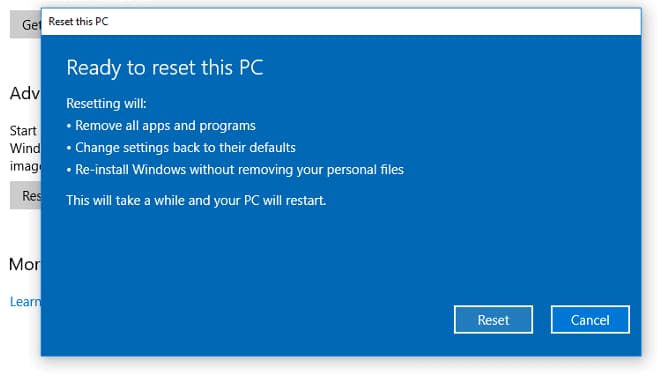
Whenever you reset Windows 10, it's a good idea to back up your computer or drive first, using the built-in backup tool or a professional tool like Qiling backup, which can back up selected hard drives, folders, files, or even the entire computer system, making the process easy and secure.
If you haven't backed up your computer or previous settings and files on your Windows 10 computer, you can't restore files after a reset. To recover data, you'll need to use data recovery software, such as Deep Data Recovery, available online. Please refrain from using your Windows 10 PC until you've followed the guide below to restore files after a reset.
Recover data after reset windows 10 with Deep Data Recovery for Windows
Deep Data Recovery is a professional software tool that helps users recover lost files due to various scenarios, utilizing edge-leading recovery technology to increase the chances of successful data recovery.
Your Effective Data Recovery Software for Windows 10 Reset
- Not only can it recover data after a Windows 10 reset, but it can also retrieve data lost due to other scenarios such as deletion, computer system crash, drive failure, factory reset, abrupt interrupt, and drive format.
- This software supports a wide variety of file types, including video, audio, images, documents, emails, and other types of files in various formats.
- Windows 10 has two scanning modes to resume files after a reset: Quick Scan and Deep Scan. When the Quick Scan is finished, it automatically continues scanning with Deep Scan.
Download this software to recover data after resetting Windows 10.
- Install the Windows 10 data recovery
- To select the hard drive to scan for deleted files in Windows 10, follow these steps:
- Recover files after Windows reset
To recover your data on Windows 10, click the DOWNLOAD button to get the installation package for the best Windows 10 data recovery software. Once downloaded, simply install it on your computer, which should work seamlessly without any incompatibility issues. You can then use it on your PC to retrieve your lost data.
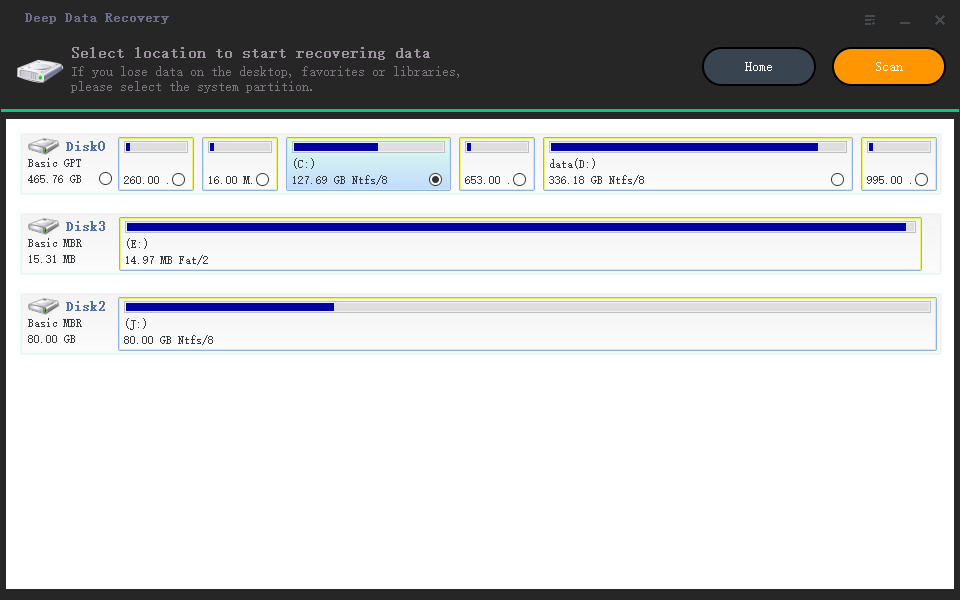
Select the hard drive where your lost files were stored, usually drive C, and click "Scan" to let the software scan for lost files.
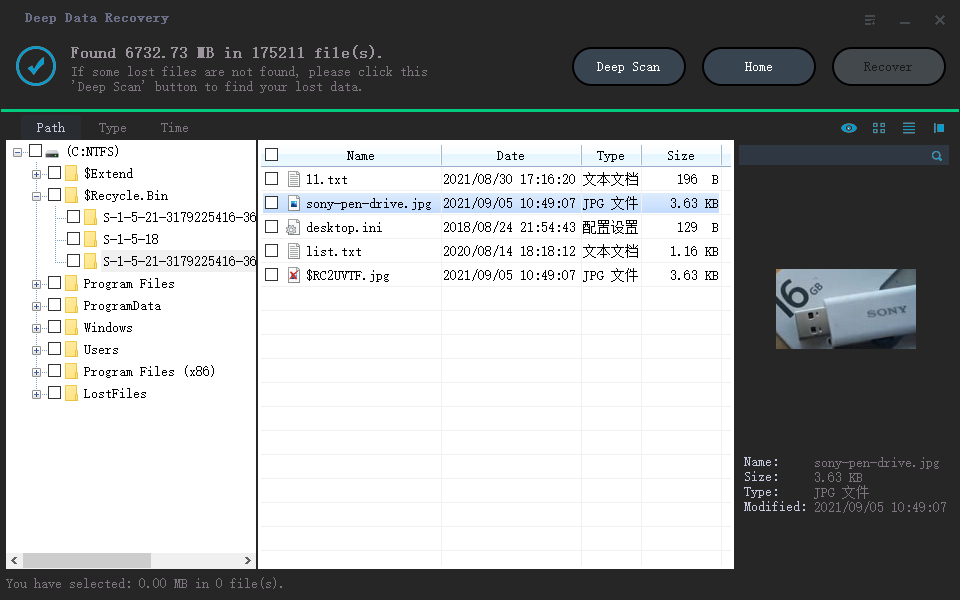
Wait patiently for the data recovery software to finish scanning, then select and recover the found files, including those lost during a Windows 10 reset.
To keep your data safe, it's essential to backup your computer and files before resetting Windows 10. If you've already reset and lost files, consider using Deep Data Recovery to try and recover them. However, the most efficient way to protect your files is to backup them before resetting your computer. If you do lose files, you can try recovering them with Qiling as soon as possible.
Related Articles
- Recover Deleted Files after Reinstalling Windows
- Fix Windows 10 Update Error Code 0x80070002
- Fix Windows 10 Keeps Freezing Up Randomly
- Recover Shift Deleted Files in Windows 10
- Find/Recover Lost Files after the Upgrade to Windows 11
- How to Recover Corrupted Files in Windows 10/11
Products
Articles & Tutorials
- Data Recovery
- Data Backup
- File Recovery
- File Backup
- File synchronize
- System Backup and Restore
- Disk and Partition Clone
- Technical articles
- Disk Master Help
- Windows Deleted File and Disk Recovery Tutorials
- Windows File and Data Recovery Tutorials
- More Windows Tutorials for Install, Security, Files, and PC Tips
- Windows Boot, Repair, and Recovery Environment Tutorials
- Windows Backup Tutorials
- Windows Restore Tutorials
- Windows Clone and Migration Tutorials
- Windows Server Backup, Recovery, and Management Tutorials
- Windows Disk, Partition, and Storage Management Tutorials