How to Recover Files After Factory Reset/System Restore Windows 10
Quick Navigation:
- Where are the lost files now after system restore?
- How to Recover Data after Factory Reset Windows 10
- Your Effective Software for Data Recovery after Reinstalling Windows 10
- Step-by-step guide to retrieve files after System Restore in Windows 10
- Extra Tips: How to Avoid Data Lost Due to System Restore and Factory Reset Computer
"I factory reset my computer in Windows 10 and restore the system. I supposed I have restored the system with the former backup file saved on my external hard drive. However, it seems I lost many important files, including family videos and pictures, my paper, Oh my god, please help me, telling me how to recover files after factory reset Windows 10"
If the same problem happens after a reset instead of System Restore, this Windows 10 reset lost files guide explains another recovery path.
Both resetting computers to factory settings and restoring computer systems are risky. It's a process to erased all content on the computer. Though you restore the system with an image backup file, you may fail or though your success, you may also lose files since not all files are backed up. And it's a big task to back up the whole computer if you haven't had the habit of using software, like Qiling backup to back up your computer selectively or wholly. What if you lost files after restore system of the Windows, like Windows 10? let's learn how to recover files after system restore in Windows 10 (other Windows version supported as well. Here we take how to restore files after factory reset Windows 10).
Where are the lost files now after system restore?
Although Windows 10 doesn't have a "Cancel" option for system restore or factory reset, the deleted files are still stored on the hard drive, waiting to be overwritten. This means that if you act quickly, you can recover the lost files before they're replaced by new data. If you wait too long, the files will be permanently deleted.
How to Recover Data after Factory Reset Windows 10
If you've lost files after a factory reset on Windows 10, they're marked as useless and invisible, making them difficult to recover on your own. To get them back, you'll need the help of specialized software designed for Windows 10 data recovery. These programs can scan your computer, locate the files you need, and retrieve them for you.
Deep Data Recovery is a well-known data recovery tool for Windows 10 that can recover any lost data, regardless of the reason for its loss. It is a powerful tool that can recover data from a computer, no matter the circumstances of its loss. Its features include the ability to recover data that was lost due to various reasons, making it a reliable solution for users who have lost important files or data.
Your Effective Software for Data Recovery after Reinstalling Windows 10
- If you've lost files due to a cut and paste error, system restore, factory resetting, virus attack, accidental deletion, or system crash, you can recover your lost files using various methods.
- The computer has over 800 commonly used file types, including various picture file extensions, videos, audio files, documents, and more.
- A simple and easy-to-use software with built-in navigation that is fully compatible with various versions of Windows, including Windows 10, Windows 7, Windows 8, Windows XP, and Windows 11, allowing for formatted drive recovery and the recovery of deleted files.
Step-by-step guide to retrieve files after System Restore in Windows 10
If you're using Windows 10, we'll guide you through recovering files after a system restore. If you're on a Mac, you can try the Mac version to retrieve data after a factory reset in macOS. The software has a separate Mac version for your convenience.
- Download Windows 10 Data Recovery Software
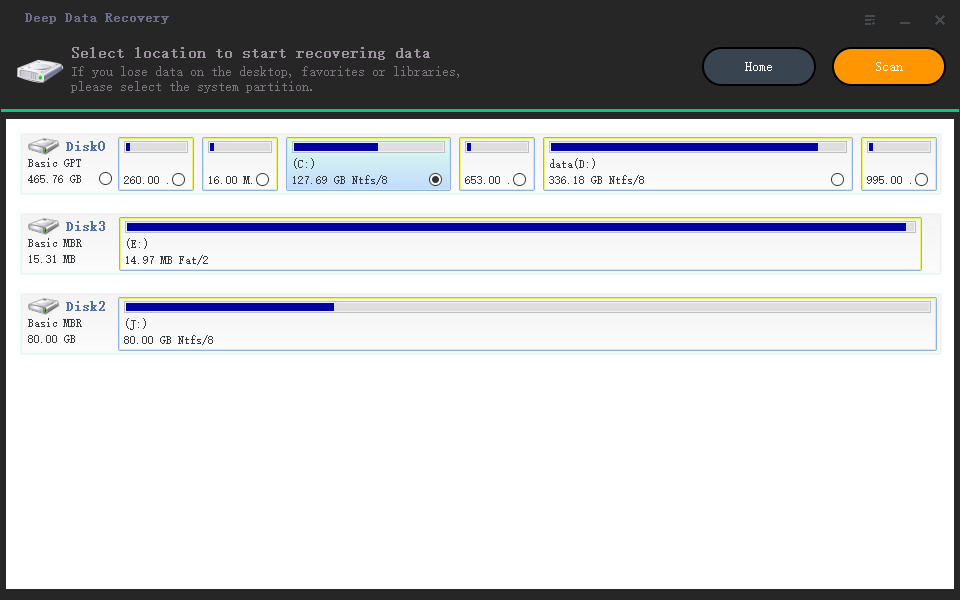
- Select System Hard Disk/Partition to Scan
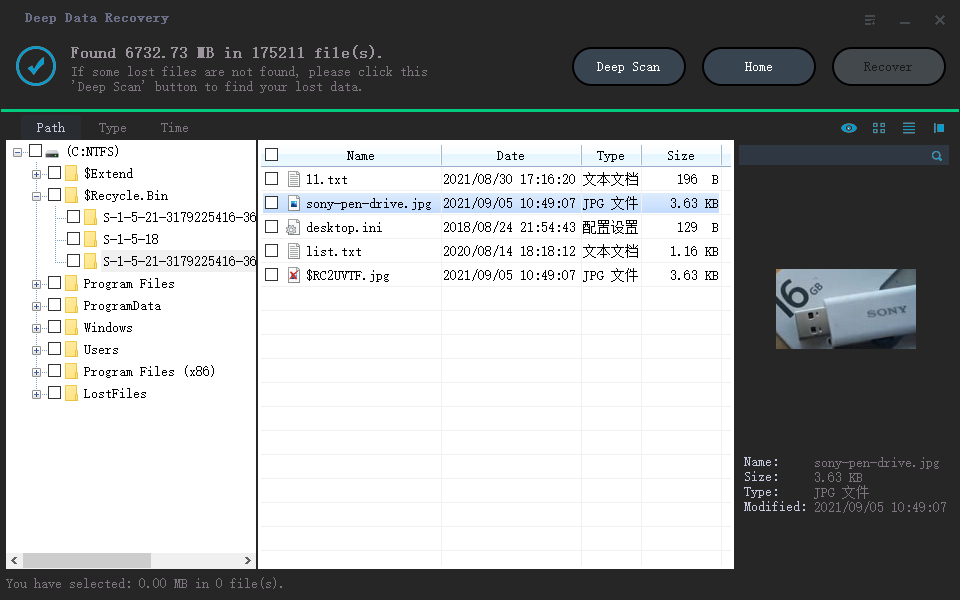
- Recover Files after Factory Reset Windows 10
Click the DOWNLOAD button to get the Windows version for your Windows 10 computer. This software is fully compatible with Windows 10 and can be installed by double-clicking on the downloaded .exe file. It is a safe and standalone software tool.
After system restore in Windows 10, you can recover files by selecting the hard drive or external hard drive where the files were stored in a new window. The software will then scan the selected drive for the lost files.
The scanning process may take a few minutes to complete, after which all found files are categorized. You can then filter the target files by selecting specific types and extensions. Preview the selected files before recovering them. To recover the files you lost after a system restore on Windows 10, select them and click "Recover" to save them on your computer.
Extra Tips: How to Avoid Data Lost Due to System Restore and Factory Reset Computer
To avoid data loss, it's essential to backup files on your computer, especially before performing a system restore or factory reset, which can be unpredictable and may cause data loss. Using Qiling backup can help ensure that your important files are safely stored and can be easily restored if needed.
Related Articles
- Recover Deleted Files from SD Card in Windows 10
- Recover Deleted Restore Points in Windows 10
- Recover Lost Files after the Upgrade to Windows 11
- Recover Deleted Files after Reinstalling Windows
- How to Recover Corrupted Files in Windows 10/11
- Ultimate Guide to Partition Recovery on Windows 11/10/8/7 (2023)
Follow the latest guide to partition recovery on Windows 11/10/8/7 and you'll easily restore deleted or lost partitions and volumes that were accidentally deleted or lost.
Products
Articles & Tutorials
- Data Recovery
- Data Backup
- File Recovery
- File Backup
- File synchronize
- System Backup and Restore
- Disk and Partition Clone
- Technical articles
- Disk Master Help
- Windows Deleted File and Disk Recovery Tutorials
- Windows File and Data Recovery Tutorials
- More Windows Tutorials for Install, Security, Files, and PC Tips
- Windows Boot, Repair, and Recovery Environment Tutorials
- Windows Backup Tutorials
- Windows Restore Tutorials
- Windows Clone and Migration Tutorials
- Windows Server Backup, Recovery, and Management Tutorials
- Windows Disk, Partition, and Storage Management Tutorials