How to Recover Shift Deleted Excel Files from Windows PC
If you've ever permanently deleted a file from your computer by pressing "Shift + Delete", you know how stressful it can be, especially if it's an important file like an Excel document. Normally, you wouldn't be able to recover a shift deleted file, but fortunately, there are ways to get it back. In this article, we'll guide you through the process of recovering a shift deleted Excel file in Windows 7, Windows 10, and other versions. We'll show you two methods to retrieve your lost file, so you can restore access to your files and get back to work. Follow the methods below to recover Shift-deleted Excel files from your PC.
If Excel also left a temporary copy, this temporary Excel file recovery guide can help you check another source.
- Quick Navigation
- Part 1: Best Way to Recover Shift Deleted Excel Files in Windows 11/10/7
- Part 2: Restore Shift Deleted Excel Files in Windows by Restoring from Backup
Part 1: Best Way to Recover Shift Deleted Excel Files in Windows 11/10/7
To recover Shift deleted Excel files in Windows 10, 7, or XP, you'll need a data recovery tool. The best software for this task is Deep Data Recovery, which offers an easy-to-use interface and advanced features suitable for both novice and experienced users. This tool can help you find and recover Shift deleted Excel files on your Windows PC.
Your Effective Shift Deleted File Recovery Software
- It can recover deleted files in various situations, including after the recycle bin has been emptied, after using the "shift+del" keys, and in other scenarios.
- This software can recover files from various storage devices, including hard disks, partitions, SD cards, external hard drives, RAW drives, and USB drives, among others.
- This software can recover deleted files of various types, including videos, images, audio files, documents, archives, and more, on a computer.
How to Recover Shift Deleted Excel Files in Windows 10/7 with Deep Data Recovery:
Step 1: To recover an XLS file, first download and install XLS recovery software on your computer, then launch the program which will take you to its home interface.
Step 2: After scanning, the recover shift deleted excel file system will display all drives connected to your PC, including your hard disk and external storage. Select the drive where the permanently deleted files were located, click the "Scan" button, and the tool will quickly scan the selected folder or drive to recover the deleted files.
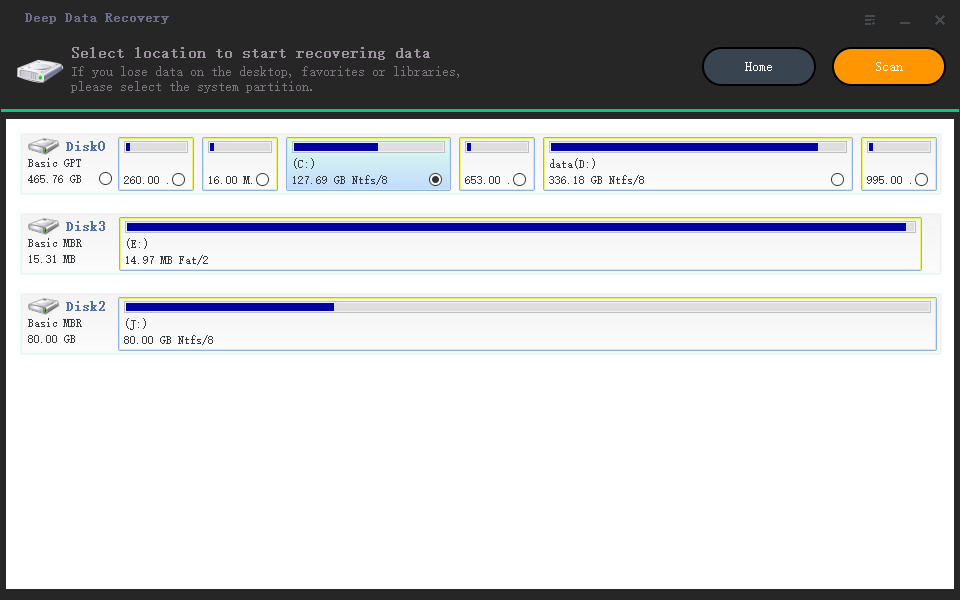
Step 3: After a quick scan, the program will display all deleted Excel files, allowing you to easily select and preview the ones you want to recover. If a normal scan doesn't show your lost files, a deep scan feature is available. Once you've selected the files, click "Recover" to start the recovery process.
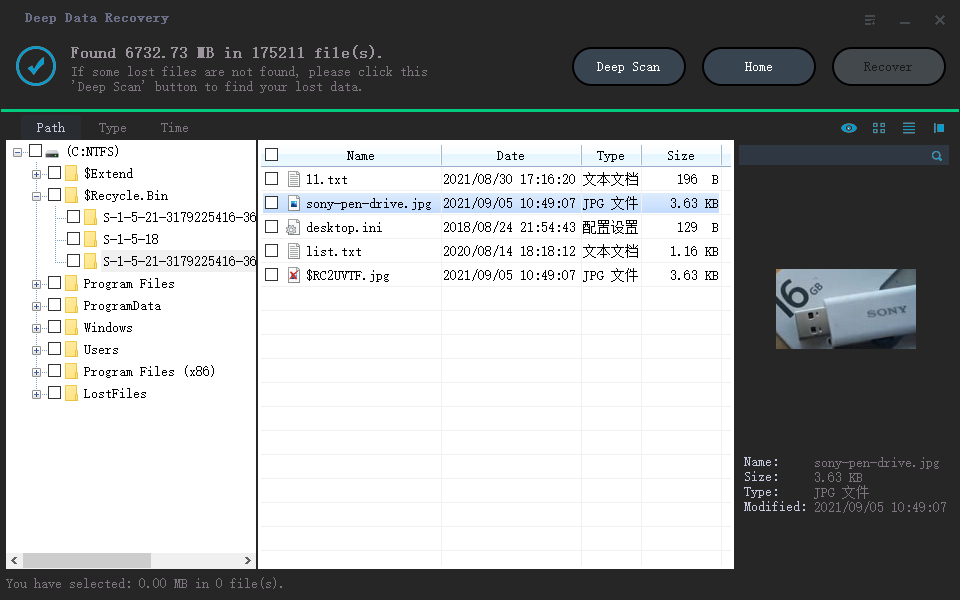
Step 4: Once the script has completed its task, all selected shift deleted Excel files will be restored to your chosen output folder, so be sure to select a secure folder to receive these files from your hard drive.
Part 2: Restore Shift Deleted Excel Files in Windows by Restoring from Backup
If you don't know how to recover Shift deleted Excel files from your PC, you can try restoring them from your Windows PC if you saved and backed up the files. This method is easy but also a technique for new users. However, if you didn't back up the data or are unsure, it's best to try the first method from this article to avoid any risks. If you saved the files on your desktop, you can follow the steps outlined to recover the Shift deleted Excel Files.
Step 1: First navigate to the "Control Panel" of your computer by searching for it from the search option.
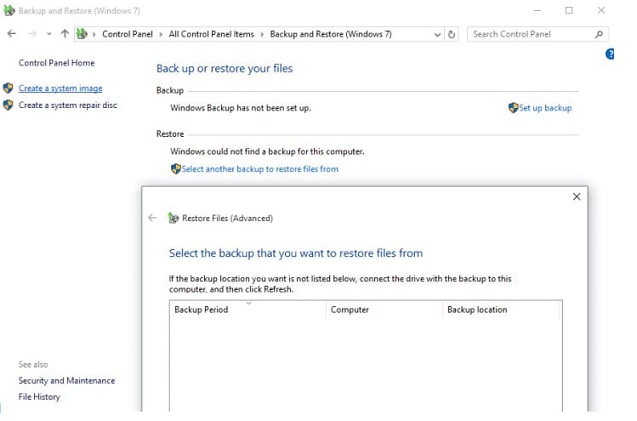
Step 2: On the "Control Panel" page, select the option that says "Backup and Restore (Windows 10)" or "Backup and Restore (Windows 7)".
Step 3: You can select a backup file from the available options, or if none are listed, click "select another backup to restore files from" and choose the drive containing the backed up files.
If you want to recover shift deleted files in Windows 10, Windows 7, and more, this article can help you. You already know two easy and effective ways to recover shift deleted Excel files from your PC. If you have a previous backup, you can try using the backup and restore method of Windows, but if not, Deep Data Recovery software is the ultimate solution for guaranteed results. This tool can help you get back your shift deleted Excel files without any hassle.
Related Articles
- Shift Delete Recovery – Get Back Shift Deleted Files
- How to Recover Shift Deleted Files in Windows 11/10/8/7
- Recover Temporary Excel Files in Windows 10/7/XP
- Recover Deleted Files from GoPro
- Recover Permanently Deleted Text Files in Windows 10/11
- 5 Best Micro SD Card Recovery Software Free Download
The best Micro SD card recovery software for Windows/Mac enables users to recover deleted or lost photos, videos, documents, and more from a Micro SD card, and selecting the right Windows or Mac micro SD data recovery among the top 5 options is key.
Products
Articles & Tutorials
- Data Recovery
- Data Backup
- File Recovery
- File Backup
- File synchronize
- System Backup and Restore
- Disk and Partition Clone
- Technical articles
- Disk Master Help
- Windows Deleted File and Disk Recovery Tutorials
- Windows File and Data Recovery Tutorials
- More Windows Tutorials for Install, Security, Files, and PC Tips
- Windows Boot, Repair, and Recovery Environment Tutorials
- Windows Backup Tutorials
- Windows Restore Tutorials
- Windows Clone and Migration Tutorials
- Windows Server Backup, Recovery, and Management Tutorials
- Windows Disk, Partition, and Storage Management Tutorials