How to Migrate Windows 8/8.1 to SSD with Secure Boot
Why Migrate Windows 8 to SSD?
Historically, computers often came with HDDs (Hard Disk Drives), which are made of a metal platter with a magnetic coating. When spinning, they can read and write data, but their construction makes them prone to breaking from heavy shocks. Additionally, using HDDs can be noisy due to the spinning motion, and they tend to work slowly.
To optimize your Windows 8 computer's performance, consider migrating from a traditional Hard Disk Drive (HDD) to a Solid State Drive (SSD), which can significantly improve speed and efficiency. The SSD is a type of storage device made of solid-state electronic storage chips, consisting of flash and DRAM chips, offering several advantages over traditional HDDs.
✿ The device stores data on a memory chip, eliminating the need for spinning parts, which results in a quiet operation.
✿ The data will be safer on the SSD.
✿ SSDs can operate in a wider temperature range than HDDs, functioning between -10 to 70℃, whereas HDDs are limited to 5 to 50℃.
✿ SSDs read and write data faster than HDDs, leading to improved computer performance.
Best System Migration Software for Windows 8/8.1
To improve your computer's performance, you can transfer Windows 8/8.1 to an SSD without reinstalling the system, using a third-party software like Qiling Disk Master. This can save you trouble and time.
Qiling Disk Master allows you to migrate Windows 8 to an SSD using either System Clone, which transfers the system and boot-related files, or Disk Clone, which migrates the entire system disk, including the operating system and data.
Transferring Windows 8/8.1 to an SSD is a breeze with Qiling Disk Master. The program's concise interface makes it easy to use, and it will automatically select the system drive and boot-related files, ensuring that all important system files are cloned.
The software allows you to migrate Windows 8 to a smaller SSD using its Intelligent Clone feature, which clones a larger hard drive to a smaller SSD.
Migrate Windows 8/8.1 to SSD with Qiling Disk Master
Here is the step-by-step guide on how to migrate Windows to SSD. It is not only suitable for Windows 8/8.1, but also Windows 11/10/7/Vista/XP.
- Install the SSD to your computer and ensure it can be detected. Next, back up all data on the old drive, then clone the old drive to the new SSD using a cloning software.
- To clone Windows 8 to an SSD, download, install, and launch Qiling Disk Master Professional. Then, click on the "Clone" button to open the clone main interface and select "System Clone" to begin the cloning process.
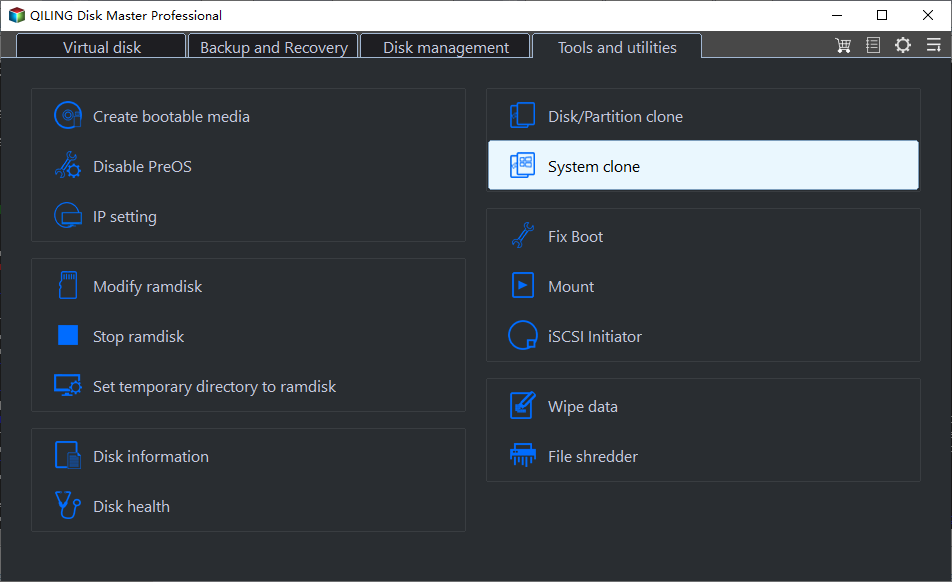
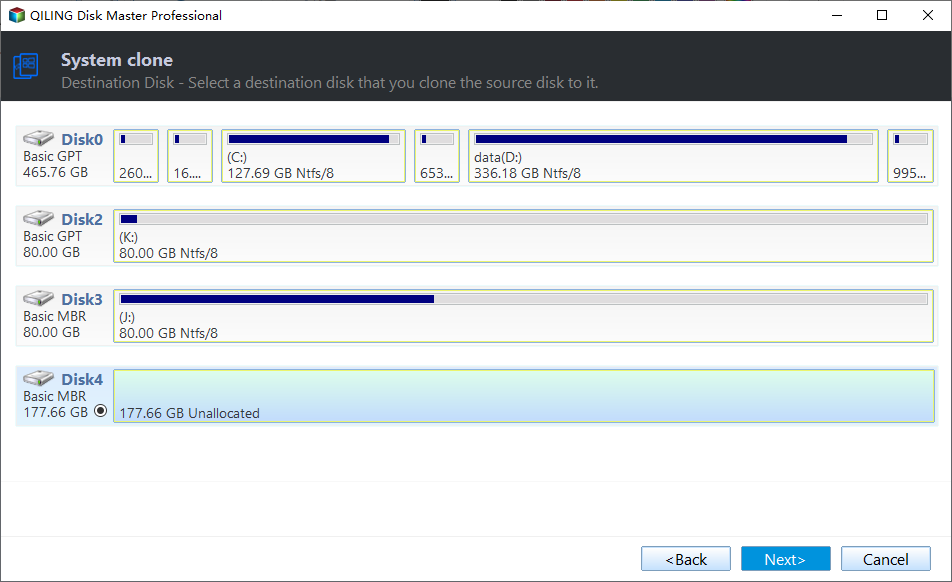
- The system has been selected by default, so you will reach the following interface. Select the destination disk, which is the SSD you prepared beforehand, and then click Next.
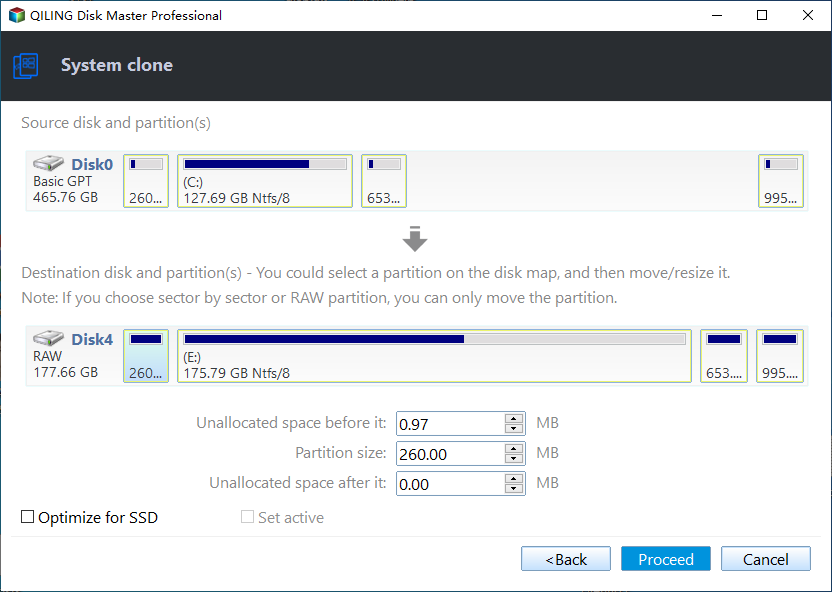
- Confirm the operation. Tick SSD Alignment to improve the performance of the target SSD, then click Proceed.
Note:
✡ Sector by sector clone: The malware is a type of boot sector virus that will clone every byte of the system, including unused bytes, resulting in a significant increase in time and storage space.
Migrating Windows 8/8.1 to an SSD using Qiling Disk Master is a straightforward process that requires just a few clicks. You can simply migrate the system to the SSD, or select the "Disk Clone" option at step 2 to clone the entire disk to the SSD.
To Sum Up
Migrating Windows 8 to an SSD can be achieved in just 4 steps with the help of Qiling Disk Master, ensuring a smooth transition without startup issues. This process is also applicable to Windows Server users, who can utilize the System Clone feature in Qiling Disk Master Server.
This software has a range of functions beyond cloning, including backup, restore, synchronization, and the ability to create a bootable disk for emergency system recovery.
Related Articles
- Easiest Way to Clone Hard Drive in Windows 8, 8.1 to New HDD, SSD
This guide explains Easiest Way to Clone Hard Drive in Windows 8, 8.1 to New HDD, SSD with clear steps, key checks, and practical tips. - How to Transfer Windows 8/8.1 Installation from HDD to SSD?
Learn how to Transfer Windows 8/8.1 Installation from HDD to SSD with clear steps, key checks, and practical tips. - (2022) Migrate Dell OS with Dell Migrate or An Alternative
Using system migration software, you can simply solve the problem of upgrading system disks or changing computers when there is a need to migrate OS or other data. - How to Copy or Clone Dynamic Disk in Windows 7, 8,10?
Learn how to Copy or Clone Dynamic Disk in Windows 7, 8,10 with clear steps, key checks, and practical tips. - Create Image of SSD Drive with Free SSD Image Software
Be aware of how to create an image of SSD can prevent data loss when your SSD fails. Qiling Disk Master can be the best tool for your manipulation.
Products
Articles & Tutorials
- Data Recovery
- Data Backup
- File Recovery
- File Backup
- File synchronize
- System Backup and Restore
- Disk and Partition Clone
- Technical articles
- Disk Master Help
- Windows Deleted File and Disk Recovery Tutorials
- Windows File and Data Recovery Tutorials
- More Windows Tutorials for Install, Security, Files, and PC Tips
- Windows Boot, Repair, and Recovery Environment Tutorials
- Windows Backup Tutorials
- Windows Restore Tutorials
- Windows Clone and Migration Tutorials
- Windows Server Backup, Recovery, and Management Tutorials
- Windows Disk, Partition, and Storage Management Tutorials