How to Backup Old Emails in Outlook: A Comprehensive Guide
How to Find Old Emails in Microsoft Outlook
If you use Microsoft Outlook to manage your email, you may need to access old emails at some point. Some users like to keep records of multiple emails for personal reference and future use, while others may need to search through old emails to find specific information such as contact details, instructions, or references.
To avoid old emails being automatically deleted, many people back up their old emails in Outlook to an external hard drive. This requires finding the old emails first, which can be done by searching for them in Outlook.
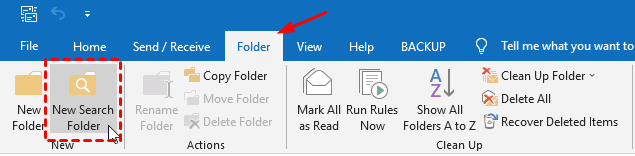
- Open the Folder menu tab and click New Search Folder.
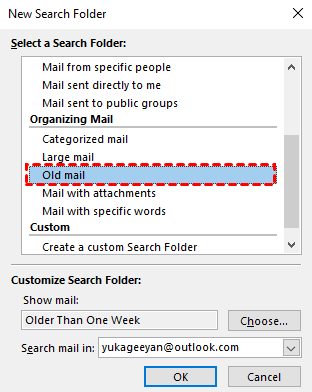
- In the New Search Folder window, click "Old mail" in the Organizing Mail section.
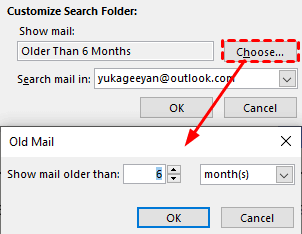
- Click "Choose" and set the age range, such as mail older than 6 months. Select the target Outlook account if needed, and click OK.
- Open the new search folder to review the old emails that match the age range.
2 Ways to Backup Old Emails in Outlook
To backup old emails in Outlook, start by creating a new folder in Outlook and integrating the old emails you want to save into this folder. From there, you can use one of the two methods provided below to successfully backup your old emails.
☞ Preparation:
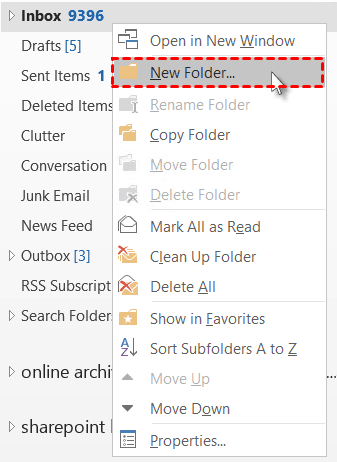
- Right-click the mailbox or target location in Outlook, select "New Folder", and name it "Old Emails Older Than 6 Months".
- Copy the old emails found in the search folder to the newly created folder.
#1. Backup Old Email in Outlook via Import and Export Wizard
To create a reliable backup of your Outlook data, have Microsoft Outlook automatically export a .pst file for you, which will save email, contacts, calendars, tasks, and notes.
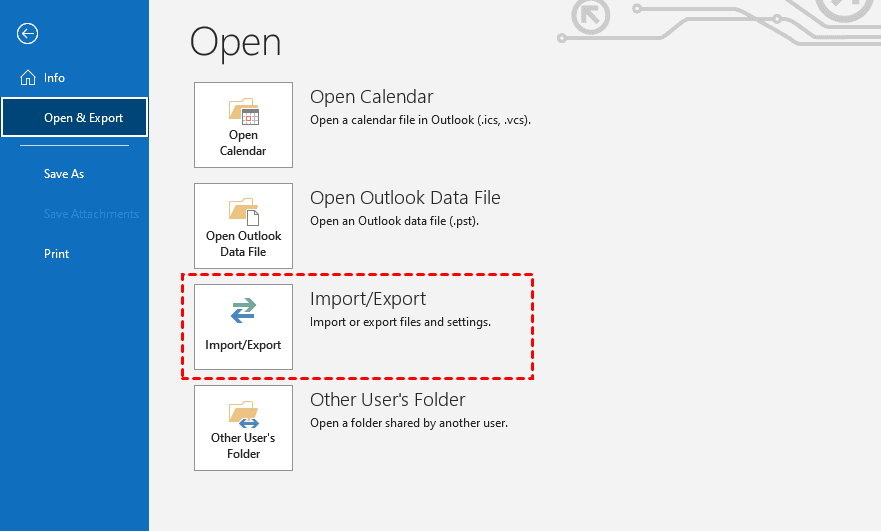
- Open Outlook, go to the File tab, click Open & Export, and then select Import/Export.
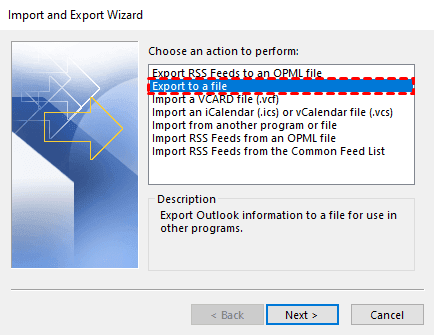
- The Import and Export Wizard will open. Select "Export to a file" and click Next.
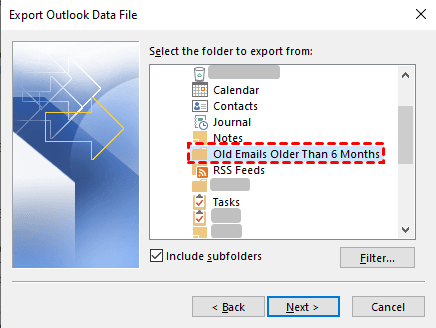
- Select the old email folder you want to export from Outlook, then choose "Outlook Data File (.pst)" as the file format to export it in.
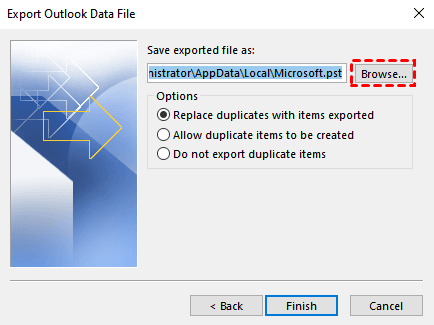
- Select the location where you want to save the old Outlook email, then click on the "Finish" button.
#2. Backup Outlook Old Emails Automatically via Third-party Software
If you're receiving a lot of important emails, you can use professional file backup software, such as Qiling Disk Master, to automatically back up newly added emails in the "Old Email Folder" instead of exporting them one by one. This can save you time and energy.
This tool offers incremental and differential backup capabilities, making it easy to save old emails in Outlook and freeing up time and effort. It not only saves Outlook emails to local folders like your hard drive, desktop, or external hard drive, but also securely backs up other important files, such as calendars, contacts, and personal data, when needed.
To backup old emails in Outlook, download Qiling Disk Master on your computer, and for Server users, try Qiling Disk Master Server.
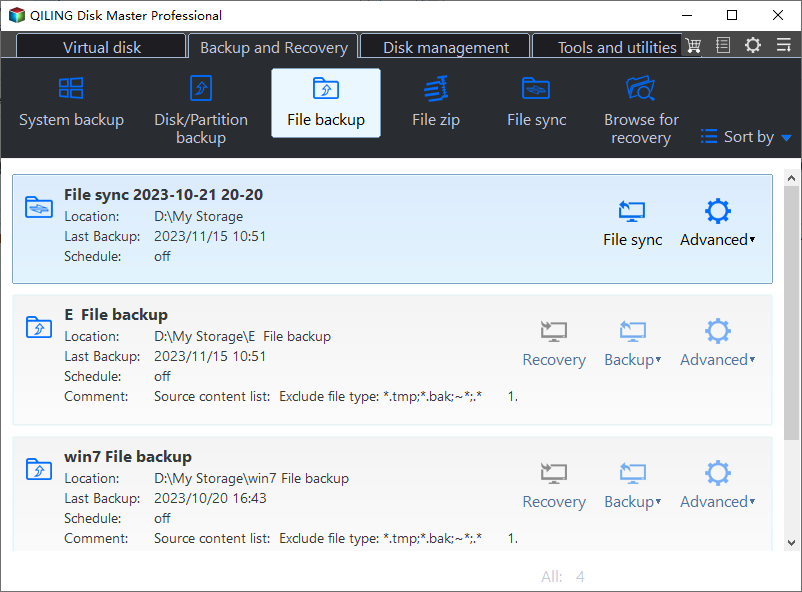
- To backup Outlook data using Qiling Disk Master Professional, open Outlook and log in with your account, then launch Qiling Disk Master Professional and click on 'Backup' and 'File Backup'.
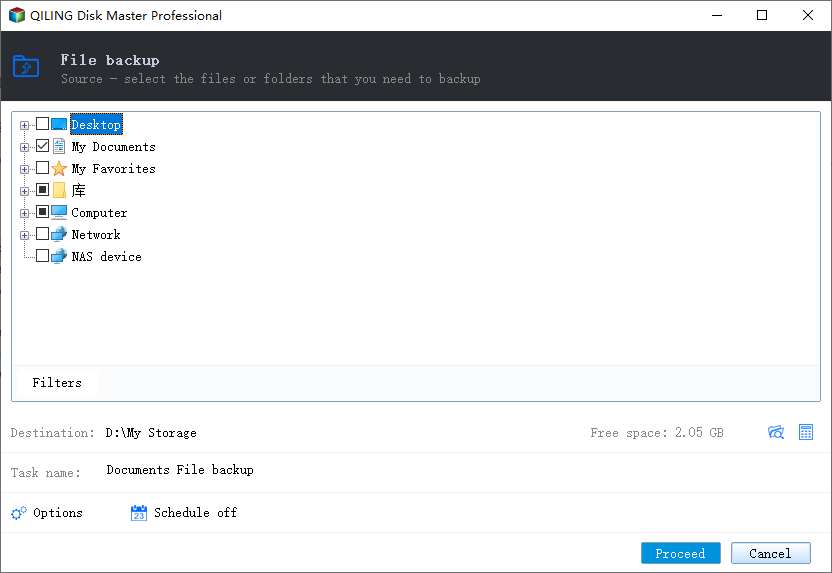
- To add Outlook data, click on the "Add Outlook data" option and select the "Old Email Folder" from your Outlook account.
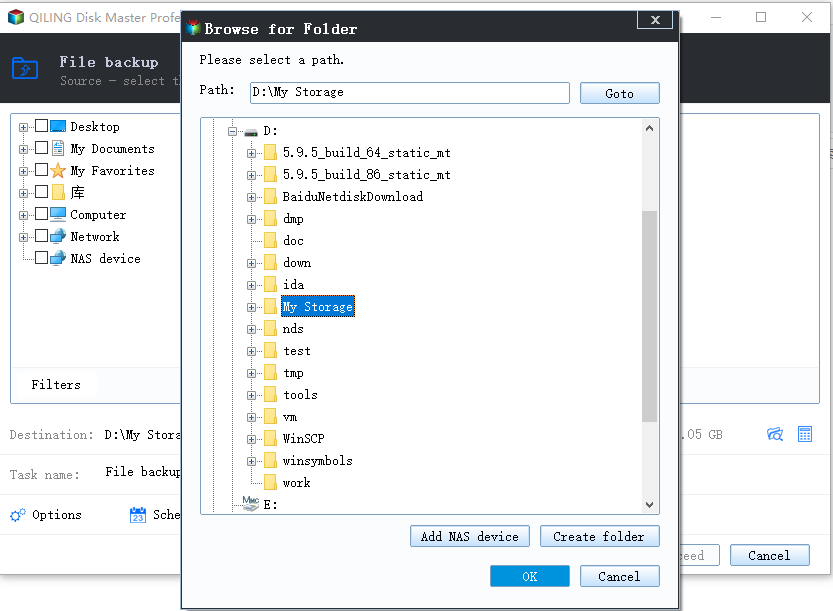
- Click the second box to select a local path, network or NAS location, or cloud drive to store your Outlook old emails.
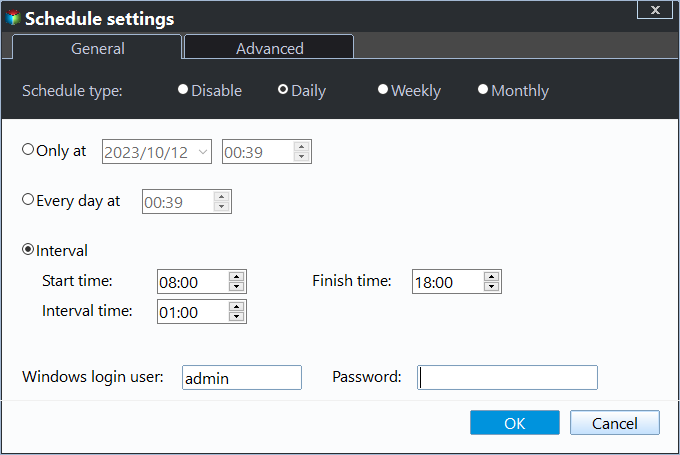
- To schedule automatic backups of your Outlook emails, enable daily, weekly, monthly, or event triggers, and click "Proceed" to initiate the backup process.
☞ Notes:
- You can change "Incremental Backup" to "Differential Backup" in Backup Scheme.
- To resolve backup disk full issues, enable automatic backup cleanup in Backup Scheme to remove old backup images regularly.
Conclusion
You can backup old emails in Outlook using two methods that also apply to exporting all emails. The reasons for doing so vary, but getting into the habit of backing up your emails can help protect your data.
Outlook's built-in export tool works for manual backups, but it has limitations. For ongoing protection, use the "Outlook Backup" function of Qiling Disk Master to automatically back up old emails and restore them when needed.
Related Articles
- (Solved) Outlook Not Showing Old Emails | 6 Ways
You will get all the possible reasons for Outlook 2016 or Windows 10 not showing old emails and 6 effective methods to fix it. To keep your emails safe, please back them up. - How to Backup or Export Entire Outlook Mailbox Easily
You will learn how to backup entire Outlook mailbox to PST file or other location. This article also includes two useful methods to backup individual or multiple emails. - Full Guide to Export Outlook 2016/2013/2010 Emails to PST
If you are in need of exporting Outlook emails to a PST file, read this article to get a stepwise guide. To backup your Outlook folders more easily, you may pick the best Outlook backup software. - How to Backup Old Emails in Outlook: A Comprehensive Guide
Learn how to Backup Old Emails in Outlook: A Comprehensive Guide with clear steps, key checks, and practical tips.
Products
Articles & Tutorials
- Data Recovery
- Data Backup
- File Recovery
- File Backup
- File synchronize
- System Backup and Restore
- Disk and Partition Clone
- Technical articles
- Disk Master Help
- Windows Deleted File and Disk Recovery Tutorials
- Windows File and Data Recovery Tutorials
- More Windows Tutorials for Install, Security, Files, and PC Tips
- Windows Boot, Repair, and Recovery Environment Tutorials
- Windows Backup Tutorials
- Windows Restore Tutorials
- Windows Clone and Migration Tutorials
- Windows Server Backup, Recovery, and Management Tutorials
- Windows Disk, Partition, and Storage Management Tutorials