How to Solve Lenovo OKR Button Not Working?
Symptom
Case One
- New z580 with win7 home basic
- Installed win 8
- Recovery did not work
- Installed win ultimate from old dvd
- Installed one key recovery software
- Made factory default recovery dvds
- Recovered to the factory win7 home basic
- C drive is nearly all the capacity of hdd
- resized the C: to 200gb
- Created another partition named g
The device has a single key recovery button that serves as both a power button and a recovery key. When pressed, it triggers a recovery process, allowing users to restore their device to its original state or perform other recovery-related tasks.
Case Two
Your original Windows 8 installation is still intact, but the OKR (Operating System Reinstallation) process didn't work as expected. The only change made was partitioning the C drive, and you haven't created the restore disks using the OKR.
Case Three
The first time I tried this it was working well. The last thing I did was to put some files in my D drive (where all the drivers files are) and I tried to delete the files I put and try again but it didn't work.
Diagnosis
A slight change to the system hard disk, such as a system upgrade or boot partition resizing, can cause Lenovo OneKey Recovery to malfunction.
The user experienced issues with the Lenovo Onekey Rescue system not working, which was triggered by significant system changes: a Windows 7 to Windows 8 update and a C Partition resize. Even with minimal system drive changes, the Onekey Recovery still failed to boot.
Users should make minimal changes to their operating system partition, including the entire hard drive, if they plan to restore from OKR, as significant changes can prevent the recovery partition from booting when needed. Deleting or damaging the OKR recovery partition will also render the recovery process ineffective.
Solutions
Solution One
Attempting to burn recovery DVDs under Windows and using them to restore your system can be a workable method, but it's also somewhat troublesome and complex.
Solution Two
When the Lenovo OKR button isn't working, consider using an alternative like Qiling Disk Master instead. This software is completely safe and can be downloaded directly to help with recovery.
With the OKR software, you can perform various tasks, such as creating a recovery partition or recovery USB, setting up a schedule to automate backups, and restoring the system to a healthy state when needed. These operations are easy and safe, similar to using Lenovo's Onekey Recovery.
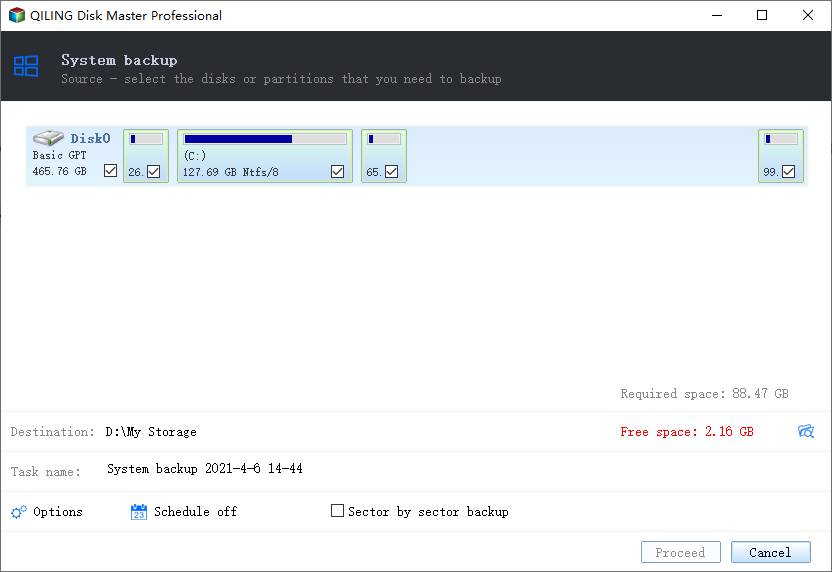
You can learn more about Qiling OKR backup and restore by referring to the articles provided, which offer detailed information on the process.
Tip: Other problems you may encounter while using Lenovo OKR
- Current system cannot support backup.
- Driver failed to initialize.
- One key recovery partition has damaged.
- Other errors.
Conclusion
Just as a user said:
OKR should be extremely robust and able to recover data even in sensitive situations, much like a Windows OS. It should work seamlessly even if the user has resized their drives yet still has OS and data on them. Ideally, OKR could keep a log of hard disk changes, including drive resize information, in a setting file that can be updated. This would make it the most reliable recovery software available, even if the user's OS is compromised, and could be activated by a simple button.
This is also a suggestion to other recovery programs.
Related Articles
- Reset Lenovo Ideapad (300, 110) with Lenovo Onekey Recovery
This guide explains Reset Lenovo Ideapad (300, 110) with Lenovo Onekey Recovery with clear steps, key checks, and practical tips. - Fixed: Lenovo Onekey Recovery Current System Cannot Support Backup
This guide explains Fixed: Lenovo Onekey Recovery Current System Cannot Support Backup with clear steps, key checks, and practical tips. - Restore from Initial Backup with Lenovo OneKey Recovery (2 Steps)
You can learn how to restore from initial backup using Lenovo OneKey Recovery easily. Also, you can use another powerful software. - How to Solve Lenovo OKR Button Not Working
lenovo onekey recovery not working problem may be caused by system upgrade, boot partition resizing, recovery partition damage or deletion, etc. The best way to solve this is to find an alternative of Lenovo OKR. - Solution: Windows Could Not Find the Recovery Environment
Follow this guide to Solution: Windows Could Not Find the Recovery Environment, with backup options, storage tips, and recovery precautions. - How to Create a Backup Windows 10 with the Least Effort
Windows Backup and Restore can create a backup of your Windows system and files, but for a full, incremental, or differential backup, consider using third-party software like Qiling.
Products
Articles & Tutorials
- Data Recovery
- Data Backup
- File Recovery
- File Backup
- File synchronize
- System Backup and Restore
- Disk and Partition Clone
- Technical articles
- Disk Master Help
- Windows Deleted File and Disk Recovery Tutorials
- Windows File and Data Recovery Tutorials
- More Windows Tutorials for Install, Security, Files, and PC Tips
- Windows Boot, Repair, and Recovery Environment Tutorials
- Windows Backup Tutorials
- Windows Restore Tutorials
- Windows Clone and Migration Tutorials
- Windows Server Backup, Recovery, and Management Tutorials
- Windows Disk, Partition, and Storage Management Tutorials