How to Reset Canon Rebel DSLR to factory settings
Professional photography as we know it wouldn't be possible without DSLR cameras, thanks to their extensive customization options. However, losing photos during a reset would be a significant setback. This article aims to guide you through the process of resetting a Canon camera while preserving your precious photos, ensuring your creative endeavors remain uninterrupted.
Before resetting a camera, recover important files with Canon camera memory card recovery.
- Quick Navigation
- Part 1. How to reset Canon camera to factory settings
- Part 2. How to recover lost videos and photos after reset Canon camera
What are the reasons for resetting your Canon Rebel DSLR?
When learning photography, it's common to reset your DSLR camera multiple times for various reasons, often focusing on resetting specific modules. However, there are instances where it becomes necessary to reset your Canon camera to its factory settings.
- Sometimes, we see software glitch which leads to factory reset.
- New learners often find themselves lost in a sea of options, requiring a factory reset to get back on track. This phenomenon is less common among professionals, who have honed their skills and are better equipped to navigate the complexities of their craft.
- Sometimes, it shows some problems like a computer or smartphone that also needs a factory reset to solve the problem.
While it's easy to take the factory reset route when dealing with camera issues, it's not always the best solution, especially for non-technical users. Performing a factory reset can result in lost data, but we'll show you how to recover it at the end of this article.
To reset your Canon Rebel DSLR to its factory settings, follow these steps. First, turn off the camera.
How to reset a Canon camera?
We've talked about the reasons. Now, it's time to see the procedure to perform a factory reset to my Canon Rebel DSLR. This procedure applicable for all Rebel models.
- At first, turn it on and set the top mode setting wheel to "M" for manual exposure.
- Press the "MENU" button and scroll to the second right option which has the "Clear settings" option.
- Scroll to the "Clear settings" option and press the "SET" button.
- Finally, you'll see two options.
- Click on the "Clear all camera settings" and confirm by selecting "OK" to reset all types of setting modifications.
- Then click on the "Clear all Custom Function" and confirm by selecting "OK" to reset all types of button modifications.
You've to perform both resetting to ensure the factory reset.
To reset a Canon Rebel DSLR camera to its factory settings, you'll need to follow a specific process. This involves navigating through the camera's menu, selecting the "Reset" option, and confirming the action. However, it's essential to note that resetting the camera will completely erase all data, including settings, images, and videos. If you want to recover your data, consider using a Canon camera memory card recovery tool.
Part 2. How to recover lost videos and photos after reset Canon camera
To recover lost files from a Canon camera after a factory reset, you can use a data recovery software like Deep Data Recovery to easily and quickly retrieve your valuable photos, videos, or other files.
The software offers a free version to try its performance without any cost. If you're satisfied, you can purchase it for Windows or Mac. The following sections provide a brief overview of Qiling's features and guide on how to recover deleted photos from a Canon camera using the software.
Your Safe & Effective Canon Camera Recovery Tool
- This software can recover permanently deleted files from a Canon camera or retrieve data after a Canon camera reset. It can restore images, videos, and other files that were accidentally erased or lost due to a system crash, formatting, or other issues.
- Data loss can occur during various device-related activities, such as copying, restoring factory settings, or incorrectly moving devices, resulting in lost data.
- The software can recover data from drives that display as RAW, inaccessible, or corrupted, as well as from situations like Windows reinstallation, virus attacks, or software/hard drive/system crashes, where data is lost.
How to recover Canon camera reset lost files
While you may always back up your data before a factory reset, mistakes can still happen, and data recovery software can be a lifesaver. Not only can it help restore accidentally deleted photos, but it can also recover data from your camera's memory and external storage devices like thumb drives. This makes it a useful tool to have, especially when you need to recover data after resetting your Canon camera settings.
- Download the software from the provided link, choosing the version that matches your operating system (Windows or Mac), and then install it.
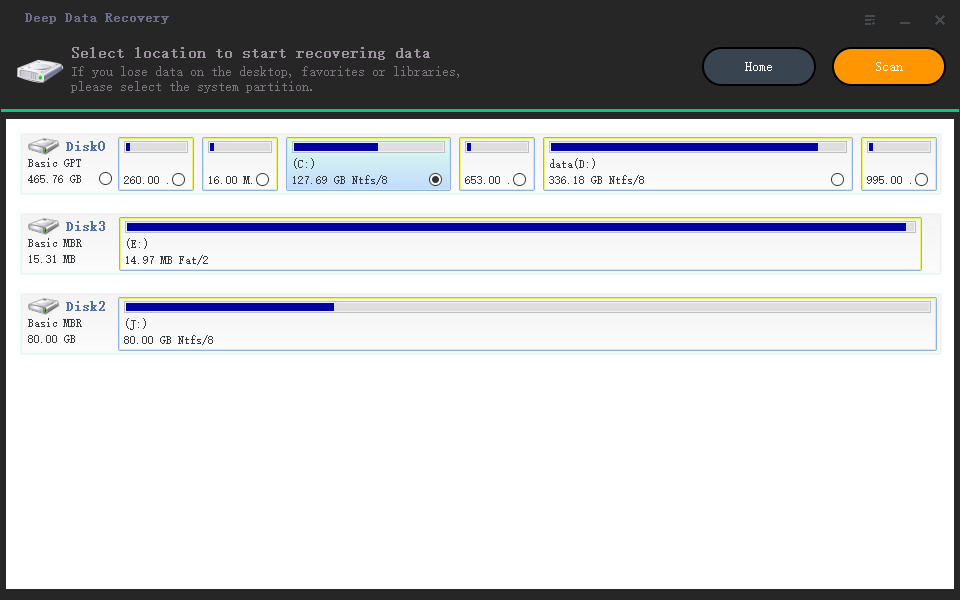
- Connect your camera to your PC, then open Deep Data Recovery on your computer.
- Next, select the targeted SD card and click "Scan".
- After scanning, select the deleted photos you want to recover and click on "Recover" to recover them.
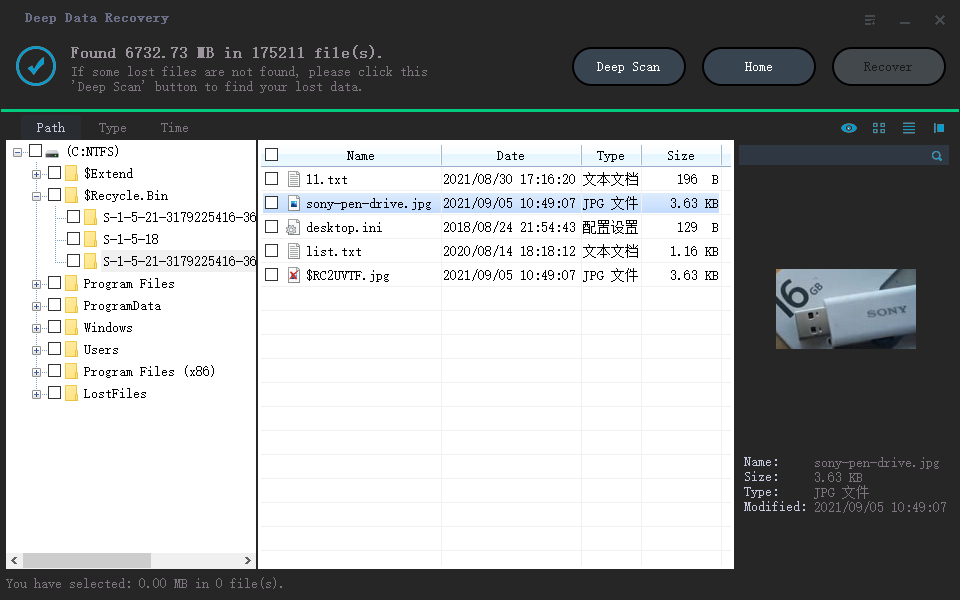
That's it. You've got your precious moments back within minutes without any hassle.
Related Articles
- Reset GoPro Hero 3/4 to Factory Settings Without Data Loss
- How to Fix 'There was a problem resetting your PC' Error
- Repair SanDisk Memory Card with SanDisk Repair Tool
- Recover Deleted Files after Reinstalling Windows
- How to Recover Photos from Leica Camera
- Fix Windows 10 Keeps Freezing Up Randomly
- How to Fix RAW drive/partition and Recover RAW Drive
- How to Reset SMC, PRAM and NVRAM on Mac
- How to Recover Videos from Canon Camcorder
Products
Articles & Tutorials
- Data Recovery
- Data Backup
- File Recovery
- File Backup
- File synchronize
- System Backup and Restore
- Disk and Partition Clone
- Technical articles
- Disk Master Help
- Windows Deleted File and Disk Recovery Tutorials
- Windows File and Data Recovery Tutorials
- More Windows Tutorials for Install, Security, Files, and PC Tips
- Windows Boot, Repair, and Recovery Environment Tutorials
- Windows Backup Tutorials
- Windows Restore Tutorials
- Windows Clone and Migration Tutorials
- Windows Server Backup, Recovery, and Management Tutorials
- Windows Disk, Partition, and Storage Management Tutorials