Best Freeware to Backup Windows 10 Operating System (OS)
Windows 10 Operating System Backup
Backing up your operating system, such as Windows 10, is crucial due to various reasons that can cause system failure, including virus attacks, hard drive errors, and accidental deletion of system files. Given that Microsoft still has room for improvement in perfecting Windows 10, it's essential to take proactive measures to protect your system by backing it up.
Backing up your system volume and essential files allows for easy restoration in case of a system failure, saving time and preventing data loss. To backup Windows 10, you can follow the steps to learn how.
Backup Windows 10 Operating System with Built-in Tool
Windows 10 has its built-To create a system backup in Windows 10, you can use the built-in tool called Backup and Restore. This tool allows you to create a system image backup, which can be used to restore your entire system to a previous state in case of a problem. To use this tool, follow the specific steps in the Backup and Restore tool to create a system image backup.
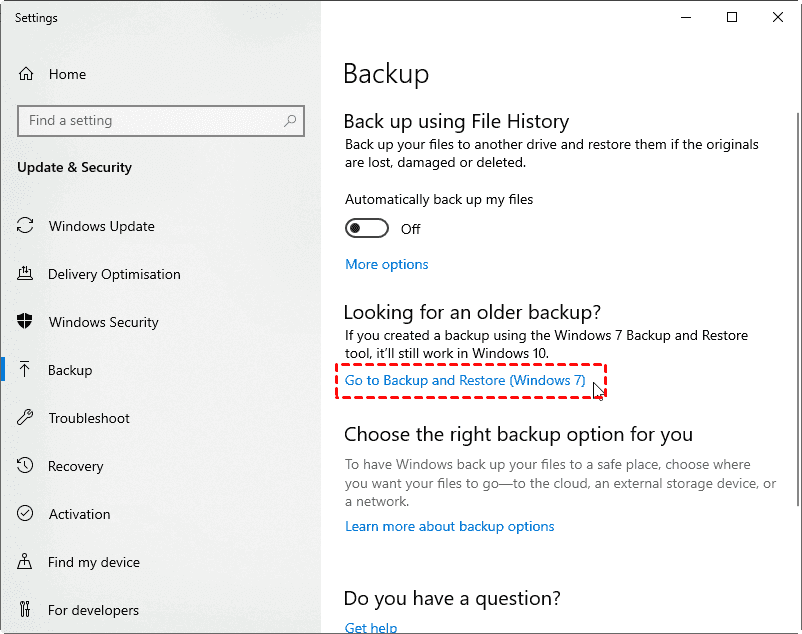
Step 1. To open the Windows Settings, press Win + I, then click on Update & Security, followed by Backup, and select Backup and Restore (Windows 7).
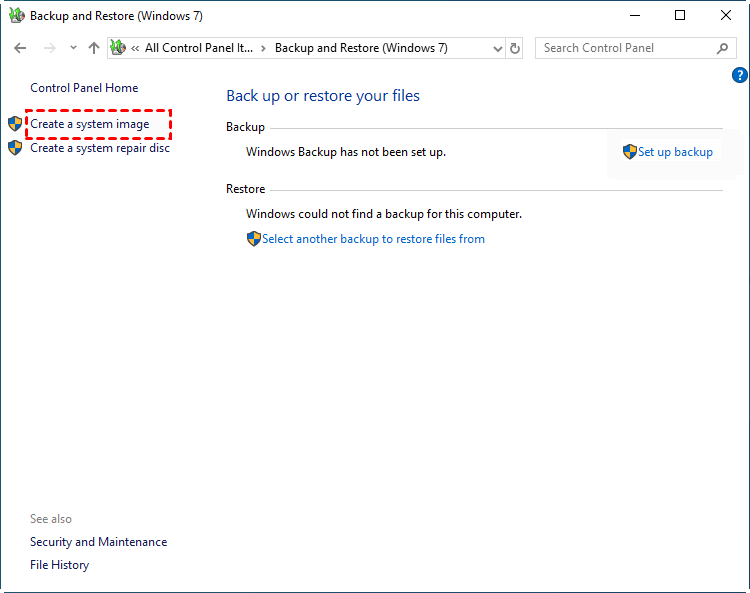
Step 2. Click Create a System Image option.
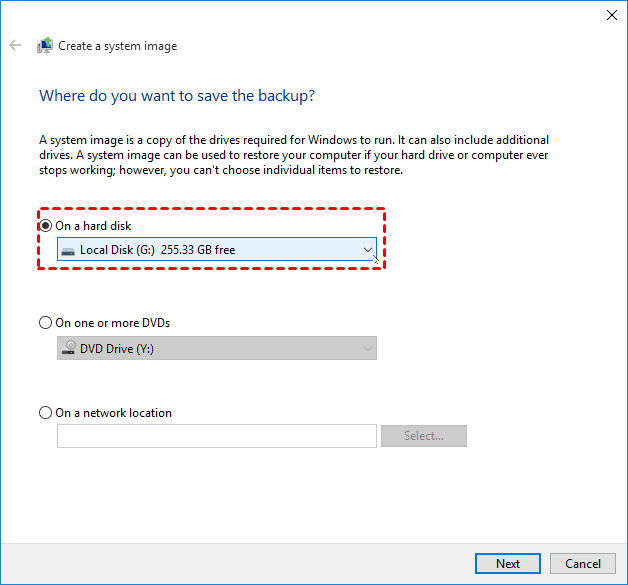
Step 3. Choose the drive where you'd like to store the system image backup and click Next.
Step 4. Confirm your backup settings, and click Proceed.
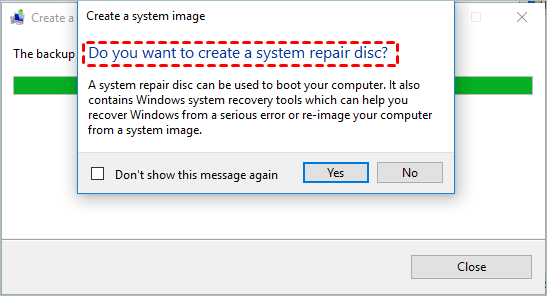
After installing Windows, you'll be prompted to make a system repair disc. This requires a CD/DVD as a storage device.
If you don't have a CD/DVD, you can create a bootable USB using the built-in Recovery Drive tool or a third-party media creator, which can help you start your computer if your Windows OS encounters any boot problems.
The Best Freeware to Backup Windows 10 OS
Windows 10's built-in System Image Backup tool has limitations, making it difficult for some users to access and operate. Fortunately, Qiling Disk Master Standard is a free backup software that offers four backup solutions: System Backup, Disk Backup, Partition Backup, and File Backup. This tool allows users to easily create an OS backup in Windows 10, providing a convenient and efficient solution for meeting various backup needs.
- Easy to operate: You can easily create a Windows 10 system image backup with just a few clicks, thanks to the user-friendly interface.
- Incremental backup and Differential backup: Its incremental/differential backup can keep your system backups updated while saving space.
- Schedule backup: The software allows you to backup your Windows 10 operating system at fixed intervals, including daily, weekly, and monthly backups.
- Bootable rescue media: With bootable rescue media, you can restore your system when it is unbootable.
With Qiling Disk Master, you can take backups of your system and disk, ensuring that your data is safe even in case of system crashes or hardware failures. The tool also allows you to restore your system backup to a different computer with different hardware, thanks to its Universal Restore feature. This provides peace of mind and protects your data from loss.
Backup Windows 10 Operating System with Qiling Disk Master
Qiling Disk Master allows you to backup your system, disk, partition, and files to any folder on your hard disk or a shared network folder. In the event of a hard disk failure, it's recommended to backup your Windows 10 system to an external hard drive or other non-system disks.
To perform a system backup on Windows 10 using Qiling Disk Master, follow these steps:
Step 1. Download Qiling Disk Master Standard, install and launch it. Click Backup > System Backup.
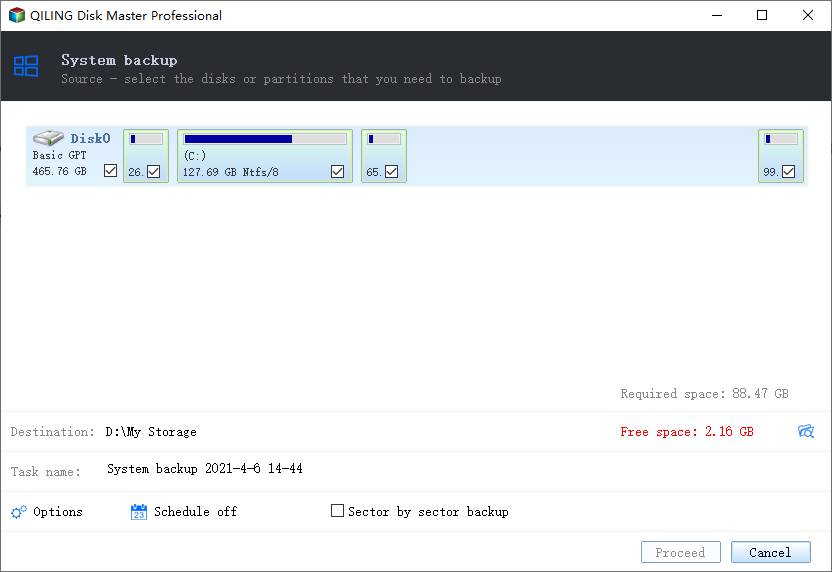
Step 2. You just need to select the backup destination, as the program will automatically choose the system partition(s) that need to be backed up.
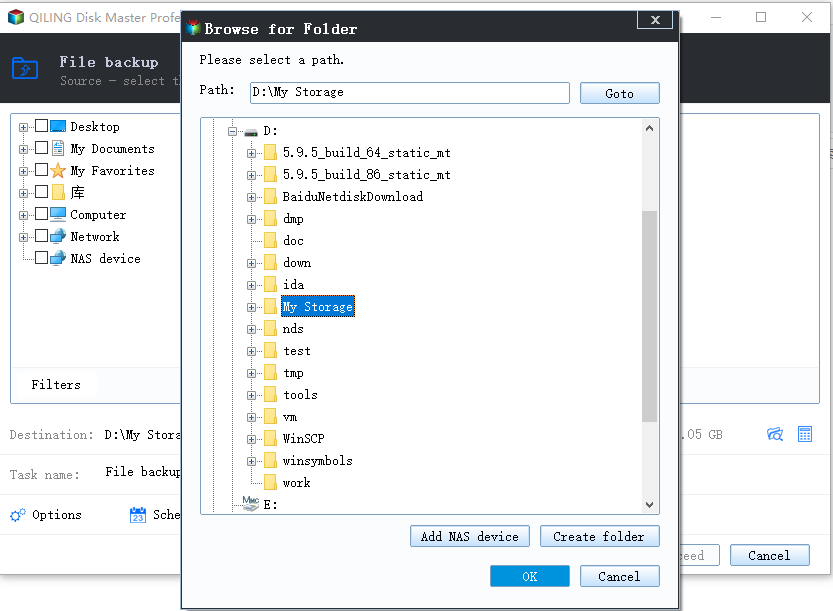
Step 3. Click Proceed to backup Windows 10 operating system.
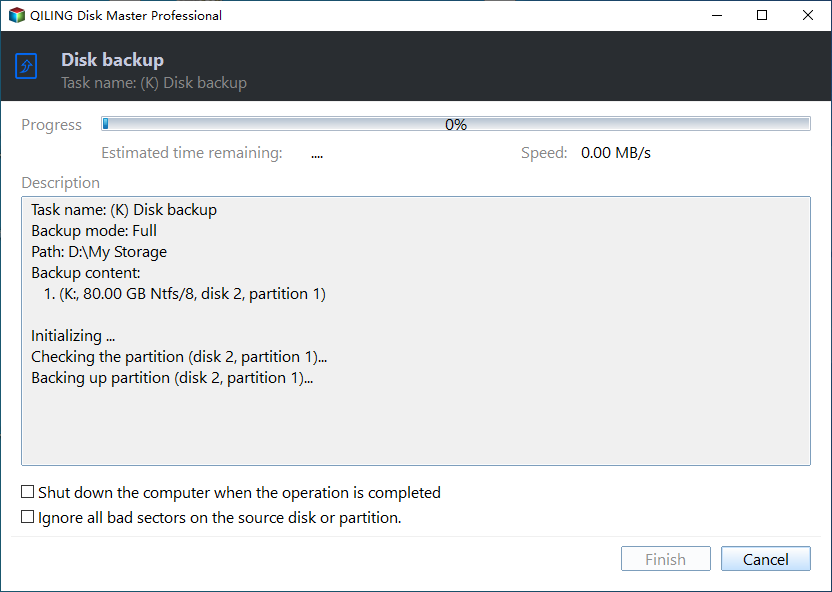
Notes:
- Options: It enables image compression or splitting, and also sends email notifications.
- Schedule: The software allows setting a backup task to run automatically at fixed intervals, including daily, weekly, and monthly frequencies, as well as event triggers and USB plug-ins, with the latter being exclusive to the Pro version.
- Scheme: You can choose from various backup methods, including Full, Incremental, and Differential backups. Additionally, you can enable the automatic backup cleanup feature to conserve target disk space, a feature available in Qiling Disk Master Professional and higher versions.
Summary
You can easily backup your Windows 10 operating system using either the built-in Windows tool or the free software Qiling Disk Master Standard. This freeware allows you to achieve the backup goal simply and also supports scheduled backup, as well as incremental and differential backup methods.
While the system backup is in process, you can still use your Windows 10 computer for other tasks. Qiling Disk Master, a top software for backing up Windows 10, also allows for easy system restoration with just a few clicks. Additionally, you can create a system repair disk using a CD/DVD or USB drive, which can be used to restore the OS if the computer fails to boot.
Qiling Disk Master also offers a clone function to migrate OS or upgrade hard drives, as well as utilities like "Explore Image" to mount images as virtual drives and Qiling PXE Boot tool to load micro-systems over networks.
Related Articles
- How to Delete Backup Files in Windows 10 When Backup Disk Full
- 3 Workarounds to Setup Multiple Backups in Windows 10
- Backup Windows 10 to USB Drive with Best Freeware
- Create Complete System Backup in Windows 10 [Best Free Way]
- Best Intenso USB Stick Format Tool in Windows
Windows 10 backup disk may become full after storing multiple versions of backups, taking up valuable disk space. To resolve this, one can either manually delete old backup files or set up the system to automatically delete them. - Best Free Kingston Hard Drive Cloning Software
You can learn the best Kingston hard drive cloning software and how to clone HDD to Kingston SSD with secure boot. Please read on.
Products
Articles & Tutorials
- Data Recovery
- Data Backup
- File Recovery
- File Backup
- File synchronize
- System Backup and Restore
- Disk and Partition Clone
- Technical articles
- Disk Master Help
- Windows Deleted File and Disk Recovery Tutorials
- Windows File and Data Recovery Tutorials
- More Windows Tutorials for Install, Security, Files, and PC Tips
- Windows Boot, Repair, and Recovery Environment Tutorials
- Windows Backup Tutorials
- Windows Restore Tutorials
- Windows Clone and Migration Tutorials
- Windows Server Backup, Recovery, and Management Tutorials
- Windows Disk, Partition, and Storage Management Tutorials