Easiest Solution to Backup Windows Server to Amazon Drive
Why backup Windows Server to Amazon Drive?
Windows Server operating systems like Server 2016, Server 2008 (R2), and Server 2012 (R2) are commonly used in medium to large companies. These servers store sensitive data, including employee files, business documents, and customer information. As a result, backing up Windows servers is a crucial task for administrators to protect this confidential data. This can be done by backing up the server to external storage devices, such as an external hard drive, as seen in Windows Home Server 2011.
Cloud storage has become increasingly popular, making backing up servers to Amazon a viable option. Like other cloud storage services, Amazon Drive offers a secure backup destination for various files, with 5 GB of free storage and unlimited storage for users in different countries, making it a reliable choice for data preservation.
Users can back up their Windows files to Amazon Drive to store critical files securely and access them easily in case of disaster. The cloud also offers file sharing and photo printing services, allowing users to share files with others and print photos. Additionally, users can back up and share their Windows files with family, friends, and co-workers, making it a convenient and accessible storage solution.
When there is no internet connection, files can be stored on the Amazon Drive desktop, and once an internet connection is available, they can be synced to online storage. Regardless of the reasons for backing up your Windows server to Amazon, finding a way to accomplish this task is crucial.
How to backup Windows Server 2012 (R2) to Amazon Cloud?
Windows Server Backup is a backup utility for Server 2008 or higher, offering easy regular backups. However, it lacks some important features, such as the ability to back up files larger than 2 TB.
Qiling Disk Master Server is a feature-rich and enterprise-level backup solution that allows users to backup their Windows Server to various cloud drives, including Amazon Drive, hubiC, SugarSync, Onedrive, Google Drive, Box, Dropbox, Cloudme, and more, using full, incremental, or differential backup types with customizable scheduling and triggers.
This software supports password protection for backup images, preventing unauthorized access and leakage. It is compatible with Windows Server 2003 and later versions. It can be easily installed.
Before you do:
- Download Amazon Drive desktop app to your Server.
- Download Qiling Disk Master Server.
Backup Windows Server 2012 system to Amazon Cloud via Qiling Disk Master
1. To start, install and log in to your Amazon Drive account, keeping its location in mind for later use.
2. Install and launch Qiling Disk Master Server. Go Backup -> System Backup.
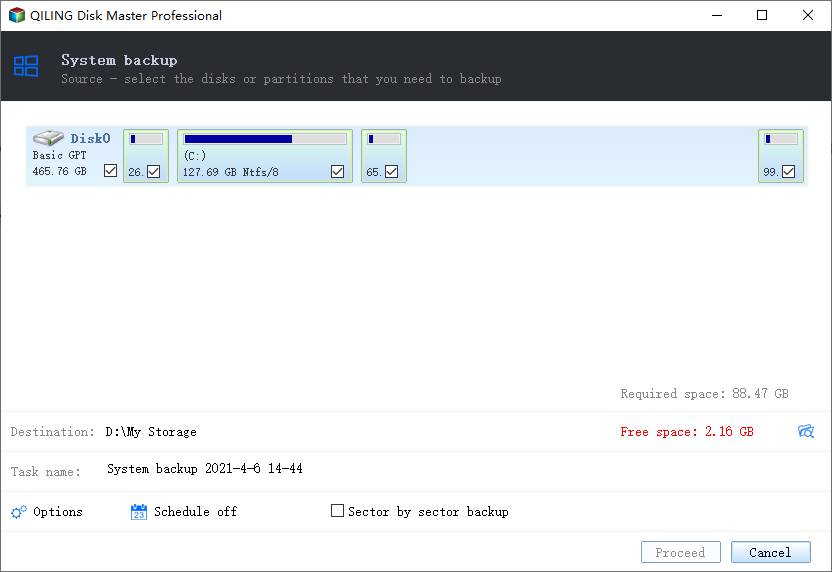
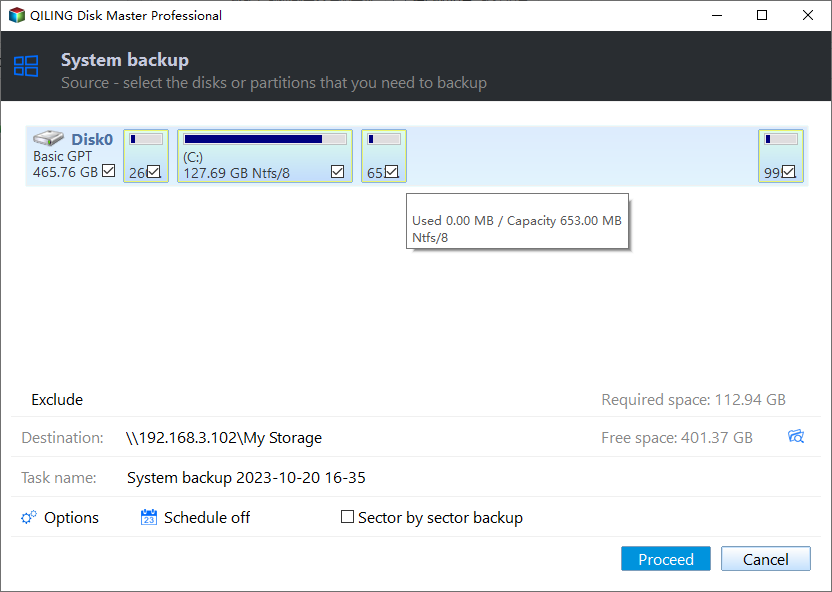
3. The system partition is automatically selected at this window, and you can add an Amazon Drive folder by clicking on it. Further configurations can be made using the options below, and once you're done, click "Proceed" to start the process.
Tips:
- You can set password protection here, as well as other settings such as compressing or splitting the backup image and choosing between intelligent or sector-by-sector backup.
- To backup Windows Server to Amazon S3, use Cloud manager MultCloud to manage the process efficiently.
More Details about Schedule and Scheme settings (optional) in Step 3:
1. The Schedule offers 5 options to automatically backup Windows Servers:
- Daily/Weekly/Monthly: To ensure automatic backups without forgetting, set up a backup schedule based on daily, weekly, and monthly intervals. This will guarantee that your data is regularly backed up, reducing the risk of data loss due to human error or oversight.
- Event Triggers The backup task will be triggered by the following events: User logon, User logoff, System startup, System shutdown.
- The USB plug in option enables automatic backup of data on the USB device or local data to the USB device when the USB device is plugged in.
- File Sync: To keep all your files up to date, sync them immediately once they change, so you can always access the latest version.
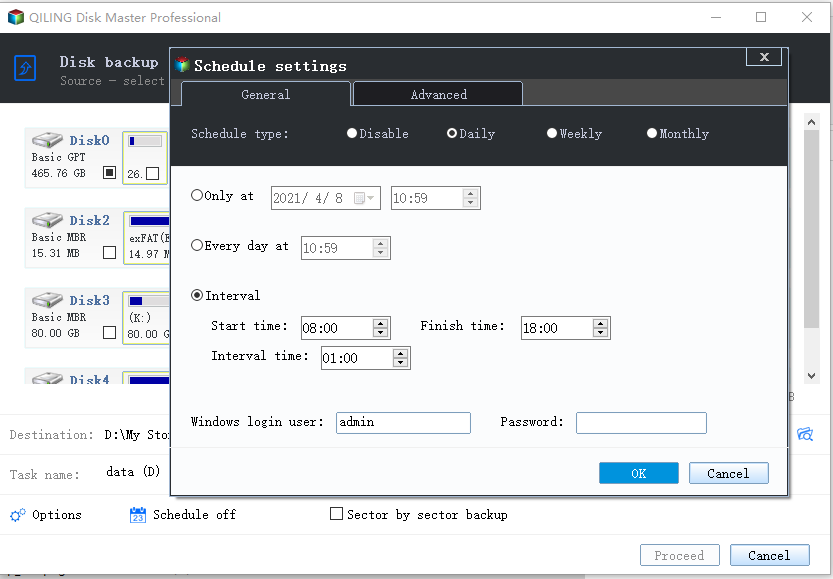
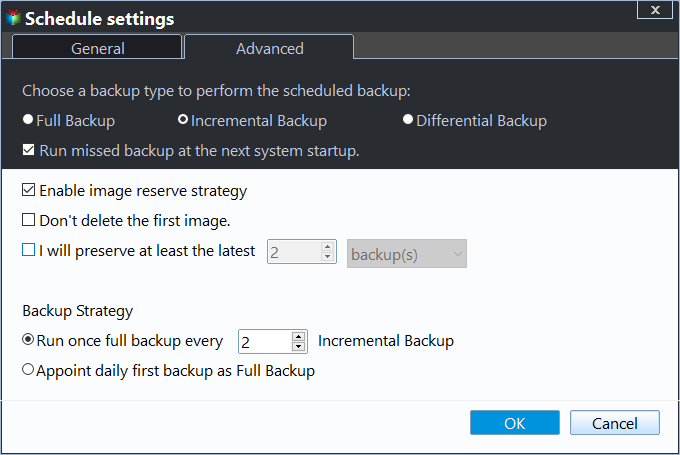
2. To enable backup scheme and specify the number of backups to keep, click on "Scheme" and then select "Enable Backup Scheme". From there, you can choose a backup scheme (such as full, incremental, or differential) and set the number of backups to retain. This will automatically delete old backup images based on the chosen scheme.
To backup Windows Server to Amazon Drive, you'll need to follow two simple steps and configure a few settings. Qiling Disk Master can also help with other tasks, such as cloning Windows Server 2011 to a new hard drive, making it a useful tool for disk upgrading without reinstalling everything.
Qiling Disk Master also has a Professional edition suitable for Windows PC users, especially for backing up Windows 7 or Windows 10 to Amazon Drive.
Final Words
To back up your Windows server to Amazon Drive, you can use professional tools to make the process easy and secure. The Qiling Disk Master Server software, for example, allows you to easily back up your server and has additional features such as cloning, synchronization, and restore. It also enables you to migrate your server to a new hardware, making it a versatile tool for managing your server's data.
Related Articles
- Fix Amazon Cloud Drive Not Syncing Problem (3 Solutions)
You will fix Amazon Cloud Drive not syncing issue with 3 possible solutions, or try the best Amazon cloud drive sync tool to sync files automatically. - D Drive Suddenly Missing in Windows 10 | How to Recover?
This guide explains D Drive Suddenly Missing in Windows 10 | How to Recover with clear steps, key checks, and practical tips. - Fixed: Encrypt Contents to Secure Data Greyed Out Windows 10
If you find "Encrypt contents to secure data" option greyed out and therefore can't secure folders via EFS technology in Windows 10/8/7, try following solutions to fix it. - Solved: exFAT Drive Not Recognized in Windows 11
This guide explains Solved: exFAT Drive Not Recognized in Windows 11 with clear steps, key checks, and practical tips. - How to Wipe a Hard Drive on a Dead Computer?
To completely wipe a hard drive on a dead computer before selling or giving it away, you can resort to the professional software to make it instead of physically destroying the hard drive. - What Should I Do When Computer Freezes? (7 Options)
The computer freezes always to make users annoyed. Fortunately, you can find some effective solutions to fix it from here.
Products
Articles & Tutorials
- Data Recovery
- Data Backup
- File Recovery
- File Backup
- File synchronize
- System Backup and Restore
- Disk and Partition Clone
- Technical articles
- Disk Master Help
- Windows Deleted File and Disk Recovery Tutorials
- Windows File and Data Recovery Tutorials
- More Windows Tutorials for Install, Security, Files, and PC Tips
- Windows Boot, Repair, and Recovery Environment Tutorials
- Windows Backup Tutorials
- Windows Restore Tutorials
- Windows Clone and Migration Tutorials
- Windows Server Backup, Recovery, and Management Tutorials
- Windows Disk, Partition, and Storage Management Tutorials