Best Automatic Backup Freeware for USB Flash Drive
Why need automatic USB backup freeware?
To mitigate the risk of data loss and ensure the safety of your important files, a USB automatic backup freeware is indispensable. Qiling Disk Master Standard is a reliable and user-friendly software that can automatically back up your USB flash drive, providing a safeguard against data loss.
- Prevent data loss: Losing your important files can be a stressful experience, especially when it involves a USB drive. These portable storage devices are convenient and easy to use, but they can also be prone to data loss due to various reasons. Formatting the USB drive, deleting files accidentally, or the device failing can all lead to data loss.
- Avoid virus attack: Losing your important files can be a stressful experience, especially when it involves a USB flash drive. These portable storage devices are convenient and easy to use, but they can also be prone to data loss due to various reasons. Formatting the USB drive, deleting files accidentally, or the device failing can all lead to data loss.
- Promote backup efficiency: Backing up your USB flash drive can be a tedious and time-consuming process, especially if you have to do it manually. However, with the right tools and software, you can automate the backup process and ensure that your important files are safe and secure.
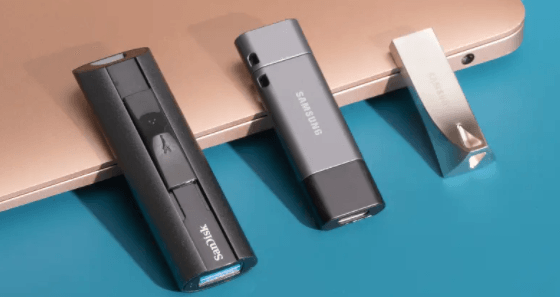
Backing up your USB flash drive can be a bit tricky, especially when using the built-in Windows backup utility. If you're trying to back up files from your USB drive, you may encounter errors like 0x80070032, which can be frustrating. However, there's a simple solution to this problem.
What USB drive auto back up software do you need?
So what USB drive auto back up software do you need? This article summarizes the points below for you.
- Backing up your files can be a daunting task, especially if you're not familiar with the process. However, with the right software, you can automate the backup process and ensure that your files are safely stored.
- Also, professional auto back up tool should run schedule backup as well as incremental backup.
- The most important thing, it should run missed backup at the next system startup because USB drive isn't the kind of drive that you will connect to your computer all the time.
Qiling Disk Master Standard is a free, integrated USB backup software that is suitable for home use. This automatic USB backup freeware allows you to schedule backups to run regularly, with options for daily, weekly, or monthly backups. With Qiling Disk Master Standard, you can easily set up automatic backups with just a few clicks.
Qiling Disk Master Standard is a versatile external hard drive backup software that offers a range of features to help you protect your important files. In addition to its automatic USB backup capabilities, this software also supports compressing backup images to save disk space.
How to automatically back up your USB drive
Qiling Disk Master Standard is a powerful and user-friendly software that allows you to back up your USB drive with ease. Whether you have a single partition or multiple partitions on your USB drive, this software has got you covered.
Step 1. Insert your USB flash drive, and make sure it can be detected by Windows. Install and launch Qiling Disk Master Standard. Click Backup -> Partition Backup.
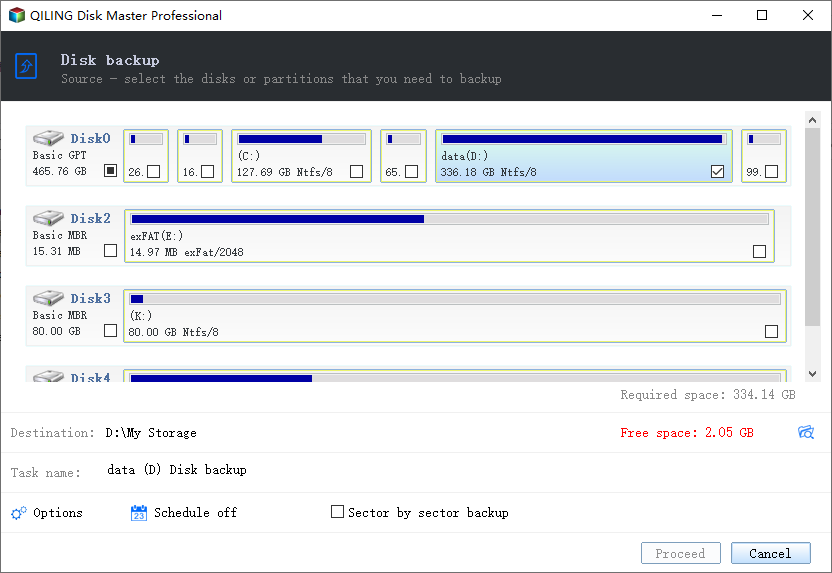
Step 2. Select the partition of the USB drive to be backed up.
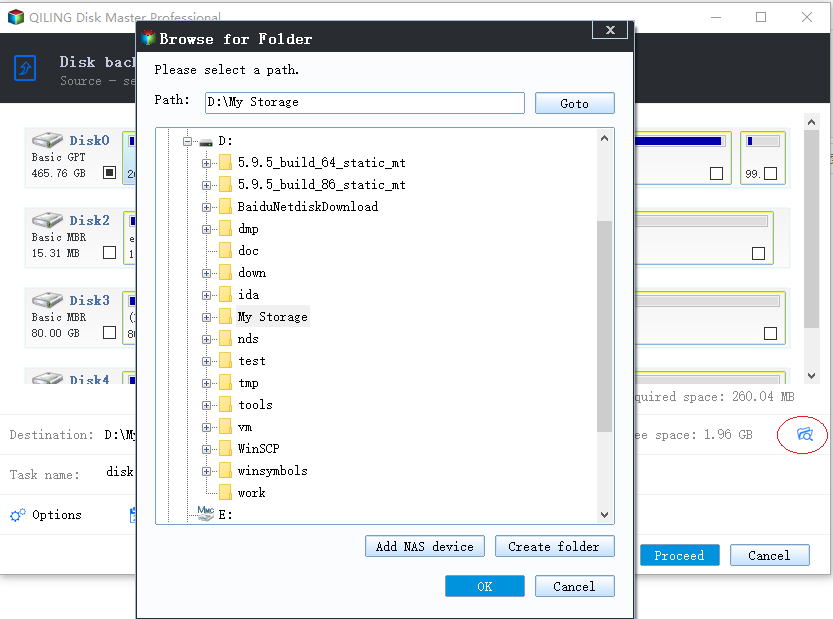
Step 3. Choose the destination path. You can backup USB stick to your PC in most cases.
Step 4. Click Schedule Backup, and then set the specific backup frequency. You may choose the "USB plug in" mode to backup flash drive automatically when plugged in.
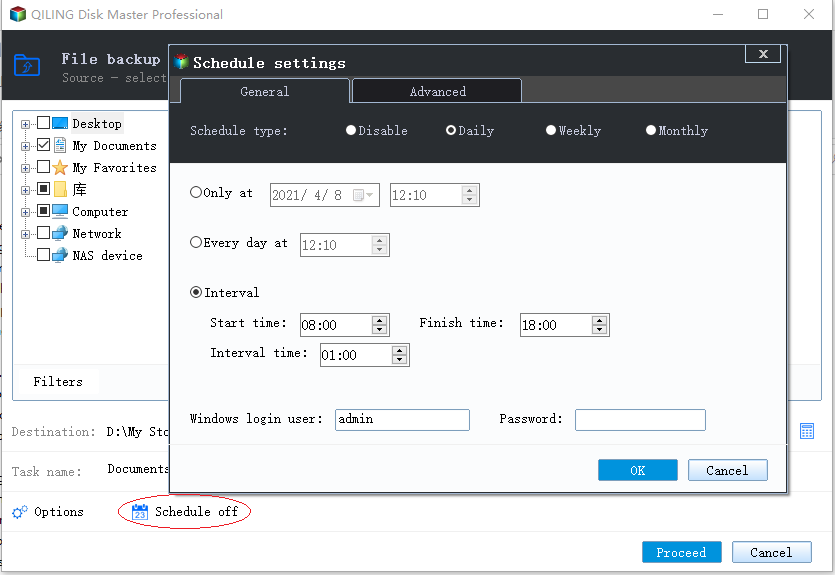
Click Advanced and you can see Run the missing backup after starting computer next time is checked by default. Keep the default option.
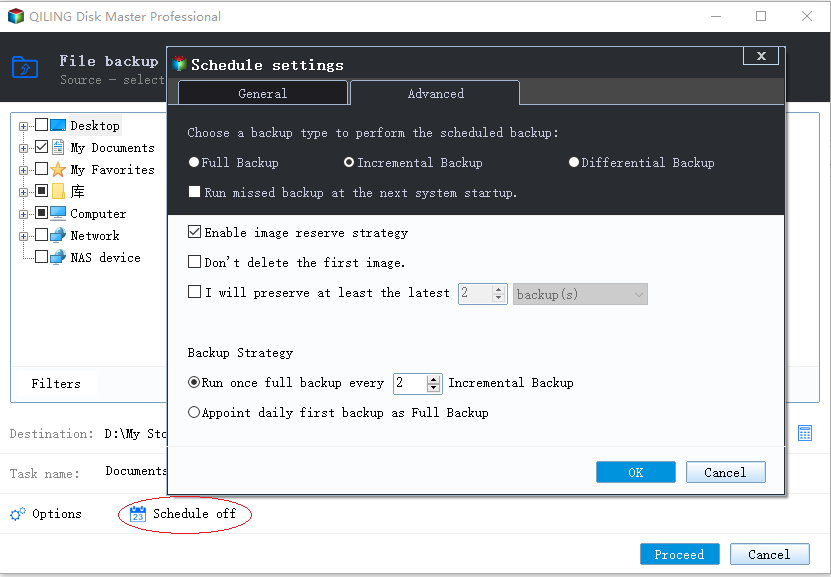
Step 5. Click Proceed after your configuration.
- Notes:✎...
- Options: This is the place where you are able to compress or split backup image during the backup process.
- Backup Scheme: You can manage backup images on destination storage at will with this option. To enjoy this feature, you need to upgrade to Qiling Disk Master Professional.
- If you carelessly delete one or two important files and want to restore them from the entire disk/partition images, you can perform selective files restore. (paid feature)
Verdict
Are you concerned about losing your important files stored on your USB flash drive? Do you want to ensure that your data is safe and can be easily recovered in case of data loss or damage? Look no further than Qiling Disk Master Standard, a free and powerful USB drive automatic backup software.
Are you looking for a way to automate the backup process of your USB flash drive? Do you want to ensure that your data is safe and can be easily recovered in case of data loss or damage? Look no further than Qiling Disk Master Professional, a powerful and feature-rich software that offers command line backup and advanced disk space management.
Related Articles
- 3 Methods to Fix The Mounted Backup Volume Is Inaccessible
This guide explains 3 Methods to Fix The Mounted Backup Volume Is Inaccessible with clear steps, key checks, and practical tips. - 5 Best Backup and Restore Software for Windows 10 [Updated 2024]
This guide explains 5 Best Backup and Restore Software for Windows 10 with clear steps, key checks, and practical tips. - Top 3 Ways for Server Backup to Cloud: Effective, Secure, Simple
This guide explains Top 3 Ways for Server Backup to Cloud: Effective, Secure, Simple with clear steps, key checks, and practical tips. - Top 3 Best Free Synology Backup Software: Which is Better?
In this post, you can master the top 3 Synology backup software to back up your computer to a Synology NAS. Read on carefully to gain more details by yourself. - How to Turn on or off Bitlocker to Go in Windows 11
In Windows 11, you can easily enable Bitlocker to Go to protect your data and use it with a password or recovery key, and also turn it off if needed. - What Is Block Level Backup and How to Use It?
Block-level backup and file-level backup are two different approaches to backing up data. While file-level backup involves copying entire files, block-level backup involves copying only the changed blocks of data.
Products
Articles & Tutorials
- Data Recovery
- Data Backup
- File Recovery
- File Backup
- File synchronize
- System Backup and Restore
- Disk and Partition Clone
- Technical articles
- Disk Master Help
- Windows Deleted File and Disk Recovery Tutorials
- Windows File and Data Recovery Tutorials
- More Windows Tutorials for Install, Security, Files, and PC Tips
- Windows Boot, Repair, and Recovery Environment Tutorials
- Windows Backup Tutorials
- Windows Restore Tutorials
- Windows Clone and Migration Tutorials
- Windows Server Backup, Recovery, and Management Tutorials
- Windows Disk, Partition, and Storage Management Tutorials