How to Fix 0x80240fff Windows 10 Update Error
The 0x80240fff Windows update error message can be caused by various unexpected reasons, including firewall malfunction, file system corruption, internet connection issues, damaged Windows update services, or an outdated system. This error can also occur on Windows 10 build 10240. Fortunately, the issue can be resolved with a few simple tricks, and resolving it can be done to get back to a normal Windows update experience.
Before major Windows repairs, protect important files with installed program backup guidance.
- Quick Navigation
- Part 1: 3 Ways to Fix 0x80240fff Windows 10 Update Error
- Bonus Tip: Always Back Up Important Files before Windows 10 Update
3 Ways to Fix 0x80240fff Windows 10 Update Error
Dealing with the 0x80240fff Windows 10 pro fix issue can be frustrating, but fortunately, there are several methods to resolve it. Three different approaches can be taken to fix this issue, offering a range of solutions to help users overcome this problem.
Method #1: Pause Windows 10 Update
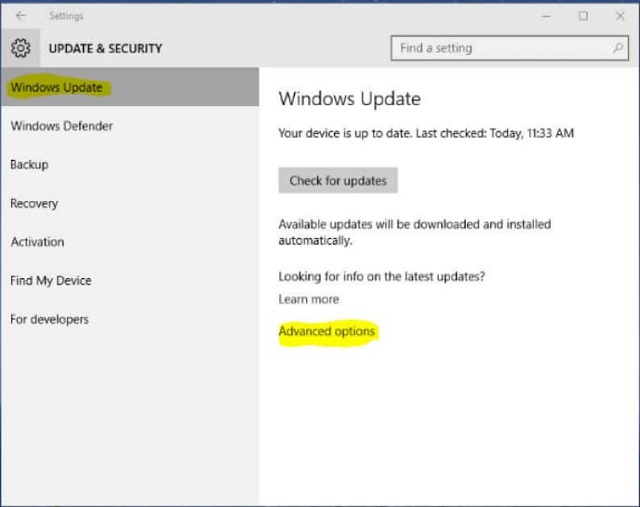
To resolve the 0x80240fff Windows update fix error caused by a new update for Windows 10, you can pause the updates. This will resolve the error and allow you to continue with the updates when Microsoft releases the patch for it. To pause the updates, go to Settings > Update & Security > Windows Update, and click on the "Pause updates for" option. Select the duration you want to pause the updates for, and click "Pause".
- To open the Settings on a Windows computer, press the Windows Key + I keys simultaneously on the keyboard. This will open the Settings menu where you can access various system settings and make adjustments as needed.
- Check the options and select 'Update and Security'.
- Navigate to the right pane and click the 'Advanced Options' link.
- Select the 'Select Date' drop-down arrow in the 'Pause Updates' section.
- If you're using Windows 10 Home, you can only stop updates for a month, while others can defer them for longer. However, if you're running a different operating system, you may be able to pause updates for more than a month.
Method #2: Download and Install the Latest Windows 10 with Media Creation Tool
If your PC uses an older version of Windows 10 Home, you can't use the 'Pause Updates' option on the Settings app, but you can upgrade to the latest version of Windows 10 by downloading the ISO, which may resolve the 0X80240fff Windows Update error.
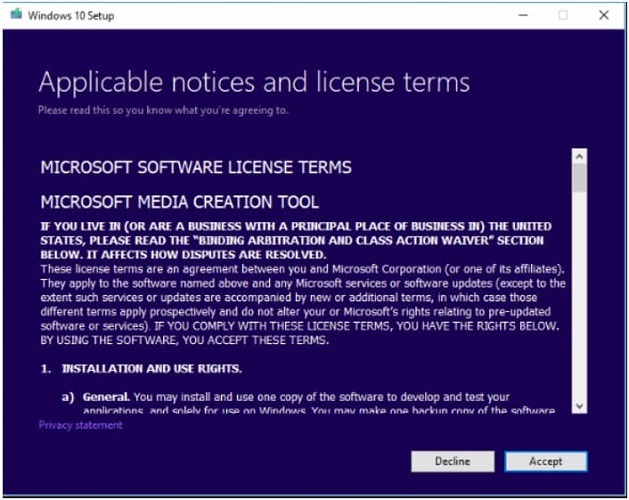
- To begin, go to the official website of Microsoft and download the Media Creation Tool.
- Run the software using the administrator account on your PC.
- Please follow the prompts and select 'Accept' on the License Terms page.
- Click on "Upgrade this PC now" and then click "Next" to start the download of the latest Windows 10 version using the Media Creation Tool.
- When prompted, select "Keep personal files and apps" to prevent the deletion of important data.
- When you've saved all files and closed all apps, click the 'Install' button. This process may take a few minutes to complete, so keep your computer on until it's finished.
Method #3: Use Windows Troubleshooter to Fix 0x80240fff Windows Update Error
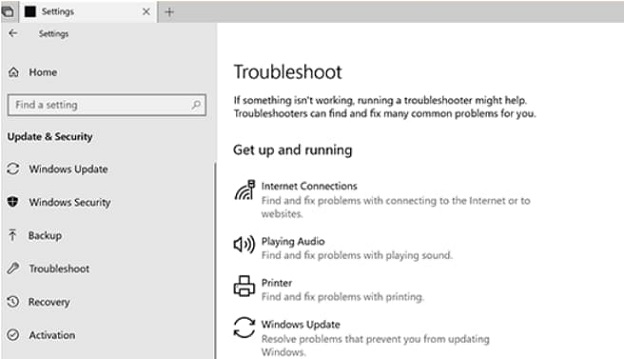
You can use the built-To resolve the 0x80240fff Windows 10 Pro fix issue, run the Windows troubleshooter on your PC. This tool will help repair the components of Windows updates and enable you to install them without any issues. To do this, go to Settings > Update & Security > Troubleshoot, and then select the "Windows Update" troubleshooter from the list. Follow the on-screen instructions to run the troubleshooter and resolve the issue.
- Go to the taskbar and click the Windows icon
- Locate the Settings app and launch it by clicking the gear icon.
- When the Settings window appears, select 'Update and Security' from the menu list.
- Navigate to the left-pane menu and click 'Troubleshoot'.
- Go to the right-pane menu and click 'Windows Update'
- Click the 'Run the Troubleshooter' button. Allow the troubleshooter to resolve the 0x80240fff Windows update issues on its own. If it recommends other actions, follow them to completely fix the issue.
With any of these three methods, you can resolve the 0x80240fff Windows 10 pro fix issues. However, to prevent data loss while updating your Windows system, you should back up your files, folders, drives, and system. Qiling Disk Master software is the most recommended tool to use.
Bonus Tip: Always Back Up Important Files before Windows 10 Update
When updating Windows 10, anything can happen, so it's wise to back up important files and data before updating to prevent potential data loss. The Qiling Disk Master is a recommended tool for this purpose.
Qiling Disk Master helps protect files, disks, partitions, and the operating system, allowing quick restoration after a system problem. It offers automatic backup options so you can back up important PC data, including hard drives, partitions, files, system data, and external drives.
How to Back Up Important Files, Folders, and Hard Drive in Windows 10
Qiling Disk Master helps you back up files, drives, partitions, and the operating system with simple steps. You can schedule automatic backups and choose a suitable backup mode, making it easier to restore data when needed.
- To back up files on Windows 10, choose a backup mode such as 'Drive Backup', 'System Backup', or 'File Backup'.
- Select the file, system, or driver that you want to backup, then click the 'Start' button to initiate the backup process, which may take a few seconds.
- After the backup process, you can view the windows and choose the option that you want, such as recovering lost or deleted files, changing backup settings, or editing the backup.

Related Articles
- How to Upgrade to Windows 11 from Windows 7/10
- How to Fix 0x80240fff Windows 10 Update Error
- 7 Ways to Fix Windows 10 Keeps Freezing Up Randomly
- Fix Win 10 PC Won't Shut Down: ShutDown Computer via CMD
- How to Fix 'Error 0xc1900101' on Windows 11 Installation Assistant
- [Fix] Convert External Drive to APFS Failed/Greyed Out/Not Available
- How to Fix a Windows 11 Installation Error 0x8007007f
- [Solved] Recycle Bin Not Showing Deleted Items
Products
Articles & Tutorials
- Data Recovery
- Data Backup
- File Recovery
- File Backup
- File synchronize
- System Backup and Restore
- Disk and Partition Clone
- Technical articles
- Disk Master Help
- Windows Deleted File and Disk Recovery Tutorials
- Windows File and Data Recovery Tutorials
- More Windows Tutorials for Install, Security, Files, and PC Tips
- Windows Boot, Repair, and Recovery Environment Tutorials
- Windows Backup Tutorials
- Windows Restore Tutorials
- Windows Clone and Migration Tutorials
- Windows Server Backup, Recovery, and Management Tutorials
- Windows Disk, Partition, and Storage Management Tutorials